by Blueberry Consultants - 製品のタイプ: コンポーネント / ActiveX DLL
この商品については、日本語の説明書きはございません。
Royalty free ActiveX controls for screen recording. BB FlashBack SDK is a quick and easy way to add screen recording and playback capabilities to your applications. Royalty free ActiveX controls allow you to record and replay movies of the screen with a range of options – including a choice of two different methods of recording. Suitable for all ActiveX compatible development environments including MS Visual Studio 6/.NET and Borland Delphi/C++. Builder. The SDK includes compiled and fully working samples, with source code. BB FlashBack SDK Advanced Editon can export recordings to Flash, AVI and WMV.
一般向け価格については下記に表示されています。お客様用の割引価格をご覧になるには、ログインしてください。
| カートに追加 | ¥ 180,495 (税込) | 1 Developer Seat License メーカーパーツ番号: BB-FBSDKB-STD-SW-(1) |
ダウンロード (13.8 MB) | |
| カートに追加 | ¥ 263,760 (税込) | 2 Developer Seat License メーカーパーツ番号: BB-FBSDKB-STD-SW-(2) |
ダウンロード (13.8 MB) | |
| カートに追加 | ¥ 319,410 (税込) | 3 Developer Seat License メーカーパーツ番号: BB-FBSDKB-STD-SW-(3) |
ダウンロード (13.8 MB) | |
| カートに追加 | ¥ 347,130 (税込) | 4 Developer Seat License メーカーパーツ番号: BB-FBSDKB-STD-SW-(4) |
ダウンロード (13.8 MB) | |
| カートに追加 | ¥ 360,990 (税込) | 5 or more Developer Seat License メーカーパーツ番号: BB-FBSDKB-STD-SW-(5+) |
ダウンロード (13.8 MB) |
| カートに追加 | ¥ 36,120 (税込) | 1 Developer Seat License メーカーパーツ番号: BB-FBSDKB-STD-PS-(1) |
要確認 | ダウンロード (13.8 MB) |
| カートに追加 | ¥ 50,610 (税込) | 2 Developer Seat License メーカーパーツ番号: BB-FBSDKB-STD-PS-(2) |
要確認 | ダウンロード (13.8 MB) |
| カートに追加 | ¥ 61,425 (税込) | 3 Developer Seat License メーカーパーツ番号: BB-FBSDKB-STD-PS-(3) |
要確認 | ダウンロード (13.8 MB) |
| カートに追加 | ¥ 68,670 (税込) | 4 Developer Seat License メーカーパーツ番号: BB-FBSDKB-STD-PS-(4) |
要確認 | ダウンロード (13.8 MB) |
| カートに追加 | ¥ 72,240 (税込) | 5 or more Developer Seat License メーカーパーツ番号: BB-FBSDKB-STD-PS-(5+) |
要確認 | ダウンロード (13.8 MB) |
| カートに追加 | ¥ 694,470 (税込) | 1 Developer Seat License メーカーパーツ番号: BB-FBSDKP-STD-SW-(1) |
ダウンロード (13.8 MB) | |
| カートに追加 | ¥ 972,300 (税込) | 2 Developer Seat License メーカーパーツ番号: BB-FBSDKP-STD-SW-(2) |
ダウンロード (13.8 MB) | |
| カートに追加 | ¥ 1,180,620 (税込) | 3 Developer Seat License メーカーパーツ番号: BB-FBSDKP-STD-SW-(3) |
ダウンロード (13.8 MB) | |
| カートに追加 | ¥ 1,319,535 (税込) | 4 Developer Seat License メーカーパーツ番号: BB-FBSDKP-STD-SW-(4) |
ダウンロード (13.8 MB) | |
| カートに追加 | ¥ 1,389,045 (税込) | 5 or more Developer Seat License メーカーパーツ番号: BB-FBSDKP-STD-SW-(5+) |
ダウンロード (13.8 MB) |
| カートに追加 | ¥ 138,915 (税込) | 1 Developer Seat License メーカーパーツ番号: BB-FBSDKP-STD-PS-(1) |
要確認 | ダウンロード (13.8 MB) |
| カートに追加 | ¥ 194,460 (税込) | 2 Developer Seat License メーカーパーツ番号: BB-FBSDKP-STD-PS-(2) |
要確認 | ダウンロード (13.8 MB) |
| カートに追加 | ¥ 236,145 (税込) | 3 Developer Seat License メーカーパーツ番号: BB-FBSDKP-STD-PS-(3) |
要確認 | ダウンロード (13.8 MB) |
| カートに追加 | ¥ 263,970 (税込) | 4 Developer Seat License メーカーパーツ番号: BB-FBSDKP-STD-PS-(4) |
要確認 | ダウンロード (13.8 MB) |
| カートに追加 | ¥ 277,830 (税込) | 5 or more Developer Seat License メーカーパーツ番号: BB-FBSDKP-STD-PS-(5+) |
要確認 | ダウンロード (13.8 MB) |
| カートに追加 | ¥ 1,389,045 (税込) | 1 Developer Seat License メーカーパーツ番号: BB-FBSDKA-STD-SW-(1) |
ダウンロード (13.8 MB) | |
| カートに追加 | ¥ 1,944,705 (税込) | 2 Developer Seat License メーカーパーツ番号: BB-FBSDKA-STD-SW-(2) |
ダウンロード (13.8 MB) | |
| カートに追加 | ¥ 2,361,450 (税込) | 3 Developer Seat License メーカーパーツ番号: BB-FBSDKA-STD-SW-(3) |
ダウンロード (13.8 MB) | |
| カートに追加 | ¥ 2,639,280 (税込) | 4 Developer Seat License メーカーパーツ番号: BB-FBSDKA-STD-SW-(4) |
ダウンロード (13.8 MB) | |
| カートに追加 | ¥ 2,778,195 (税込) | 5 or more Developer Seat License メーカーパーツ番号: BB-FBSDKA-STD-SW-(5+) |
ダウンロード (13.8 MB) |
| カートに追加 | ¥ 277,830 (税込) | 1 Developer Seat License メーカーパーツ番号: BB-FBSDKA-STD-PS-(1) |
要確認 | ダウンロード (13.8 MB) |
| カートに追加 | ¥ 388,920 (税込) | 2 Developer Seat License メーカーパーツ番号: BB-FBSDKA-STD-PS-(2) |
要確認 | ダウンロード (13.8 MB) |
| カートに追加 | ¥ 472,290 (税込) | 3 Developer Seat License メーカーパーツ番号: BB-FBSDKA-STD-PS-(3) |
要確認 | ダウンロード (13.8 MB) |
| カートに追加 | ¥ 527,835 (税込) | 4 Developer Seat License メーカーパーツ番号: BB-FBSDKA-STD-PS-(4) |
要確認 | ダウンロード (13.8 MB) |
| カートに追加 | ¥ 555,660 (税込) | 5 or more Developer Seat License メーカーパーツ番号: BB-FBSDKA-STD-PS-(5+) |
要確認 | ダウンロード (13.8 MB) |
すべてのご注文にて弊社標準の 契約条件および返品条件の内容が適用されます。
一般向け価格については上記に表示されています。お客様用の割引価格をご覧になるには、ログインしてください。
The BB FlashBack SDK is a quick and easy way to add-in screen recording and playback functions to your applications. BB FlashBack SDK allow you to record and replay movies of the screen with a range of options including a choice of two different methods of recording. Its suitable for use with any ActiveX compatible development environment including MS Visual Studio .NET, MS Visual Studio 6, Borland Delphi and Borland C++ Builder.
BB FlashBack SDK comes as two components: a recorder and a player, packaged along with fully working compiled samples and source code. Implementation is unbelievably quick simply drag and drop the recorder component onto a form and use a single call to get your application recording. Once recorded, movies can be replayed in your software with the player component in only two lines of code. A comprehensive help file and compiled samples of all the functions in C#, Delphi and VB.NET with source codes are included to give you an easy reference when you need it. Blueberry also considers product support very important and always offers help and assistance to users whenever needed.
When initialising recording from your program you have the choice of two recording technologies. The first option uses a special capture driver to intelligently detect and log changes in the screen. Taking Blueberry thousands of hours of development, the perfected result in the SDK is extremely fast recording with minimal strain on the CPU, very high quality playback and an impressive movie file size.
The alternative recording methodology is frame by frame screen capture. This requires no driver to be installed on the target platform, and is perfect for older operating systems and recording very graphical technology such as DirectX or Flash. Optimised compression techniques ensure the best file size.
Extra options are available to tweak recording such as set plain wallpaper and disable windows graphics effects for the duration of capture. These can be used to lower the movie file size and impact on system resources even further. Your application can enable these options automatically as and when required, or give control over to the user, depending upon the intended purpose.
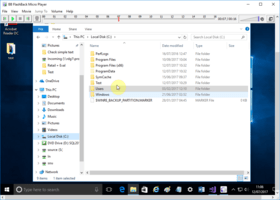
The player component allows the integration of a customisable playback window into your application. A range of options allows you to configure the size of the playback screen, user control bars and playing behaviour. Sophisticated navigation controls empower you and your users to create checkpoints anywhere in the movie, repeat sections, seek to any location, and more. Whichever recording method used the image quality of playback is 100% of the original screen.
BB FlashBack SDK comes in three editions: Basic, Professional and Advanced
BB FlashBack SDK Basic Editon Includes:
BB FlashBack SDK Professional Editon includes all Basic Edition Features and
BB FlashBack SDK Advanced Editon includes all Basic Edition Features all Professional Edition Features and
Standard Support
Support Plan:
You receive these additional services for one year: