BB TestAssistant - Application - V2.0.1 - 概要

by Blueberry Consultants - 製品のタイプ: アプリケーション

結果

BB TestAssistant by Blueberry Consultants

Screen recording for developers and testers. BB TestAssistant is a screen recording application allowing software testers to report bugs in a visual movie, making bug reporting clearer and faster. Features include automatic capturing of PC information, detailed key logging, API support, rolling record mode, error detection, annotation tools and more. The developer does not require the application to be installed in order to view the movie problem report. Saves hours of communication time during software testing.

BB TestAssistant is a screen recording application for software testers. It allows bugs to be visually captured in a movie, and sent to the developer for a quicker and clearer problem report.

Three different screen recording methods are offered for complete coverage of all testing and working situations on the Windows platform. Capture driver recording uses a Blueberry device driver to record the screen, providing in most cases the quickest and most sophisticated recording available to date. This driver produces perfect quality replays at an impressive file size. Alternative recording modes are innovatively designed frame by frame style recording, best used for older operating systems, highly graphical material and lower performance machines.

Recording can be used as and when necessary, or continuously in the background using TestAssistants rolling record mode. This allows the tester to limit their movie file by time or file size, and is perfect for capturing intermittent and hard to reproduce problems. The program can be set to record full screen, or focus only on a single window, menu or toolbar.

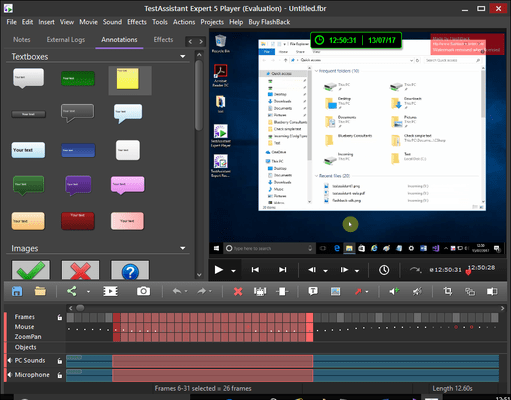
Movie navigation is easy with our graphical interface and powerful browsing controls. A time and framebar allows precise location of any movie time frame, with a handy preview window to aid finding the relevant moment. All movie events, such as mouse clicks and key presses, are shown visually on the interface and can be browsed to easily with a next and previous event finder.

A comprehensive key logging system is included showing exactly what keys were pressed and when. This information can be viewed in raw or sentence form, and searched to locate necessary sections.

BB TestAssistants text annotation features are particularly useful for highlighting and explaining the issues raised on screen, and these come in a full range of colours, shapes and font settings.

Full editing is supported and footage can be inserted, erased, or cut and pasted inside or between movies. Speed controls allow selected selections of the footage to be sped up or slowed down making it easier to get the issues across to the viewer without them missing anything or having to sit through unnecessary material. The mouse cursor is completely editable.

While recording your movie, sound can be captured alongside the visual through any sound channel on the computer. This means system sounds can be included in the movie file, or a tester can record a voice over explaining their operations and the problems theyve encountered. Sounds can also be added to an existing movie through computer sound channels and the PC microphone, or by importing wav or MP3 files into the footage.

API support means you can command the program to run and start recording to a specified filename and set other options from outside the TestAssistant application. This can be used to start the program capturing upon startup or loading of a particular program.

BB TestAssistant will automatically capture software and hardware information about the testing workstation such as CPU clock speed and operating system version to help the developer track down the problem. This is included automatically with your movie report and viewable in the free TestAssistant player, or in a XML file for easy integration with your own systems.

If you use direct software logging during your testing, BB TestAssistant can be configured to synchronise recording as your program begins logging, and include software logs with your movie for easy and convenient viewing in the TestAssistant player.

Windows errors, crashes and exceptions are detected automatically by default, and a reporting wizard is included for quickly creating and sending bug reports to a pre-set system, address or network location.

The end viewer of your movie does not need to have TestAssisant installed in order to view your movies, as footage can be exported to Flash, AVI, WMV or standalone EXE formats. For users wanting to keep movies inside TestAssistants native file format, Blueberry offers a completely freeware player for users to distribute to as many staff as they wish at no cost.

Save time wasted by problematic and vague bug reporting over phone and email, and actually show the developers the problem. BB TestAssistant offers quick and clear visual and technical problem reporting to enhance your development and testing cycles. Download it today to see the difference it makes to your business.

What's New in BB TestAssistant V2.0?

Extensive sound editing functions to allow precision audio manipulation

Record from screen and webcam simultaneously to produce picture-in-picture video

Recording wizard for easy step-by-step setup of recording

Highlight tool for drawing attention to particular areas of your movie

Improved Vista compatibility

Easy smoothing of mouse movements

PartNumbers: PC-515732-150512 515732-150512 PC-515732-150515 515732-150515 PC-515732-150513 515732-150513 PC-515732-150516 515732-150516 PC-515732-150518 515732-150518

Publisher PartNumbers: BB-TA-STD-PS-(1) BB-TA-STD-PS-(2-5) BB-TA-STD-SW-(1) BB-TA-STD-SW-(2-5)

PurchaseOptions: BB TestAssistant V2.0.1 1 User License , BB TestAssistant V2.0.1 1 User licence + Support Plan , BB TestAssistant V2.0.1 1 User Licence, per User from 2 to 5 users , BB TestAssistant V2.0.1 1 User licence + Support Plan, per User from 2 to 5 users , BB TestAssistant 1 One year Support Plan, per User

Resources: Read the BB TestAssistant help file, Read the BB TestAssistant License Agreement, Download the BB TestAssistant V2.0.1 evaluation on to your computer - Expires After 30 Days

Operating System for Deployment: Windows Vista, Windows XP, Windows Server 2003, Windows ME, Windows 2000, Windows 98, Windows NT 4.0

Architecture of Product: 32Bit

Product Type: Application

Product Class: Component Development Tools

Search Items: New Product Feb 05, New Product Mar 05, New Product July 05

Keywords: Debugging debug debugs Testing Test Tests Author BBTestAssistant, TestAssistant

商品検索

検索したい単語を入力して下さい:

クイック リンク

開発元/発売元

主要なカテゴリー

関連製品