BCGControlBar Library Professional (BCGControlBar Pro MFC) - 概要

by BCGSoft - 製品のタイプ: Component / DLL / VC++ Class Library / Source Code / Static Link Library

結果

BCGControlBar Library Professional (BCGControlBar Pro MFC) by BCGSoft

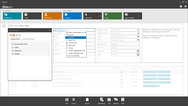
Create applications with a user interface similar to Microsoft Office 2007 / XP / 2003 / 2007, Microsoft Visual Studio, Microsoft Internet Explorer (IE) and other well-known products. BCGControlBar Library Professional (BCGControlBar Pro MFC) is an MFC extension library with more than 200 well designed, tested and fully documented MFC extension classes such as toolbars, menus, controls as well as customization and visualization, that can be incorporated into your application to add Office like and Microsoft Visual Studio like UI. BCGControlBar Library Professional (BCGControlBar Pro MFC) supports Office 2007 (Office 12) style with Ribbon control, skinned interface, Vista Aero, Gantt and more. BCGControlBar Library Professional License includes Source Code and a free one year subscription that entitles you to e-mail technical support, patches and upgrades.

Overview

BCGControlBar Library Professional (BCGControlBar Pro MFC) ("Business Components Gallery ControlBar") is an MFC extension library that allows you to create Microsoft® Office 2000, XP, 2003 , 2007, Vista and Microsoft® Visual Studio®.NET like applications with full customization options (customizable toolbars, menus, keyboard and more).

The library has more than 200 fully documented MFC extension classes which can be easily incorporated into your application and save you hundreds of development and debugging hours.

BCGControlBar Professional Edition is an MFC extension library that includes many advanced features such as detachable tab windows, auto hide windows, docking control bars and toolbars that display context while dragging, new docking algorithms (similar to algorithms introduced in Microsoft® Visual Studio.NET® environment and Microsoft® Visio®), shortcut bars with detachable panes, tabbed toolbars, text editor with syntax highlighting and IntelliSense® style support, completely flat look and more:

Toolbars and Menus

Microsoft® Office 2000 , Office XP, Office 2003 and Office 2007 Look and feel toolbar and menu

Microsoft ® Visual Studio 6.0, Visual Studio.NET (VB.NET, C#, etc..), Visual Studio 2005 and VS2008 Themes

Microsoft® Internet Explorer (IE) Look

Custom Application Look (support for application-defined skin)

High and True color toolbar / menu images support

Large icons support

Auto-build keyboard shortcut names in menus and ToolTips

Toolbar Menu buttons

Built-in toolbar controls such as combo box, edit box, date/time picker, color picker and more

Tabbed Toolbars

Microsoft® Office-like "tear-off" ("detachable") menus

Control Bars

Shortcuts (Microsoft® Outlook style) bar

Visual Studio® style Docking/Resizable Control Bar with detachable tabs and Auto Hide mode.

VS 2005 style docking

Microsoft® Office style task pane

Visual Studio.NET® style Toolbox

Enhanced Status Bar with built-in progress bar, animation and icon

Advanced Document Management

MDI Tab Control and MDI Tab Groups

Tabbed Views

MTI interface support

Docking views

Customization

Customizable toolbars and menus

Context menu customization

Keyboard shortcuts customization

User defined tools

User defined image editing (simple bitmap editor is included)

Visualization and skins

Built-in skins: Office2000 like, OfficeXP like, Office2003 like, VS.NET like, VS2005 like

User defined skin

Planner Control

Microsoft® Outlook style Calendar with Day, Work Week, Week and Month Views

Appointment and scheduling

Appointment reminders

Recurring appointments

Events

Printing support

Integration with Calendar Control

Grid and Report Controls

Microsoft® Outlook style Report control with grouping, columns, printing drag and drop and more.

Advanced Grid control with support for hierarchical data

Built-in cell types such as text, number, color, font, URL and more

Data binding support. ODBC, ADO and DAO are provided of of the box

Popup (Desktop Alert) Window

This Microsoft® Office style popup control allows to display short-time messages

In opposite to the standard message box, this window doesn't require from the user to close it by clicking "Ok" button and it automatically disappears after short time

Content can be created from an user defined dialog resources or it can be automatically generated from given text and icon

Various Pop Up looks: Office 200/XP/2003, MSN Messenger and more

Various animation types: fade, slide and unfold

Semi-transparent background

Custom events

Miscellaneous GUI Controls

Advanced edit control with IntelliSense support and syntax highlighting

Property List Control

Hyperlink control

Advanced Tab Control

Microsoft® Office-style color picker

Font picker

Masked edit control

Date/Time picker

Calendar control

Images with hot-spot areas

Calculator

Dialogs

Advanced Property Sheet: the tab on top can be replaced by left-side shortcuts bar or tree.

Customization dialog

Image Edit dialog

Office-like color selection dialog box

Key Map Dialog

Windows Management dialog

Visual Studio Integration

Support for VC++ 6.0, VS.NET 2002/2003 ( VB.NET, CSharp, etc.) VS.NET 2005 and VS 2008

Integration Wizard integrates the library with your Visual Studio environment

Application Wizard allows to create MFC application with new cool look in seconds

Build Wizard build required library configuration (s).

MSDN-integrated Help. Integrates the library help with MSDN, so by pressing F1 key in your editor, you'll get a relevant help topic.

Skin Wizard allows to create your own skin from the scratch.

Miscellaneous

Shell management classes and shell tree and list controls

UNICODE support

Microsoft® Active Accessibility Support

Right-to-Left (RTL) Languages Support

The library has been translated to Chinese, Czech, Danish, Dutch, French, German, Greek, Hungarian, Italian, Japanese, Korean, Polish, Portuguese, Romanian, Russian, Slovak, Swedish, Turkish, Slovenian and Spanish. The built-in mechanism allows a developer to change the user-interface language during runtime

What's New in BCGControlBar Library Professional (BCGControlBar Pro MFC) V10?

Improved Office 2007-style Ribbon

Calendar and Grid Enhancements

Skinned dialogs and forms

Vista Aero controls

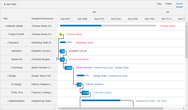
Gantt Chart

Ribbon Designer is available: This designer dramatically simplifies the ribbon creation process and allows to create the "state of the art" products in few minutes.

What's New in BCGControlBar Library Professional (BCGControlBar Pro MFC) V9.56?

The library is fully-compatible with Microsoft® Visual Studio 2008 now. The following features have been implemented:

Integration and Build wizard

VS 2008 Application Wizard

Implemented a new visual manager "CBCGPVisualManagerVS2008" which allows to create applications with Microsoft® Visual Studio 2008 ("Orcas") look.

What's New in BCGControlBar Library Professional (BCGControlBar Pro MFC) V9.55?

Added .PNG image support for the following products:CBCGPButton, CBCGPHotSpotImageCtrl, CBCGPPropertySheet,CBCGPRibbonStatusBarPane

The .PNG image support can be excluded from the product now

MS Office 2007-style DLLs have a version number prefix now: for example, MS Office 2007 Blue theme DLL in version 9.55 has the following file name: BCGPStyle2007Luna955.dll

CBCGPVisualManager2007: MDI child system buttons located on the menu bar have Office 2007 look now.

CBCGPRibbonEdit class has a new protected method: CreateSpinButton. Calling this method allows to create spin buttons in CBCGPRibbonEdit-derived classes.

What's New in BCGControlBar Library Professional (BCGControlBar Pro MFC) V9.53?

Added support for Microsoft® Visual Studio® 9.0 Beta 1 (Code Name "Orcas"). The Build and Integration Wizards are not ready yet, but you can open VS 9.0 solutions (BCGCBPro90.sln or BCGCBProStatic90.vcproj), build required DLLs/libraries and use them in your projects. All our examples/samples were thoroughly tested with VS 9.0 and no problems were detected. However, if you detect any compatibility issues, please inform us and we'll resolve them. Important note: CBCGPMenuBar::GetMenu and CBCGPPopupMenu::GetMenu methods have been replaced by GetHMenu methods. This change made due to impossibility to override virtual methods returning different types in VS Orcas.

Added IE 7-style "Close" button displayed on active tabs

What's New in BCGControlBar Library Professional (BCGControlBar Pro MFC) V9.52?

Significantly improved Ribbon layout and performance

Added the ability to customize collapsing order of Ribbon control panels

CBCGPCaptionBar can be created as MS Office 2007-style message bar now

Now the toolkit utilizes Microsoft Office 2007 font (if installed on the client machine)

What's New in BCGControlBar Library Professional (BCGControlBar Pro MFC) V9.51?

CBCGPRibbonStatusBar is merged now with the frame bottom edge

Added tooltip support to ribbon galleries

Significantly improved behavior of ribbon mini-toolbar ("floaty")

CBCGPRibbonPaletteButton is automatically stretched when the parent ribbon panel is being resized

What's New in BCGControlBar Library Professional (BCGControlBar Pro MFC) V9.4?

BCGControlBar Pro is fully compatible with Microsoft® Windows® Vista® now. The following general features have been added and improved for the Vista support:

Ribbon "glass" caption. Includes semi-transparent icons on QAT, Vista-style system buttons with glove and animation nd glass-style contextual caption

Glass borders and captions in Visual Manager 2007

All menu shadows are fully Vista-compatible

The library correctly handles DWM notifications in order to automatically apply Aero styles to frames and control bars.

The following ribbon gadgets have been added and improved:

Added a new class CBCGPRibbonEdit: implements ribbon edit box with image, text label and spin buttons.

CBCGPRibbonStatusBarPane allows to show animation on status bar pane. You need to pass an image list to CBCGPRibbonStatusBarPane constructor and call StartAnimation/StopAnimation methods in order to add animation to status bar pane.

CBCGPRibbonPaletteButton allows to resize drop-down menu.

CBCGPRibbonComboBox drop-down list is resizable

Added a new class CBCGPRibbonPaletteMenuButton: implements a popup palette submenu and can be used in CBCGPPopupMenu instead of CBCGPToolbarMenuButton item. Please take a look at CMainFrame::OnShowPopupMenu in BCGPMSOffice2007Demo example to learn how to use palettes in application context menus.

You can add separators to the Ribbon QAT

Introduced new, Office 2007-style options dialog. The new style 'PropSheetLook_List' has been added to CBCGPPropertySheet class. In addition, you can define your own property sheet headers. Call CBCGPPropertySheet::EnablePageHeader and override CBCGPPropertySheet::OnDrawPageHeader method in order to create your property sheet header.

What's New in BCGControlBar Library Professional (BCGControlBar Pro MFC) V9.3?

CBCGPVisualManager2007 implements MS Office 2007 Beta 2 Technical Refresh look

Added popup ribbon panels in minimized state. When an user clicks the category tab on minimized ribbon bar, the temporary popup category appears instead of restored ribbon. This functionality is very similar to Visual Studio auto-hide bars and allows to keep more free space for editing without loosing the ribbon functionality. This feature is provided automatically "out of the box", so no code changes are required

A new class CBCGPRibbonStatusbar has been added. This class implements Office 2007-style customizable, ribbon-based status bar control

The following new Ribbon widgets have been added:

CBCGPRibbonStatusBarPane: implements status bar pane element

CBCGPRibbonSlider: implements slider control

CBCGPRibbonProgressBar: implements progress bar

x64 libraries and DLLs are compiled in separate folder bin64. This prevents mix-up between 32 and 64-bit program databases when both platforms are used together

PartNumbers: PC-511063-161593 511063-161593 PC-511063-161595 511063-161595 PC-511063-161597 511063-161597 PC-511063-161599 511063-161599 PC-511063-161601 511063-161601 PC-511063-161603 511063-161603

PurchaseOptions: BCGControlBar Library Professional (BCGControlBar Pro MFC) V10.2 - Source Code and 1 Year Subscription Included 1 Developer Subscription License per Developer 1-4 Developers , BCGControlBar Library Professional (BCGControlBar Pro MFC) V10.2 - Source Code and 1 Year Subscription Included 1 Developer Subscription License per Developer 5-10 Developers , BCGControlBar Library Professional (BCGControlBar Pro MFC) V10.2 - Source Code and 1 Year Subscription Included 1 Developer Subscription License per Developer 11-20 Developers , BCGControlBar Library Professional (BCGControlBar Pro MFC) V10.2 - Source Code and 1 Year Subscription Included 1 Corporate License (Allows unlimited developers inside a single company) , BCGControlBar Library Professional (BCGControlBar Pro MFC) V10.2 - Renewal 1 Developer Subscription Renewal License , BCGControlBar Library Professional (BCGControlBar Pro MFC) V10.2 - Renewal 1 Corporate Renewal License (Allows unlimited developers inside a single company)

Resources: Run the BCGControlBar Library V10.0 demonstrations, Read the BCGControlBar Library Professional help file, Browse the BCGControlBar Editions Feature Comparison Web page, Browse the BCGControlBar Library Screenshot Web page, Download the BCGControlBar Library Professional Edition V10.2 evaluation on to your computer - Expires after 30 days

Operating System for Deployment: Windows Vista, Windows XP, Windows ME, Windows 2000, Windows 98, Windows NT 4.0, Windows 95

Architecture of Product: 32Bit, 64Bit

Product Type: Component

Component Type: DLL, VC++ Class Library, Source Code, Static Link Library

Compatible Containers: Microsoft Visual Studio 2008, Microsoft Visual Studio 2005, Microsoft Visual Studio .NET 2003, Microsoft Visual Studio .NET, Microsoft Visual Studio 6.0, Microsoft Visual Basic 2008, Microsoft Visual Basic 2005, Microsoft Visual Basic .NET 2003, Microsoft Visual Basic .NET, Microsoft Visual C++ 2008, Microsoft Visual C++ 2005, Microsoft Visual C++ .NET 2003, Microsoft Visual C++ .NET, Microsoft Visual C++ 6.0, Microsoft Visual C# 2008, Microsoft Visual C# 2005, Microsoft Visual C# .NET 2003, Microsoft Visual C# .NET, .NET Framework 3.5, .NET Framework 3.0, .NET Framework 2.0, .NET Framework 1.1, .NET Framework 1.0

Product Class: User Interface Components

Search Items: New Product June 04, New Product July 04, New Product Oct 04, New Product Feb 05, New Product Apr 05, New Product Oct 05

Keywords: Popup Pop up pop-up Alerts Alert alerting alerted ToolTips ToolTip Tool Tips Tool Tip planning plan scheduling schedule schedules scheduler User Interface Collections UI User Interface UI Toolbar tool bar tool-bar Toolbars Menu Menus Ribbon Ribbonbar Grid Grids Table Tables DataGrid DataGrids Button Cursor Buttons Cursors Professional Partner BCGControlBar Library, BCGSoft Library, BCGControlBar Pro, BCGControlBar Library Professional Edition

商品検索

検索したい単語を入力して下さい:

スクリーンショットギャラリー

Award Award