ComponentOne List for .NET - .NET Component - 2008 v1 - 概要

by ComponentOne - 製品のタイプ: コンポーネント / .NET WinForms / 100% Managed Code

結果

ComponentOne List for .NET by ComponentOne

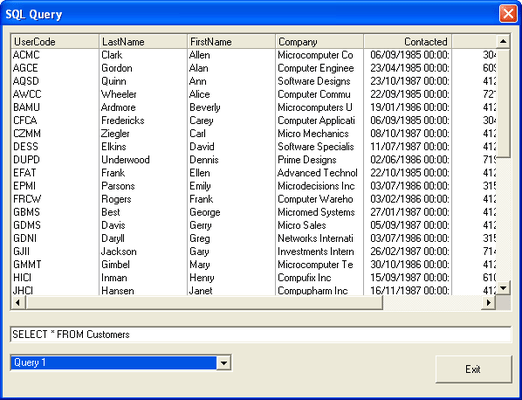
Allow end users to browse, add, and delete data in a tabular format. Using the latest data binding technologies built into Visual Studio .NET, including ADO.NET, ComponentOne List for .NET completely manages the database interface, allowing developers to concentrate on important application-specific tasks. Visual Studio 2005 and Visual Studio 2008 compatible ( VS2005 VS2008 )


ComponentOne List for .NET is part of ComponentOne Studio Enterprise and the ComponentOne Studio for WinForms.

ComponentOne List for .NET includes dozens of advanced data access, data presentation, and user interface features that enable developers to build intuitive, professional-looking applications:

Incremental search - End-users can quickly locate list items by typing. Supports both single-character matching and an incremental search mode

Automatic field completion - Works in concert with incremental search to fill the text portion of a combo with matching field data as characters are typed

Excel and Word-like styles - Hierarchical style objects encapsulate font, color, picture, and formatting information, facilitating easy customization of list components at design time and run time

Excel-like splits - Developers and end users can divide the list into separate vertical and horizontal panes to provide multiple views of the data. The splits can scroll independently or simultaneously

Fixed, nonscrolling columns - Splits can also be used to create nonscrolling columns anywhere in the list (at the left or right edges, or in the middle)

In-cell objects - ComponentOne List for .NET supports a variety of in-cell objects for data display and editing, including bitmaps, command buttons, check boxes, and radio buttons

Automatic data translation - Database values can be automatically translated into alternate text or graphics without coding. For example, numeric codes can be rendered as words or even bitmaps

Data-sensitive display - A powerful regular expression facility can be used to apply different styles to individual cells depending upon their contents. For example, negative numbers can be shown in red, or fields containing a particular substring can be shown in bold

Interactive visual editing - Programmers can create columns, retrieve field layouts from a bound data source, resize list components, and configure all aspects of the list layout at design time---no coding is required

Unbound columns - ComponentOne List for .NET supports unbound columns while other columns are bound to a data control

Run-time CellTips - Provides context-sensitive help for end users

Alternating row colors - Enhances the readability of the list's display

New Vertical Splits - Like Microsoft Excel, ComponentOne List for .NET has the ability to split both horizontally and vertically allowing for a list matrix as well as singular horizontal and vertical views. In addition, a user-friendly matrix dereferencing notation makes splits quite accessible even with multiple horizontal and vertical splits

New column objects - ComponentOne List for .NET includes two separate column objects to help simplify the sometimes-daunting object model. The C1DataColumn object contains all of the properties related to data and data processing, while the C1DisplayColumn object contains all of the properties related to the columns display

Expanded data views - ComponentOne List for .NET includes two alternate display formats. Normal view presents data in a standard form, while the MultipleLines view displays all of the columns on multiple lines in the viewable list

Style border properties - The expanded style object now includes properties that let you customize the appearance, size, color, and type of cell borders

Scroll tracking and ScrollTips - The vertical scroll bar thumb can now scroll records as it is moved. You can also use the ScrollTips feature to provide an informational pop-up during scrolling

Free run-time distribution - No royalty fees required

And much more... - Including the Find method for C1List and C1Combo, the Tag property for column objects, and right to left support.

PartNumbers: PC-513334-147204 513334-147204 PC-513334-147205 513334-147205 PC-513334-147206 513334-147206

Publisher PartNumbers: ENT-STUDIO-GOLD-U ENT-STUDIO-U ESD-ENT-STUDIO-GOLD-U ESD-ENT-STUDIO-U ESD-N-LIST-R

PurchaseOptions: ComponentOne List for .NET (To renew your current C1 List for .NET Subscription - Minimum Quantity 5)* 1 Developer Subscription Renewal License - Minimum Quantity 5 , ComponentOne Studio Enterprise 2008 v2 (To upgrade your expired C1 List for .NET Subscription to a C1 Enterprise Studio Subscription)* 1 Developer Upgrade Subscription License - from any Individual ComponentOne Product Subscription , ComponentOne Studio Enterprise 2008 v2 (To upgrade your expired C1 List for .NET Subscription to a C1 Enterprise Studio Subscription)* 1 Developer Upgrade Subscription License with Platinum Support - from any Individual ComponentOne Product Subscription

Resources: ComponentOne List for .NET help, Read End-User License Agreement for ComponentOne Software, Download the ComponentOne Studio for WPF 2008 v2 evaluation on to your computer - Displays Nag Screens, Download the ComponentOne Studio for ASP.NET 2008 v2 evaluation for .NET 1.1 on to your computer - Displays Nag Screens, Download the ComponentOne Studio for ASP.NET 2008 v2 evaluation for .NET 2 and higher on to your computer - Displays Nag Screens, Download the ComponentOne Studio for WinForms 2008 v2 evaluation for .NET 2 and higher on to your computer - Displays Nag Screens, Download the ComponentOne Studio for Mobile Devices 2008 v2 for .NET 2 or higher evaluation onto your computer - Displays Nag Screens, Download the ComponentOne Studio for Mobile Devices 2008 v2 for .NET 1.1 evaluation onto your computer - Displays Nag Screens, Download the ComponentOne Studio for WinForms 2008 v2 evaluation for .NET 1.1 on to your computer - Displays Nag Screens, Download the ComponentOne Studio ActiveX 2008 v2 evaluation onto your computer - Displays Nag Screens

Operating System for Deployment: Windows Vista, Windows XP, Windows 2000, Windows NT 4.0

Architecture of Product: 32Bit

Product Type: Component

Component Type: .NET WinForms, 100% Managed Code

Built Using: Visual C# .NET

Compatible Containers: Microsoft Visual Studio 2008, Microsoft Visual Studio 2005, Microsoft Visual Studio .NET 2003, Microsoft Visual Studio .NET, Microsoft Visual Basic 2008, Microsoft Visual Basic 2005, Microsoft Visual Basic .NET 2003, Microsoft Visual Basic .NET, Microsoft Visual C++ 2008, Microsoft Visual C++ 2005, Microsoft Visual C++ .NET 2003, Microsoft Visual C++ .NET, Microsoft Visual C# 2008, Microsoft Visual C# 2005, Microsoft Visual C# .NET 2003, Microsoft Visual C# .NET, Delphi 8.0, C#Builder, .NET Framework 3.5, .NET Framework 3.0, .NET Framework 2.0, .NET Framework 1.1, .NET Framework 1.0

Product Class: User Interface Components

Search Items: New Product Jan 03, New Version Oct 03, New Version Feb 04, New Product Apr 04, New Version Apr 04, New Product May 04, New Product Aug 04, New Product Oct 04, New Product Jan 05, New Product Feb 05, New Product May 05, New Product Sep 05

Keywords: Treeview List tree view tree-view list-view listview listbox componentone, component1, componentone studio, component one, componentone studio enterprise, componentone com, www componentone, componentone llc, componentone review, componentone activex, component one studio, studio enterprise, studio for winforms Enterprise Partner ComponentOne List for .NET

商品検索

検索したい単語を入力して下さい:

スクリーンショットギャラリー

Award