by ComponentOne - 製品のタイプ: コンポーネント / .NET WinForms / 100% Managed Code
この商品については、日本語の説明書きはございません。
Add menus and toolbars with the Visual Studio /Office look and feel to your .NET Windows Forms applications and controls. ComponentOne Menus and Toolbars for .NET is a suite of integrated components including 4 main components: C1ToolBar, C1CommandDock, C1MainMenu and C1ContextMenu. Visual Studio 2005 and Visual Studio 2008 compatible ( VS2005 VS2008 )

一般向け価格については下記に表示されています。お客様用の割引価格をご覧になるには、ログインしてください。
| カートに追加 | ¥ 47,670 (税込) | 1 Developer Subscription Renewal License - Minimum Quantity 5 メーカーパーツ番号: ESD-N-MENUSBARS-R |
要確認 | ダウンロード (285.7 MB) |
| カートに追加 | ¥ 124,740 (税込) | 1 Developer Upgrade Subscription License - from any Individual ComponentOne Product Subscription メーカーパーツ番号: ESD-ENT-STUDIO-U |
要確認 | ダウンロード (596.2 MB) |
| カートに追加 | ¥ 154,770 (税込) | 1 Developer Upgrade Subscription License with Gold Support - from any Individual ComponentOne Product Subscription メーカーパーツ番号: ESD-ENT-STUDIO-GOLD-U |
要確認 | ダウンロード (596.2 MB) |
すべてのご注文にて弊社標準の 契約条件および返品条件の内容が適用されます。
一般向け価格については上記に表示されています。お客様用の割引価格をご覧になるには、ログインしてください。
ComponentOne Menus and Toolbars for .NET is part of ComponentOne Studio Enterprise and the ComponentOne Studio forWinForms.
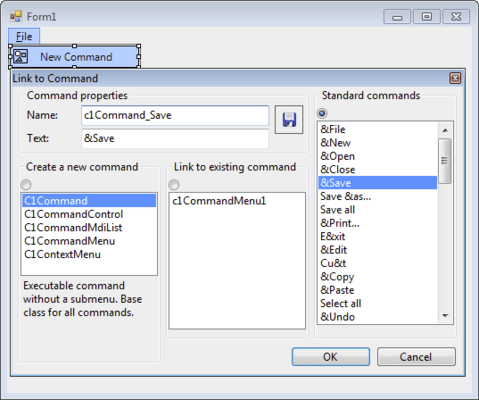
It includes 4 main components that provide you with the functionality you need to add a dynamic set of menus and toolbars to your .NET Windows Forms applications.
C1ToolBar
This is the toolbar control of the suite. When you place it on a form, you can add buttons to it by right clicking and selecting appropriate items from the context menu. To make a toolbar that end users will be able to move around the form, dock to its sides or make floating; put your C1ToolBar controls inside C1CommandDock containers.
C1CommandDock
C1CommandDock is a container control that provides flexible docking and floating behavior to your toolbars. You can drop a C1CommandDock anywhere on your form, adjust its size and position, and place your toolbars in it. At runtime, toolbars contained in a C1CommandDock will show a drag area on their left (horizontal toolbars) or top (vertical toolbars) side, and your user will be able to easily drag the toolbar to any position, dock to other sides of the form and/or to other C1CommandDock objects. Users can even choose to make the toolbars float. C1CommandDock also includes a robust set of properties giving you complete control over the available docking behavior options.
C1MainMenu
This control provides the main menu for a form. When you place this object on your form, it will show across the whole form at the top, as regular Windows main menus do. Easily add items to a C1MainMenu by simply right-clicking and selecting Item...item from the context menu. Alternatively, you can edit the CommandLinks collection of the C1MainMenu using the collection editor.
C1ContextMenu
C1ContextMenu is a command with one or more sub-items (i.e., a command with a submenu), which can be used as a context menu for an arbitrary control on your form. Objects of type C1ContextMenu appear in the component tray.
ComponentOne Menus and Toolbars for .NET features and benefits
The ComponentOne Menus and Toolbars for .NET suite of components integrate menus and toolbars into a single system, allowing you to reuse the same objects and code for menu items and toolbar buttons. ComponentOne Menus and Toolbars for .NET provides many convenient and timesaving features including: integration between menus and toolbars; Context menus with similar look and feel; Docking and floating toolbars; automatic updates of your menu items' and toolbar buttons' state; and more.
C1Command also comes with an easy to use Visual Studio add-in utility (converter) that can convert the standard .NET menus and toolbars defined on a form to C1Command-style menus and toolbars. The converter can convert forms written in VB.NET or C# languages.
ComponentOne Platinum Support Subscriptions provide a full year of Telephone and Online Technical Support. ComponentOne Technical Support Engineers are available by phone Monday through Friday, except U.S. holidays, from 9:00 a.m. to 5:00 p.m. Eastern,USA.
Customers outside the USA, please remember to check your time difference for phone support.
開発元/発売元
主要なカテゴリー
関連製品
関連のカテゴリー