Component Toolbox - ActiveX (.NET Ready) - V7.0 - 概要

by DBI Technologies - 製品のタイプ: コンポーネント / ActiveX OCX / COM Add-in for Office 2000

結果

Component Toolbox by DBI Technologies

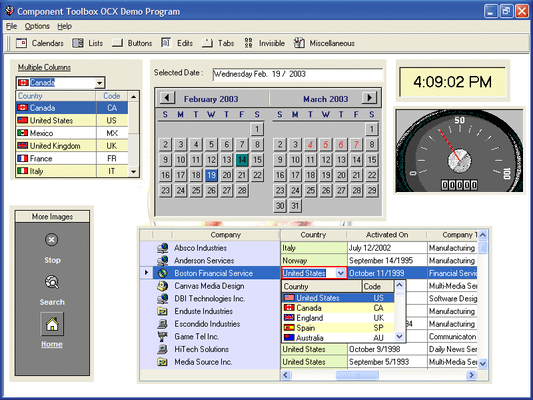
Add expanded functionality with this robust collection of 53 components. Component Toolbox OCX contains 53 licensed 32-bit OCX/ActiveX components for Outlook-style menus, enhanced tree view, advanced list box, calendars, edit controls, buttons, sliders, gauges, and much more. Speed time to market by using these fully documented (including dedicated help files for each component), and time-tested components.

Whether you're crafting a commercial product or an on-demand in-house solution you want to know that your choice of development tools perform beyond your expectations, are compatible with your choice of IDE(s) and have the functionality to meet your end-user's demands.

Component Toolbox is a comprehensive, value packed collection of components including Data Edit/Input, Dialogue, Calendar, Navigation, Animation, General Presentation, Rulers/Meters and List/Tree View components. Create fresh designs and great end-user functionality with Component ToolBox and its new functionality, including: XP styles, new gradient fills, multi-column listbar, ToolBar navigation, Date/Time and Data Edits, Lists and Tree Views. Component Toolbox has 53 individual components to choose from.

New, extensively commented component sample applications are provided to assist you in getting your job done faster.

Data Edit/Input (4) - Inputting and editing data is eventually what application development is all about. Add effective user interfaces with ctCheck, ctDEdit, ctMEdit and ctNEdit.

Dialogue (7) - There are quicker and simpler ways to make calls to Windows dialogues. Use DBI's dialogue controls for end-user interaction and the least amount of programming with ctColorButton, ctColorCombo, ctColor, ctCPick, ctFile, ctFont and ctPrint.

Calendars (2): Time is a sensitive issue and using the right calendar components can make a huge difference.

Navigation - Build on the Windows interface standard quickly and effortlessly using these controls for great presentations and user navigation; ctButton, , ctDropMenu, ctHyplnk, ctListBar, ctPush, ctToolBar and ctTabs.

List / Tree - When crafting an application, data loading and presentation are timing issues where latency is not usually an option. These five primary controls out-perform and provide results beyond expectations in your choice of IDE: ctList, ctTreeView, ctSList and ctCombo.

Presentation - From concept to implemented solution you need the right set of tools. DBI's presentation components are the perfect mix complimenting the developers' toolbox with: ctClock, ctDigit, ctFold, ctImage, ctPaper, ctSpin, ctSpiral, ctText and ctTips.

General - Add Flexibility to your favorite IDE with the great presentation tools of Component ToolBox. These eleven general purpose components will add to your own branding, User Interface design and implementation and save you countless hours of programming time: ctFrame, ctGroup, ctHTML, ctCalc, ctRadio, ctScroll, ctSize, ctSplit, ctTray and ctWave.

Animation : Create unique branding and set your User Interfaces apart from the every-day with simple, effective animations with these components: ctBanner, ctClip, ctDial.

Rulers & Meters - We all like to know where we're at, whether we're installing software, building a simulator, defining a time line, measuring an input or output, or moving to a new position, DBI's Rulers and Meters will get you there: ctFill, ctGauge, ctMeter, ctRuler and ctSlide.

Complete list of included components:

ctBanner : An animated banner/marquee component.

ctButton : A standard button replacement component providing transparency and mouse effects.

ctCalc : A simple calculator/math component.

ctCheck : An enhanced version of a standard check box.

ctClip : A picture clip component.

ctClock : A control used to view a clock in an analog or a digital format.

ctColor : A control used to activate the standard Color Common Dialog Box

ctColorButton : (NEW) A button control with a drop down color palette.

ctColorCombo: (NEW) A color combo-box object.

ctCombo : An enhanced combo-box object.

ctCPick : A compact alternative to the color common dialogue box.

ctDate : A visual representation of a monthly calendar presenting one or more months at a time.

ctDEdit : A masked edit text box that supports date/time entry and presentation.

ctDial : A component that simulates a stereo dial style of user-input interface.

ctDigit : (NEW) A digital display component.

ctDropMenu : (NEW) creates and displays drop-down or popup menus.

ctFile : A control used to activate the FileOpen and FileSave common dialogue boxes

ctFill : A meter-type component that simulates the filling of irregularly shaped objects.

ctFold : A container object that mimics a tabbed file folder.

ctFont : A control used to activate the standard Font Common Dialogue Box

ctFrame : A simple container object with many special drawing effects.

ctGauge : Provides a visual representation of a needle or scale in a gauge-type display.

ctGroup : An enhanced group box component.

ctHtml : An Html browser object.

ctHyperLink : A caption component that allows users to open linked documents.

ctImage : An image list component.

ctList : An enhanced list box component.

ctListBar : A navigation component similar to the MicrosoftOutlooklist bar.

ctMEdit : A mask-edit text entry box component.

ctMeter : An enhanced visual representation of a progress meter.

ctNEdit : An enhanced numeric edit component.

ctPaper : A text label component that simulates a paper background

ctPrint : A control used to activate the standard Printer Common Dialogue Box

ctPush : An enhanced picture push button.

ctRadio : An enhanced replacement for the standard radio button.

ctRuler : A ruler object that represents a timeline or measuring instrument.

ctScroll : An enhanced version of the standard scroll bar.

ctSize : An elastic component that sizes and/or positions its child controls.

ctSlide : An enhanced slider component.

ctSList : (NEW) A scrolling list component

ctSpin : A spinner-button component

ctSpiral : An object that simulates a spiral tabbed notebook interface

ctSplit : A splitter-bar component that divides an area into two panes

ctTabs : A page tab strip component

ctText : An enhanced text label object

ctTips : A control that provides a popup help tip display for other controls within a form

ctToolBar : a horizontal toolbar and menu component

ctTray : An invisible component that places icons in the system tray

ctTree : An enhanced hierarchical tree / outline control

ctWave : A wave file player component

What's New in Component ToolBox V7.x?

ctCombo 5.0.0.0

XML data and XML styles support

ControlStyle property added

New and enhanced XP styles

ctDEdit 6.0.0.0

XML data and XML styles support

New and enhanced XP styles

ctExplorerBar 1.0.0.0

New component for Component Toolbox OCX version 7.0

ctGrid 3.0.0.0

New component for Component Toolbox OCX version 7.0

XML data and XML styles support

XP style column headers

Hide columns (adjust horizontal scroll bar)

Export to JPEG

Enhanced printing capabilities - define page breaks, page footers and page number descriptions

Print with a printer handle (by-pass printer dialogue)

ControlStyle property and enhanced XP Styles support

New corner color

ctList 6.0.0.0

XML data and XML styles support

XP style column headers

Hide columns (adjust horizontal scroll bar)

Export to JPEG

Enhanced printing capabilities - define page breaks, page footers and page number descriptions

Print with a printer handle (by-pass printer dialogue)

Added XP Styles support

New property to set the horizontal scroll value

New SelectBoarder property to define the border around a selected item

List scroll in drag mode

New corner color

ctListBar 7.0.0.0

XML data and XML styles support

Enable / disable items in a list

New ListCount property

New Item ControlID

Customizable tip text

Full XP Styles support

ctMEdit 5.0.0.0

XML data and XML styles support

ControlStyle property and enhanced XP Styles support

ctNavBar 1.0.0.4

New Component for Component ToolBox OCX version 7.0

ctNEdit 5.0.0.0

XML data and XML styles support

ControlStyle property and enhanced XP Styles support

ctToolBar 4.0.0.0

XML data and XML styles support

ControlStyle property and enhanced XP Styles support

Enhance drag and drop

New EraseMode property to remove buttons in run-time

New menu margin support for displaying images and check boxes side-by-side in the margin

Developer defined menus for the drop button

ctTree 7.0.0.0

XML data and XML styles support

XP style column headers

Export to JPEG

Enhanced printing capabilities - define page breaks, page footers and page number descriptions

Print with a printer handle (by-pass printer dialogue)

ControlStyle property and enhanced XP Styles support

Support for changing the vertical and horizontal scroll bar values

New corner color

Please NOTE: The following components previously available in the Component Toolbox OCX are no longer in production and are not available in the Component Toolbox OCX version 7.0:

ctData.ocx,ctFormFX.ocx,ctMenu.ocx,ctMove.ocx,ctPlayer.ocx,ctRotate.ocx,ctSched.ocx,ctVList.ocx.

Please also NOTE: The following components previously available in the Component Toolbox are now only available as part of Solutions::PIM Professional:

ctMonth.ocx,ctYear.ocx.

PartNumbers: PC-504794-158767 504794-158767 PC-504794-158769 504794-158769 PC-504794-158775 504794-158775 PC-504794-158771 504794-158771 PC-504794-158773 504794-158773

Publisher PartNumbers: CTOCX0701 CTOCX0701E CTOCX0705 CTOCX0705E CTOCX07site CTOCX07siteE

PurchaseOptions: Component Toolbox V7.0 1 Developer License Special Offer Price - Ends 30 November 2008 , Component Toolbox V7.0 5 Developer License , Component Toolbox V7.0 1 Site Wide License (Allows Unlimited Developers at a Single Physical Address) , Component Toolbox V7.0 1 Developer Upgrade License from V6.0 , Component Toolbox V7.0 Source Code Escrow Annual Subscription - (An Escrow Agreement will be sent to you for signature - please read Licensing section below)

Resources: Download the Component Toolbox V7.0 evaluation on to your computer - Displays Nag Screens

Operating System for Deployment: Windows Vista, Windows XP, Windows ME, Windows 2000, Windows 98, Windows NT 4.0, Windows 95, Windows NT 3.51

Architecture of Product: 32Bit

Product Type: Component

Component Type: ActiveX OCX, COM Add-in for Office 2000

Built Using: MFC V4.2 / V6.0

General: Marked as Safe for Scripting, Marked as Safe for Initialization

Compatible Containers: Microsoft Visual Studio .NET 2003, Microsoft Visual Studio .NET, Microsoft Visual Studio 6.0, Microsoft Visual Studio 97, Microsoft Visual Basic .NET 2003, Microsoft Visual Basic .NET, Microsoft Visual Basic 6.0, Microsoft Visual Basic 5.0, Microsoft Visual Basic 4.0, Microsoft Visual C++ .NET 2003, Microsoft Visual C++ .NET, Microsoft Visual C++ 6.0, Microsoft Visual C++ 5.0, Microsoft Visual C++ 4.0, Microsoft Visual C# .NET 2003, Microsoft Visual C# .NET, Microsoft Visual InterDev 1.0, Microsoft Visual FoxPro 6.0, Microsoft Visual FoxPro 5.0, Microsoft Office XP, Microsoft Office 2000, Microsoft FrontPage, Microsoft Internet Explorer 6.0, Microsoft Internet Explorer 5.5, Microsoft Internet Explorer 5.0, Microsoft Internet Explorer 4.0, Delphi 8.0, Delphi 3.0, Delphi 2.0, C#Builder, Sybase Power++ Pro 2.0/2.1, Sybase PowerBuilder 6.0, Sybase PowerBuilder 5.0, .NET Framework 1.1, .NET Framework 1.0

Product Class: User Interface Components

Search Items: Special Offer, New Version Jun 03, New Product Apr 05

Keywords: User Interface Collections UI User Interface UI Toolbar tool bar tool-bar Toolbars Menu Menus Ribbon Ribbonbar Treeview List tree view tree-view list-view listview listbox DBI Technologies Entry data-entry date dates pickers pick Button Cursor Buttons Cursors Professional Partner Component Toolbox, DBI Component Toolbox

商品検索

検索したい単語を入力して下さい:

Award