FinalBuilder Server - Application - V6.0

by VSoft Technologies - 製品のタイプ: アプリケーション / Developer Application / Server Application

この商品については、日本語の説明書きはございません。
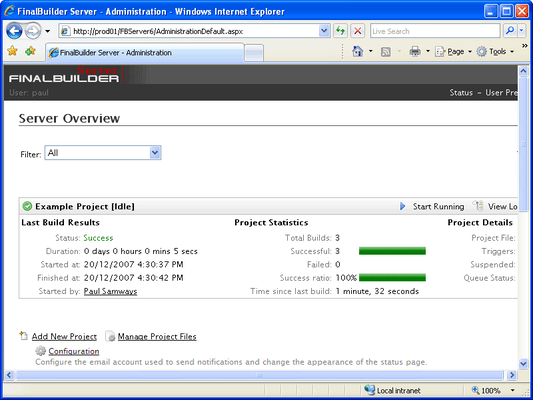
FinalBuilder Server - Application - V6.0 のスクリーンショットAutomated build and continuous integration server that centralizes build projects through a web interface. FinalBuilder Server simplifies the implementation of sophisticated build, test and release systems and centralizes build management to provide you with complete control over your build system.

¥13,860 (税込)

一般向け価格については下記に表示されています。お客様用の割引価格をご覧になるには、ログインしてください。

FinalBuilder Server V6.0 (Requires FinalBuilder Professional Edition License)

カートに追加 ¥ 13,860 (税込) 1 User License 要確認 ダウンロード (4.6 MB)
カートに追加 ¥ 62,475 (税込) 5 User License 要確認 ダウンロード (4.6 MB)
カートに追加 ¥ 118,125 (税込) 10 User License 要確認 ダウンロード (4.6 MB)
カートに追加 ¥ 277,830 (税込) 25 User License 要確認 ダウンロード (4.6 MB)
カートに追加 ¥ 486,255 (税込) 50 User License 要確認 ダウンロード (4.6 MB)
カートに追加 ¥ 833,490 (税込) 100 User License 要確認 ダウンロード (4.6 MB)

FinalBuilder Server V6.0 with Software Assurance (Requires FinalBuilder Professional Edition License)

カートに追加 ¥ 16,695 (税込) 1 User License with Software Assurance 要確認 ダウンロード (4.6 MB)
カートに追加 ¥ 74,970 (税込) 5 User License with Software Assurance 要確認 ダウンロード (4.6 MB)
カートに追加 ¥ 141,645 (税込) 10 User License with Software Assurance 要確認 ダウンロード (4.6 MB)
カートに追加 ¥ 333,375 (税込) 25 User License with Software Assurance 要確認 ダウンロード (4.6 MB)
カートに追加 ¥ 583,485 (税込) 50 User License with Software Assurance 要確認 ダウンロード (4.6 MB)
カートに追加 ¥ 1,000,230 (税込) 100 User License with Software Assurance 要確認 ダウンロード (4.6 MB)

すべてのご注文にて弊社標準の 契約条件および返品条件の内容が適用されます。 

一般向け価格については上記に表示されています。お客様用の割引価格をご覧になるには、ログインしてください。

With FinalBuilder Server, you'll always know the status of your build because important build information is made easily accessible. A central status page gives a quick overview of the health of all your latest builds. Digging deeper, you can access complete build logs, build history and metrics to get in-depth information about every aspect of your automated build processes.

Once a build project is configured in FinalBuilder Server, you can start or stop a build with a single click, or it can be run automatically with a time, process or continuous integration trigger. FinalBuilder Server also provides access to a project's build queue, variables and notifications to empower you with remote control over your build process.

Access to all of these great features is safely managed through an Active Directory (LDAP) integrated Team Management System. Role based permission management is the backbone of this system, allowing administrators to assign each user a set of permissions for interacting with build projects.

The benefits of using FinalBuilder Server include:

  • Easily accessible build information (even away from your build machine)
  • Centralized build control for effective build project management
  • Build project independence from particular developers or machines
  • Simplified implementation of continuous integration and continuous feedback
  • All the benefits of using the FinalBuilder IDE to automate your builds

The features of FinalBuilder Server include:

  • Continuous Integration triggers for a number of version control systems
  • Build Notifications for instant feedback via email and RSS
  • Comprehensive build logs and insightful build metrics
  • Active Directory (LDAP) integrated Team Management System with role based permissions management
  • Time and process triggers for daily builds, nightly builds and more automatically executed builds
  • Build Responsibility system to fix broken builds faster; all packaged in a Rich web interface


FinalBuilder Server is packed with powerful features to simplify the implementation of sophisticated build, test and release processes.

Rich Web Interface

  • Centralized build management
  • Anonymous access to build statistics and metrics
  • AJAXaccelerated web content
  • Integrated help comments to streamline learning curve
  • Supported by all major browsers (Internet Explorer, Firefox, Safari, Opera)

Logging

  • Dynamic hierarchical build log
  • Static hierarchical build logs
  • Live build log
  • Search in dynamic logs
  • Filter dynamic logs

Build notifications

  • RSS
  • Email
  • Customizable templates for build notifications

Build Metrics

  • Compiler
  • Help compiler
  • Unit Tests

Team Management System

  • User authentication
  • Active Directory LDAP integration

Build responsibility

  • Role based permissions management schemes
  • Comprehensive permissions for:
    • Interaction with Projects
    • Managing Projects & Project Files
    • Managing Variables
    • Managing Notifications
    • Managing Project Triggers & Conditions
    • Managing Users
    • Managing Roles
    • Managing Licenses

Continuous Integration triggers supporting:

  • CVS
  • Perforce
  • Subversion
  • Surround SCM
  • SourceGear Vault
  • Visual SourceSafe
  • Visual Studio Team System

Time triggers to schedule builds:

  • Daily
  • Weekly
  • Monthly
  • Once Off
  • At any specified interval

Run Process Trigger to run builds on specified

  • Process exit code
  • Process output
  • File changes

File Trigger to run builds when a file is:

  • Created
  • Changed
  • Deleted
  • Renamed

Trigger Conditions

  • If Project is Running
  • Project's Last Run Result
  • Time Since Last Run
  • Project Waiting to be Started
  • If Time Between

Build queue


商品検索

検索したい単語を入力して下さい:

クイック リンク

開発元/発売元

主要なカテゴリー

関連製品