by VSoft Technologies - 製品のタイプ: アプリケーション / Developer Application
FinalBuilder by VSoft Technologies
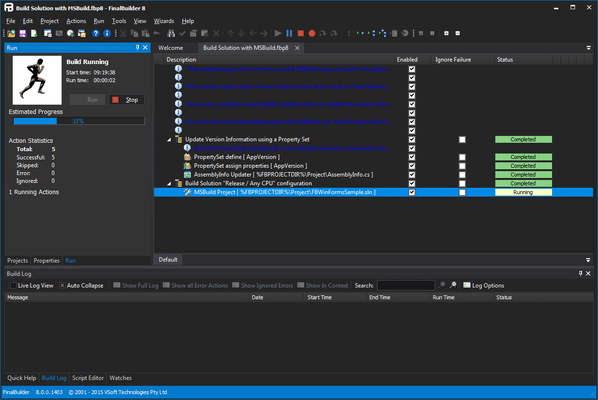
Point, click, build, deliver. FinalBuilder is an automated build and release management solution for Windows software developers and SCM (Software Change Management) professionals. Use FinalBuilder to define, debug, maintain, run and schedule reliable and repeatable build processes. Software projects are inherently complex, and creating a build process can be fraught with errors and oversights. FinalBuilder is an automated build and release management tool that makes it easy to define and maintain a reliable and repeatable build process.
Why use FinalBuilder - an automated build and release management solution for software developers and buildmasters?
Traditionally, developers have used DOS batch files or general purpose scripting tools to automate builds. Batch files and scripts are typically difficult to maintain, difficult for people to understand and suffer from a lack of proper error handling. It can often take a long time to evolve a batch file or script to the point where it is reliable enough for use, whereas automating the build process with an automated build tool such as FinalBuilder is quick and easy. Anyone can create, maintain, debug, and edit a build process with FinalBuilder.
FinalBuilder will help you to :
Save time and money - automated builds are typically much quicker than manual builds, sometimes cutting something that took a day down to minutes
Allow anyone in the team to run a build - FinalBuilder is so easy to use, so you won't need a "build guru" team member to run all your builds
Improve the quality of your releases - FinalBuilder cuts the human error factor substantially, automating boring and repetitive tasks
Have a record of what was built when - FinalBuilder logs the output from all the tools it calls, and the logs from previous builds are archived
Standard v Professional
For information about the differences between the Standard and Professional Editions please see the Feature Mtrix in the Evals & Downloads section.
FinalBuilder Features:
Easy-to-use graphical interface - FinalBuilder's user interface has been carefully crafted to make it as easy-to-use as possible. Anyone in your team can use FinalBuilder to automate tasks.
600+ built in Action Types - FinalBuilder includes a broad range of action types that cover almost any task you might need to automate. Here are just a few:
Compile applications from source code
Compile setup/installer programs
Work with Version Control Systems, to get, check out, check in & label files
Handle versioning with ease
Create & edit INI files & Windows registry keys
Burn CD's & DVD's, or create CD/DVD images (ISO images)
Zip & unzip files and other archive formats
Run automated testing
FTP files to/from servers
Send emails, post on news servers
Handle errors, run multiple tasks in parallel, and dynamically change the build flow
Iterate over sets of files and other lists
Compile help files
Creating custom plugins. See ActionStudio below for more information
Scheduled Builds- FinalBuilder provides tight integration with the windows scheduling service, which allows builds to be scheduled to run daily, weekly or whatever you wish.
Advanced Flow control actions - FinalBuilder includes Try/Catch/Finally actions which allow localised structured error handling, and flow control actions such as If Then, Else, Switch/Case, While Loop.
Integration with Version Control Systems/Source Code Repositories - Almost all automated build processes require some type of interaction with a Version Control System or Source Code Repository. FinalBuilder directly supports the following:
AccuRev [AccuRev Website]
Borland StarTeam [Borland StarTeam]
CVS [Concurrent Version System]
IBM/Rational ClearCase [ClearCase]
JediVCS [JEDI Version Control System]
QVCS [Quma Software]
MKS Source Integrity [MKS Website]
Perforce [Perforce Software]
PureCM [PureCM Website]
PVCS [Serena Website]
SubVersion [Tigris.org]
Surround SCM [Seapine website]
Sourcegear Vault [Sourcegear]
Team Coherence [QSC]
Team Foundation Source Control [VisualStudio Team System]
Visual SourceSafe (VSS 6 and VSS 2005) [Microsoft VSS 6, Microsoft VSS 2005]
If your version control system is not directly supported - please contact ComponentSource.
Email, Newsgroup, ICQ, FTP Support - Your build process can email the results of the build to you, so for example if the build fails, it can export the log, attach it to an email and send it to you. Or it can send you an ICQ message. You can announce successful builds on nntp news servers.
Built in Active Scripting Support - Each FinalBuilder action exposes a number of script events, where you have access to all the properties of the action using VBScript or JScript. In addition, the Run Script action allows you to perform specific tasks which might not be covered by the built in action types..
Detailed Logging -Output from all actions in the build process is directed to the build log. The log maintains the same tree structure as the action lists, which makes it easy to find your way in the log file. Logs can be exported in HTML, XML or text formats.
Variables -Using variables is the key to making your build process dynamic. Use variables to pass information from one action to another, and also to enable actions to use user specific or machine specific values.
FinalBuilder Plugin Architecture - ActionStudio
FinalBuilder ActionStudio is an IDE for defining and developing plugins for FinalBuilder. ActionStudio is included in both Professional and Standard editions of FinalBuilder and provides an easy way for users to develop custom actions to increase the functionality of their FinalBuilder projects.
ActionStudio creates an action package, which contains one or more custom FinalBuilder Actions. The action package file defines the action properties, events, options, and property pages in an XML file format. Actions written in Active Script are completely contained within the action package, whereas COM and .Net based actions refer to external dlls and assemblies for the implementation of the action.
Plugins can be developed in any of the following languages:
Active Script (VBScript, JScript)
COM
.Net languages
What are FinalBuilder Plugins?
FinalBuilder uses plugins for the implementation and definition of its actions. They can be either compiled source code or custom plugins. The compiled plugins, which are shipped with FinalBuilder, can be viewed from the Tools->Package Manager dialog, whereas custom plugins are loaded automatically from the ActionDefs directory.
Unlike compiled packages, custom plugins are defined by an XML file. ActionStudio can load and save these action package XML files, or you can edit them manually (if you really want to!). These plugin definition files (with file extension .FBAP) are stored in the directory FinalBuilder\ActionDefs. FinalBuilder automatically loads any .FBAP files in the ActionDefs folder when it starts up. Depending on the type of plugin you are creating, you may require extra files alongside the action package file; for example, for a .Net based plugin the assembly must be stored in the Assemblies directory inside the ActionDefs directory so that FinalBuilder can find the referenced assembly.
FinalBuilder Professional edition includes a license for ActionStudio Professional. ActionStudio Professional has the extra capability to import and export protected action packages. A protected action package is encrypted with a password so that others cannot view the action package source. Both FinalBuilder Standard and FinalBuilder Professional automatically load up protected action packages and allow use of the included actions.
What's New in FinalBuilder V6?
FinalBuilder V6 Core Improvements
Windows PowerShell:PowerShellis now supported alongside VBScript and JavaScript as a FinalBuilder scripting language. This means that any action can be extended with PowerShell script events, and it is also possible to create PowerShell based custom actions with ActionStudio
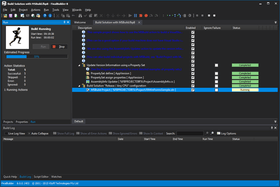
Action Logging: Action log output is now tagged and color-coded according to Errors, Warnings, Success and Information. It is possible to filter the log display in the IDE according to these output tags (for example, to show only Error & Warning output.)
Hierarchical Logging: Actions now produce hierarchical log output, so related messages are grouped together in the log tree
Performance: FinalBuilder is now faster to start up, and runtime performance has dramatically improved. Live logging performance has also increased markedly over previous versions
Improved Output Quality: All frequently used actions have been visited and revamped, with a view to improving the quality and usefulness of log output
Automatic Descriptions: Automatic descriptions for all commonly used actions have been revisited and improved. This make it easy to create a self-documenting build process
Action Output Monitors: The new Action Output Monitor feature allows you to watch for particular patterns of log output from an action. The action's behaviour can be modified depending on the output, or specific messages can be captured or suppressed from the action log
MSBuild Task: The FinalBuilder MSBuild task now outputs fully formatted MSBuild output, for use with MSBuild Loggers.
Extra Team Foundation Support: Team Foundation support has been improved markedly for this release of FinalBuilder. FinalBuilder projects running inside Team Build now automatically export any MSTest results to the Team Foundation Data Warehouse. Statistics from other testing frameworks (NUnit, MbUnit, etc.) are also submitted to the Data Warehouse, and can be included in Team Foundation Reports such as the Build Quality report
Visual Studio Team Explorer Integration: FinalBuilder now comes with an addin for Visual Studio 2008 Team Explorer. New Team Build definitions can be added which automatically use FinalBuilder as the build engine. There is also a new graphical Build Definition editor, integrated with Team Explorer. It is no longer necessary to edit the XML build definition file in order to add, edit and remove FinalBuilder projects
Error Dialog Monitor: This new feature allows you to monitor a third party application for error dialogs popped up while running an action. Dialogs can be automatically dismissed, as appropriate. This is useful when working with poorly-written third party tools that display dialogs when running in an automated mode
New user info file: The various user-specific .fbd,.fbw,.fbp files used in previous versions have been converted into one common .fbpinf file, with all user-specific data for the project. This file also contains information on the current layout of the project tree, which makes the project file more version-control friendly
PartNumbers: PC-518217-150341 518217-150341 PC-518217-150342 518217-150342 PC-518217-150343 518217-150343 PC-518217-150344 518217-150344 PC-518217-150345 518217-150345 PC-518217-150346 518217-150346 PC-518217-150347 518217-150347 PC-518217-150348 518217-150348 PC-518217-150349 518217-150349 PC-518217-150350 518217-150350 PC-518217-150351 518217-150351 PC-518217-150352 518217-150352 PC-518217-150353 518217-150353 PC-518217-150356 518217-150356 PC-518217-150357 518217-150357 PC-518217-150362 518217-150362 PC-518217-150354 518217-150354 PC-518217-150358 518217-150358 PC-518217-150359 518217-150359 PC-518217-150363 518217-150363 PC-518217-161497 518217-161497 PC-518217-150355 518217-150355 PC-518217-150360 518217-150360 PC-518217-150361 518217-150361 PC-518217-150364 518217-150364
PurchaseOptions: FinalBuilder V6.0 Standard Edition 1 Named User License , FinalBuilder V6.0 Standard Edition 1 Concurrent User License , FinalBuilder V6.0 Standard Edition 1 Site Wide License (Allows Unlimited Developers at a Single Physical Address) , FinalBuilder V6.0 Standard Edition with 1 Year Software Assurance 1 Named User License with 1 Year Software Assurance , FinalBuilder V6.0 Standard Edition with 1 Year Software Assurance 1 Concurrent User License with 1 Year Software Assurance , FinalBuilder V6.0 Standard Edition with 1 Year Software Assurance 1 Site Wide License with 1 Year Software Assurance (Allows Unlimited Developers at a Single Physical Address) , FinalBuilder V6.0 Professional Edition 1 Named User License , FinalBuilder V6.0 Professional Edition 1 Concurrent User License , FinalBuilder V6.0 Professional Edition 1 Site Wide License (Allows Unlimited Developers at a Single Physical Address) , FinalBuilder V6.0 Professional Edition with 1 Year Software Assurance 1 Named User License with 1 Year Software Assurance , FinalBuilder V6.0 Professional Edition with 1 Year Software Assurance 1 Concurrent License with 1 Year Software Assurance , FinalBuilder V6.0 Professional Edition with 1 Year Software Assurance 1 Site Wide License with 1 Year Software Assurance (Allows Unlimited Developers at a Single Physical Address) , FinalBuilder V6.0 Standard Edition Upgrades Standard Edition 1 Named User License Upgrade from FB1, FB2 Developer or FB3, FB4 Standard Named User , FinalBuilder V6.0 Standard Edition Upgrades Standard Edition 1 Concurrent User License Upgrade from FB1, FB2 Developer or FB3, FB4 Standard Named User , FinalBuilder V6.0 Standard Edition Upgrades Standard Edition 1 Site Wide License Upgrade from FB1, FB2 Developer or FB3, FB4 Standard Site Wide License , FinalBuilder V6.0 Standard Edition Upgrades Standard Edition 1 Concurrent License Upgrade from FB4 Standard Concurrent License , FinalBuilder V6.0 Professional Edition Upgrades from Standard Edition Professional Edition 1 Named User License Upgrade from FB1, FB2 Developer or FB3, FB4 Standard Named User , FinalBuilder V6.0 Professional Edition Upgrades from Standard Edition Professional Edition 1 Concurrent User License Upgrade from FB1, FB2 Developer or FB3, FB4 Standard Named User , FinalBuilder V6.0 Professional Edition Upgrades from Standard Edition Professional Edition 1 Site Wide License Upgrade from FB1, FB2 Developer or FB3, FB4 Standard Side Wide License , FinalBuilder V6.0 Professional Edition Upgrades from Standard Edition Professional Edition 1 Concurrent License Upgrade from FB4 Standard Concurrent License , FinalBuilder V6.0 Professional Edition with 1 Year Software Assurance Upgrades from Standard Edition Professional Edition 1 Named User License with 1 Year Software Assurance Upgrade from FB1, FB2 Developer or FB3, FB4 Standard Named User , FinalBuilder V6.0 Professional Edition Upgrades from Professional Edition Professional Edition 1 Named User License Upgrade from FB2 Enterprise or FB3, FB4 Professional Named User , FinalBuilder V6.0 Professional Edition Upgrades from Professional Edition Professional Edition 1 Concurrent User License Upgrade from FB2 Enterprise or FB3, FB4 Professional Named User , FinalBuilder V6.0 Professional Edition Upgrades from Professional Edition Professional Edition 1 Site Wide License Upgrade from FB2 Enterprise or FB3, FB4 Professional Site Wide License , FinalBuilder V6.0 Professional Edition Upgrades from Professional Edition Professional Edition 1 Concurrent License Upgrade from FB4 Professional Concurrent License
Resources: Read the FinalBuilder help file, Browse the FinalBuilder Feature Matrix, Read the FinalBuilder End User License Agreement, Download the FinalBuilder V6.0 evaluation on to your computer - Expires after 30 days
Operating System for Deployment: Windows Server 2008, Windows Vista, Windows XP, Windows Server 2003, Windows 2000
Architecture of Product: 32Bit, 64Bit
Product Type: Application
Application Type: Developer Application
Keywords: Installation Installing install installs uninstalling uninstall uninstalls setup MSI msi scripts Professional Partner FinalBuilder, VSoft FinalBuilder, Final Builder