by FMS - 製品のタイプ: アドイン
この商品については、日本語の説明書きはございません。
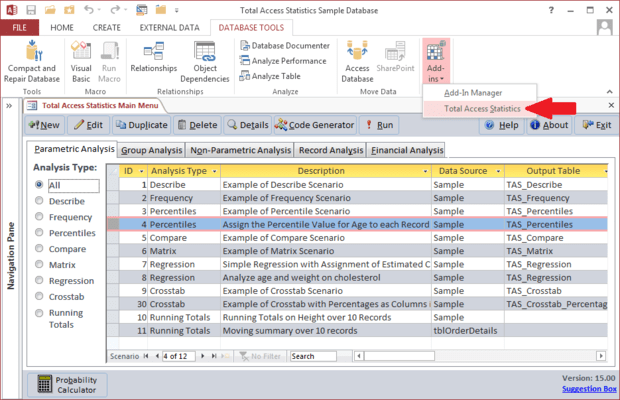
Easily perform a wide variety of calculations on your Access programs. Designed specifically for Access, Total Access Statistics runs as an Access add-in (from the Tools menu), and offers a wide range of statistical functions to analyze your data. Your data can be in Access tables or linked from other sources such as SQL Server. Analyze multiple fields and an unlimited number of records at one time. You can even analyze data from multi-table select queries.
一般向け価格については下記に表示されています。お客様用の割引価格をご覧になるには、ログインしてください。
| カートに追加 | ¥ 83,160 (税込) | 1 Developer License | ダウンロード (12.1 MB) |
| カートに追加 | ¥ 83,160 (税込) | 1 Developer License メーカーパーツ番号: TAST11 |
ダウンロード (11.0 MB) |
| カートに追加 | ¥ 83,160 (税込) | 1 Developer License メーカーパーツ番号: TAST105 |
ダウンロード (10.3 MB) |
| カートに追加 | ¥ 83,160 (税込) | 1 Developer License メーカーパーツ番号: TAST95 |
ダウンロード (10.4 MB) |
すべてのご注文にて弊社標準の 契約条件および返品条件の内容が適用されます。
一般向け価格については上記に表示されています。お客様用の割引価格をご覧になるには、ログインしてください。
What’s new in Total Access Statistics?
Access Data Projects (ADP) Support - Data in Access Data Projects (ADP) can now be analyzed. Perform statistical analysis on your SQL Server data with results stored in SQL Server tables. Data sources can be views, stored procedures, and user defined functions. Previously, Total Access Statistics only supported Access MDB/Jet databases which could be linked to SQL Server.
Use Parameterized Data Sources - All the statistical analyses now support parameterized queries as the data source. For ADPs, data sources may be stored procedures and user defined functions with parameters.
Data Analysis Enhancements - New Running Totals Calculations - Calculate running averages, sums, counts, etc. for a sorted list of values and placing the values in a field in your table. The running value can be for all records or a moving set of records such as the running average over the last 10 records. The values are stored directly in your data source in the fields you specify. Up to five fields can be updated at one time.
Enhanced Regression Analysis - For Regressions, the estimated Y value can now be added directly into a field in your data source. This is available where there’s only one regression equation calculated at a time such as a multiple regression or a simple or polynomial regression with only one independent (X) field.
Enhanced Percentile Analysis - For Percentiles, a new option is available to assign percentile values to records. If there are multiple percentile values for the same record’s value, you can choose to assign the low or high percentile to that record. Previously, it always assigned the low value.
Programmatic Interface Enhancements - A new option is available in the Statistics Function to let you specify the table containing parameters for parameterized data sources.
Easily perform a wide variety of calculations including regressions, percentiles, frequency distributions, correlations, t-tests, confidence intervals, crosstabs, ANOVA, group analysis, non-parametrics, Chi-Square, probability, and much more. An interactive Wizard interface guides you through the process with no programming required! All results are generated in the most flexible format: Access tables. Easily display the results in your forms and reports. Your analysis settings are automatically saved so you can modify them later or run them again when your data changes.
General Features