Total .NET SourceBook - for Visual Studio 2002/2003

by FMS - 製品のタイプ: アドイン

この商品については、日本語の説明書きはございません。
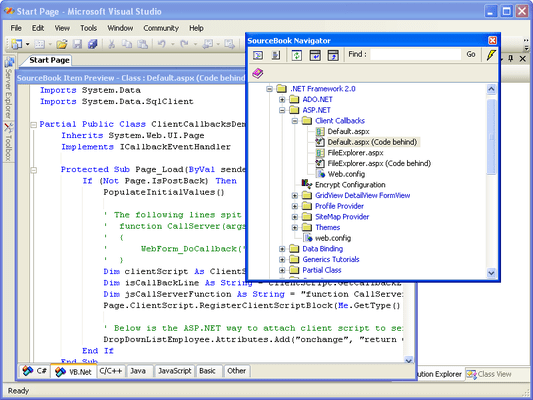
Total .NET SourceBook - for Visual Studio 2002/2003 のスクリーンショットSource code library and code repository for Visual Studio .NET. Total .NET SourceBook is a code library for .NET developers, teams, and enterprises. It provides a collection of ready-to-use code snippets, classes, how-to's and articles. It also allows you to manage your own code and share knowledge within a team by using the fully searchable code repository. Total .NET SourceBook provides both a full-featured standalone Code Explorer, and an integrated Visual Studio Add-In.

¥55,440 (税込)

一般向け価格については下記に表示されています。お客様用の割引価格をご覧になるには、ログインしてください。

Total .NET SourceBook - for Visual Studio 2002/2003

カートに追加 ¥ 55,440 (税込) 1 Developer License
メーカーパーツ番号: TASB2
ダウンロード (20.8 MB)
カートに追加 ¥ 69,300 (税込) 1 Developer License - with Subscription to Code Webservice ダウンロード (20.8 MB)
カートに追加 ¥ 180,495 (税込) 5 Developer License
メーカーパーツ番号: TASB8-5
ダウンロード (20.8 MB)
カートに追加 ¥ 541,590 (税込) 25 Developer License
メーカーパーツ番号: TASB8-25
ダウンロード (20.8 MB)
カートに追加 ¥ 41,580 (税込) 1 Developer License - Upgrade from Total Visual SourceBook
メーカーパーツ番号: TASB8-U
要確認 ダウンロード (20.8 MB)
カートに追加 ¥ 124,845 (税込) 5 Developer License - Upgrade from Total Visual SourceBook
メーカーパーツ番号: TASB8-U5
要確認 ダウンロード (20.8 MB)

Total .NET SourceBook - for Visual Studio 2002/2003 - Annual Subscription to Code Webservice

カートに追加 ¥ 27,615 (税込) 1 Developer Annual Subscription License ダウンロード (29 KB)
カートに追加 ¥ 83,160 (税込) 5 Developer Annual Subscription License ダウンロード (29 KB)
カートに追加 ¥ 249,900 (税込) 25 Developer Annual Subscription License ダウンロード (29 KB)

すべてのご注文にて弊社標準の 契約条件および返品条件の内容が適用されます。 

一般向け価格については上記に表示されています。お客様用の割引価格をご覧になるには、ログインしてください。

Huge Library of Code and Information

Total .NET SourceBook includes hundreds of classes, code snippets, how-to's and articles for just about every area of .NET development. C# and Visual Basic .NET versions of each item are provides along with helpful notes.

Get New Code Automatically with the Code WebService

Every time you start Total .NET SourceBook, the program automatically connects to our unique Code WebService. New code, articles, and tips are automatically downloaded to your database. Our developers are constantly adding new content to help you with .NET. See The SourceBook Code Webservice for more information.

Manage Your Knowledge

Total .NET SourceBook provides one convenient place to manage code, knowledge and techniques for .NET. As you write new routines, or find good tips on the Internet or newsgroups, simply add them to your SourceBook database. Finding code is now as easy as pressing a button. A full-featured color-coding editor is included with support for C#, C++, VB.NET, VB6/VBA, Java, JavaScript, XML, and HTML.

Share Your Entire Team's Knowledge

Because Total .NET SourceBook is completely multi-user, every member of your .NET development team can share in each other's knowledge and experience. As each individual adds code or content, it instantly becomes available to the entire team.

Standalone Code Explorer, or Visual Studio .NET Add-In

Total .NET SourceBook is the only code library for .NET that provides both a full-featured standalone Code Explorer, and an integrated Visual Studio .NET Add-in.

Simply drag code out of our Visual Studio .NET tool window and put it directly in your project. Or grab any code out of your solution and drag it into Total .NET SourceBook--its as easy as that.

The SourceBook Code Webservice

Every time you start Total .NET SourceBook, the program automatically connects to our unique Code WebService. New code, articles, and tips are automatically downloaded to your database. Our developers are constantly adding new content to help you with .NET.

How it Works

When you start Total .NET SourceBook, the program launches a background thread for its webservice client. It connects to a server at FMS and requests a list of new content as of the date you last downloaded. Once the new list is received and parsed, it is shown in the Total .NET SourceBook browser window. Press the [Download all new content] button and you're ready to go. New content is downloaded and added to your database automatically.


商品検索

検索したい単語を入力して下さい:

Award