by FMS - 製品のタイプ: アプリケーション
Total Visual Agent - Application - 2003 by FMS
Execute automated, scheduled tasks on multiple databases across a network. Total Visual Agent is a Windows application that automates these chores on an hourly, daily, weekly, or monthly basis. You simply schedule the tasks and launch it. If a problem occurs, the system administrator is notified immediately by email. When using Access MDB databases, you must periodically compact, repair, back up, and monitor them to ensure optimal performance, recover unused disk space, and prevent data corruption.
This version of Total Visual Agent contains several enhancements over the previous version:
Enhanced Hourly schedule options that allow you to schedule Events to run multiple times within an hour
New option within Hourly Events that allows you to turn off processing based on the day of the week
Enhanced Directory option that allows you to manage all files in directories and sub-directories with one Event Item
New option to continue processing Events in a Task Group or a Directory after an Action fails
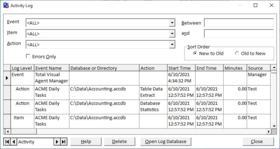
New option in the History Log that allows you to sort the results in ascending or descending order
Support for the Microsoft Access 2002 Jet database format, including object counts for Data Access Pages
Total Visual Agent performs these critical tasks for you: Compact/Repair the databaseRecover unused disk-space, optimize the database, and update query statistics, which can improve query performance. The database is repaired if Jet determines it is necessary. Copy and zip databases or create rolling "archive" versions. Multiple backups ensure you can easily fall back to a previously saved copy of your database. Perform "live" data extracts. Databases cannot be copied while users are in it. Data extracts backs up data when you would otherwise not be able to make a copy. Ideal for 24 hour a day operations.
Run macros and other command line actions on a database. Provides the flexibility to schedule any action you can launch from an Access macro such as downloading or uploading data, printing nightly reports, running reconciliation analysis, etc. Track statistics on the number of objects in your database. Keep tabs on the growth of your important databases. Track statistics on the number of records in your tables. Track trends in data acquisition. Can be used to monitor usage by hour of day.
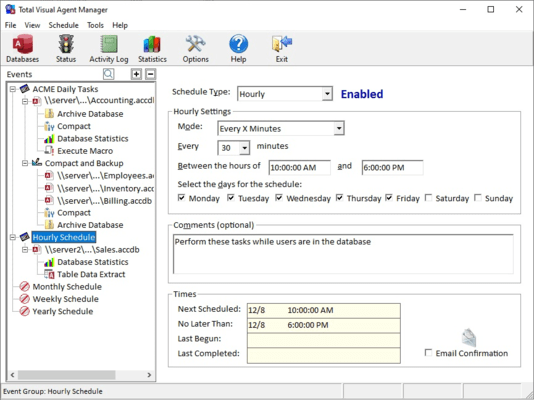
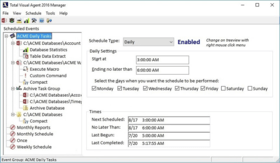
The first step is to create the schedule for the activities you wish to perform on your databases by launching the Total Visual Agent Manager. Total Visual Agent ships with four sample schedules to get you started. You can use these schedules, or create your own. To begin working with Total Visual Agent , select the schedule you wish to modify in the treeview control, or create a new schedule. Specify the schedule type (Daily, Weekly, etc.), and the parameters for that schedule type. In the example above, a schedule named "Nightly Chores" is set to run on every weekday starting at 1 AM, but ending no later than 6 AM. For each schedule created, you can add one or more databases, ADPs, Task Groups, or Directories. More information on these options is available in the online help file and manual. For each database, you can assign one or more Actions to perform. Each individual Action has parameters to control how it works. For example, you might specify the location for archived databases, or specify the particular tables to work with for the Table Data Extract action.
Once you create the schedule and specify the databases and actions to perform, the actual work is performed by the Total Visual Agent Monitor program: You may leave the Monitor window open, minimize it to the Task Bar, or hide the window entirely and control it from a Tray icon. The monitor must be running at all times in order to perform the actions at the specified time. Normally the Monitor will be installed on a network file server with access to the locations containing the databases you are working with, but this is not a requirement. Total Visual Agent runs on any Windows 95/98, Windows NT workstation, or Windows NT server machine that has access to the databases. Over time, as statistics are collected, or to check on the history of performed actions, you can use the Manager to view various informative on-line inquiries and keep tabs on the activity in your databases.
PartNumbers: PC-510321-56962 510321-56962 PC-510321-56964 510321-56964 PC-510321-56963 510321-56963 PC-510321-56961 510321-56961 PC-510321-56965 510321-56965
Publisher PartNumbers: VSAG11 VSAG11-25 VSAG11-5 VSAG11-U VSAG11-U5
PurchaseOptions: Total Visual Agent 2003 1 User License , Total Visual Agent 2003 1 User License Upgrade from previous version , Total Visual Agent 2003 5 User License , Total Visual Agent 2003 5 User Upgrade License from previous version , Total Visual Agent 2003 25 User License
Resources: Read the Total Visual Agent help file, Download the Total Visual Agent evaluation on to your computer - Displays Nag Screens
Operating System for Deployment: Windows 98, Windows NT 4.0, Windows 95
Architecture of Product: 32Bit
Product Type: Application
Built Using: Visual Basic V6.0
General: Includes Digital Signature
Compatible Containers: Microsoft Visual Studio 6.0, Microsoft Visual Studio 97, Microsoft Visual Basic 6.0, Microsoft Visual Basic 5.0, Microsoft Visual Basic 4.0, Microsoft Office 2003, Microsoft Office XP, Microsoft Office 2000, Microsoft Office 97, Microsoft Access 2003, Microsoft Access 2002, Microsoft Access 2000, Microsoft Access 97, Microsoft Access 95
Product Class: Component Development Tools
Search Items: New Product Mar 05
Keywords: FMS Database DB Management Author TOTAL VISUAL AGENT 2000 DATABASE MANAGEMENT DB ADMINISTRATION UTILITY DEVELOPMENT MONITOR SCHEDULE STATISTICS REPAIR COMPACT FIX RECOVER