by MindFusion Group - 製品のタイプ: コンポーネント / .NET WinForms / .NET Class / 100% Managed Code
ご案内:特に説明のない限り、この商品は英語版商品になります。
ダイアグラムとグラフのための機能を用いて、アプリケーションを強化。MindFusion FlowChart.NET Professional は、ワーク・フローとプロセス・ダイアグラムおよび、データベース・エンティティー関係ダイアグラム、組織的なチャート、オブジェクト階層と関係チャート、グラフとツリーの作成と表示を行うことで。開発者を支援していきます。 基本的なオブジェクト・タイプである、BOX/TABLE/ARROWについて、グループ化や、他へのアタッチ、複雑な構造への結合が可能です。MindFusion FlowChart.NET Professional は、カスタムなデザインやペイントが行われたBOXだけではなく、50 種類以上の定義済みの BOX も提供します。 FlowChart.NET Professional のソースコードも入手可能です。

一般向け価格については下記に表示されています。お客様用の割引価格をご覧になるには、ログインしてください。
| カートに追加 | ¥ 83,370 (税込) | 1 開発サブスクリプション ライセンス - 12ヶ月間のサブスクリプション付き | ダウンロード (17.9 MB) | |
| カートに追加 | ¥ 152,775 (税込) | 4 開発チーム サブスクリプション ライセンス - 12ヶ月間のサブスクリプション付き | ダウンロード (17.9 MB) | |
| カートに追加 | ¥ 263,970 (税込) | 8 開発チーム サブスクリプション ライセンス - 12ヶ月間のサブスクリプション付き | ダウンロード (17.9 MB) | |
| カートに追加 | ¥ 486,255 (税込) | 1 サイト ワイド サブスクリプション ライセンス - 指定された場所に付き、無制限の開発ライセンス - 12ヶ月間のサブスクリプション付き | ダウンロード (17.9 MB) | |
| カートに追加 | ¥ 882,210 (税込) | 1 エンタプライズ サブスクリプション ライセンス - 指定された企業のすべての場所に付き、無制限の開発ライセンス - 12ヶ月間のサブスクリプション付き | ダウンロード (17.9 MB) |
| カートに追加 | ¥ 159,810 (税込) | 1 開発サブスクリプション ライセンス - ソースコート、12ヶ月間のサブスクリプション付き | ダウンロード (19.2 MB) | |
| カートに追加 | ¥ 229,215 (税込) | 4 開発チーム サブスクリプション ライセンス - ソースコート、12ヶ月間のサブスクリプション付き | ダウンロード (19.2 MB) | |
| カートに追加 | ¥ 340,410 (税込) | 8 開発チーム サブスクリプション ライセンス - ソースコート、12ヶ月間のサブスクリプション付き | ダウンロード (19.2 MB) | |
| カートに追加 | ¥ 562,695 (税込) | 1 サイト ワイド サブスクリプション ライセンス - 指定された場所に付き、無制限の開発ライセンス - ソースコート、12ヶ月間のサブスクリプション付き | ダウンロード (19.2 MB) | |
| カートに追加 | ¥ 958,650 (税込) | 1 エンタプライズ サブスクリプション ライセンス - 指定された企業のすべての場所に付き、無制限の開発ライセンス - ソースコート、12ヶ月間のサブスクリプション付き | ダウンロード (19.2 MB) |
| カートに追加 | ¥ 55,545 (税込) | 1 アップグレード/サブスクリプション リニューアル(すべてのライセンスタイプに対する6ヶ月のサブスクリプション) | 要確認 | ダウンロード (29 KB) |
すべてのご注文にて弊社標準の 契約条件および返品条件の内容が適用されます。
一般向け価格については上記に表示されています。お客様用の割引価格をご覧になるには、ログインしてください。
What's New in MindFusion FlowChart.NET Professional V5?
Document/View architecture
FlowChart.NET implements the Model-View-Controller (MVC) architectural pattern in its new version 5. The MVC design pattern as applied to FlowChart.NET separates the diagram data (model) from its representation to the user (view) and controlling it by the user (controller). According to the MVC design pattern, FlowChart.NET Version 5 provides two new classes instead of the FlowChart class, namely Diagram and DiagramView.
Support for custom diagram item types
The FlowChart.NET API has been redesigned to allow for seamless integration of custom node and link types. You can define a custom item type by deriving from DiagramLink or DiagramNode. You could also derive from more specific node types such as ShapeNode or ContainerNode. New items can be added to a diagram by instantiating them and adding them to the Nodes or Links collections. To improve support for custom types, many type-specific methods have been replaced with more generic versions, e.g. FindNode instead of FindBox and FindTable.
Containers
The ContainerNode class implements diagram nodes that can function as containers for other nodes. Containers can be folded to hide their content, and unfolded to show it again. Containers can be nested one within another, without limitation on the depth of nesting.
Orthogonal graph layout
OrthogonalLayout is a secondary layout algorithm that can be used to arrange links after an initial node arrangement has already been applied. The orthogonal layout is useful when there are much more links than nodes in a graph. The algorithm strives to achieve the following criteria, while preserving as much of the initial node configuration as possible: links must not overlap; only vertical and horizontal routing lines are used; graph routing is performed with respect to the specified main layout direction; links crossings are minimized; bends are minimized.
Graphics interface
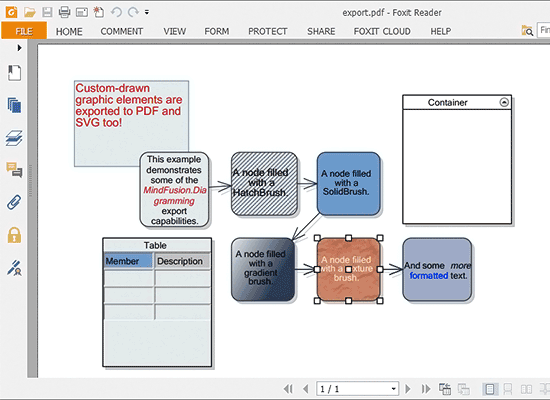
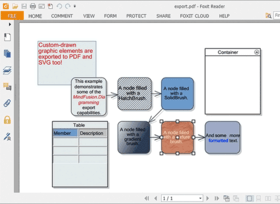
Now all drawing is done through an IGraphics interface, for which the control provides GdiGrahics, SvgGraphics and PdfGraphics implementations. Thus the files created by SvgExporter and PdfExporter can contain custom-drawn elements, which you draw either by handling custom drawing events or by implementing the Draw method in your custom item types.
API changes
Conformity with the .NET Framework naming conventions has been improved.
MindFusion FlowChart.NET Professional V4.3.1 での新機能は?
MindFusion FlowChart.NET Professional V4.3 での新機能は?
MindFusion FlowChart.NET Professional V4.2 での新機能は?
MindFusion FlowChart.NET Professional V4.1 での新機能は?
MindFusion FlowChart.NET Professional V4.0.4での新機能は?
MindFusion FlowChart.NET Professional V4.0.3? での新機能は
Standard Edition と Professional Edition の主な違いは、以下のとおりです:
主な特徴
FlowChart.NET は、最も複雑なスキーマでさえ、作成が可能な方式で設計されています。 それを実現するためには、各種の FlowChart.NET オブジェクトを結合し、また、そのプロパティを設定します。 それらのコントロールが提供するイベントを用いて、フローチャート・オブジェクトによるユーザー・インタラクションへの応答が可能になります。
FlowChart.NET の最も重要な特徴について、それらをグループごとに振り分け、以下に示します:
FlowChart.NET コンポーネント
ユーザー・インタラクション
プログラミング
ダイアグラムの保存と読み出し
出力
ダイアグラム要素
自動的なレイアウト
表示
振る舞い
アローを介したリンク
階層的なグルーピング
補助的なコントロール (FlowChart.NET Pro のみ)