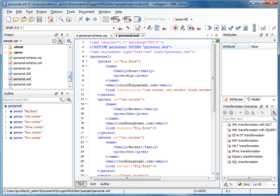
oXygen XML Editor Academic

by SyncRO Soft - 製品のタイプ: アドイン / アプリケーション

ご案内:特に説明のない限り、この商品は英語版商品になります。
Cross platform XML editor. <oXygen/> XML Editor provides the tools for XML authoring, XML conversion, XML Schema, DTD, Relax NG and Schematron development, XPath, XSLT, XQuery debugging, SOAP and WSDL testing. Integration with the XML document repositories is made through WebDAV, Subversion and S/FTP protocols. <oXygen/> has also support to browse, manage and query native XML and relational databases. <oXygen/> XML editor is also available as an Eclipse IDE plugin, bringing unique XML development features to this widely used Java IDE.

¥8,925 (税込)

一般向け価格については下記に表示されています。お客様用の割引価格をご覧になるには、ログインしてください。

oXygen XML Editor V11.2 Academic & 1 year Maintenance Pack Named Users

カートに追加 ¥ 8,925 (税込) 1 Academic Named User License & 1 year Maintenance Pack 要確認 ダウンロード (470.5 MB)
カートに追加 ¥ 8,505 (税込) 5-9 Academic Named User License & 1 year Maintenance Pack - price per license 要確認 ダウンロード (470.5 MB)
カートに追加 ¥ 8,085 (税込) 10-19 Academic Named User License & 1 year Maintenance Pack - price per license 要確認 ダウンロード (470.5 MB)
カートに追加 ¥ 7,455 (税込) 20-49 Academic Named User License & 1 year Maintenance Pack - price per license 要確認 ダウンロード (470.5 MB)
カートに追加 ¥ 68,040 (税込) 1 Academic Classroom License (upto 25 seats) & 1 year Maintenance Pack 要確認 ダウンロード (470.5 MB)
カートに追加 ¥ 291,795 (税込) 1 Academic Departmental License (for non-commercial departmental teaching and research programs) & 1 year Maintenance Pack 要確認 ダウンロード (470.5 MB)
カートに追加 ¥ 533,505 (税込) 1 Academic Site License (for academic use and can be distributed to all employees) & 1 year Maintenance Pack 要確認 ダウンロード (470.5 MB)

oXygen XML Editor V11.2 Academic & 1 year Maintenance Pack Floating Users

カートに追加 ¥ 26,670 (税込) 1 Academic Floating User License & 1 year Maintenance Pack 要確認 ダウンロード (470.5 MB)
カートに追加 ¥ 25,305 (税込) 5-9 Academic Floating User License & 1 year Maintenance Pack - price per license 要確認 ダウンロード (470.5 MB)
カートに追加 ¥ 24,045 (税込) 10-19 Academic Floating User License & 1 year Maintenance Pack - price per license 要確認 ダウンロード (470.5 MB)
カートに追加 ¥ 22,680 (税込) 20-49 Academic Floating User License & 1 year Maintenance Pack - price per license 要確認 ダウンロード (470.5 MB)

oXygen XML Editor V11.2 Academic Maintenance Pack Renewal Named Users

カートに追加 ¥ 3,045 (税込) 1 Academic Named User License Maintenance Pack Renewal 要確認 ダウンロード (470.5 MB)
カートに追加 ¥ 2,940 (税込) 5-9 Academic Named User License Maintenance Pack Renewal - price per license 要確認 ダウンロード (470.5 MB)
カートに追加 ¥ 2,730 (税込) 10-19 Academic Named User License Maintenance Pack Renewal - price per license 要確認 ダウンロード (470.5 MB)
カートに追加 ¥ 2,625 (税込) 20-49 Academic Named User License Maintenance Pack Renewal - price per license 要確認 ダウンロード (470.5 MB)
カートに追加 ¥ 23,625 (税込) 1 Academic Classroom License (upto 25 seats) Maintenance Pack Renewal 要確認 ダウンロード (470.5 MB)
カートに追加 ¥ 100,065 (税込) 1 Academic Departmental License (for non-commercial departmental teaching and research programs) Maintenance Pack Renewal 要確認 ダウンロード (470.5 MB)
カートに追加 ¥ 244,545 (税込) 1 Academic Site License (for academic use and can be distributed to all employees 要確認 ダウンロード (470.5 MB)

oXygen XML Editor V11.2 Academic Maintenance Pack Renewal Floating Users

カートに追加 ¥ 9,135 (税込) 1 Academic Floating User License Maintenance Pack Renewal 要確認 ダウンロード (470.5 MB)
カートに追加 ¥ 8,715 (税込) 5-9 Academic Floating User License Maintenance Pack Renewal - price per license 要確認 ダウンロード (470.5 MB)
カートに追加 ¥ 8,190 (税込) 10-19 Academic Floating User License Maintenance Pack Renewal - price per license 要確認 ダウンロード (470.5 MB)
カートに追加 ¥ 7,770 (税込) 20-49 Academic Floating User License Maintenance Pack Renewal - price per license 要確認 ダウンロード (470.5 MB)

すべてのご注文にて弊社標準の 契約条件および返品条件の内容が適用されます。 

一般向け価格については上記に表示されています。お客様用の割引価格をご覧になるには、ログインしてください。

What's new in <oXygen/> XML Editor Enterprise V11.2?
Version 11.2 of <oXygen/> XML Editor improves the XML Author, the XML development tools, the support for large documents and the SVN Client.

What's new in <oXygen/> XML Editor V11.1?
Version 11.1 of <oXygen/> XML Editor improves the XML authoring capabilities, the support for XML development and also a number of core features. The visual XML authoring now uses schema information to provide intelligent editing actions that help keep the document valid and provide a better editing experience. The new compact representation of tags and the quick up/down navigation features improve the ergonomics and the usability. <oXygen/> XML Editor can use any XQJ compliant XQuery processor for XQuery transformations, different error levels and external references can be specified for Schematron messages and the XProc support was improved with better editing and execution. The XML format and indent operation can use DTD/schema information to provide better formatting and the find and replace is now XML-aware and can accept XPath filtering to delimit the search scope.

What's new in <oXygen/> XML Editor V11?
Version 11.0 of <oXygen/> XML Editor comes with exciting new features covering both XML development and XML authoring like: XProc support, integrated documentation for XSLT stylesheets, a new XQuery debugger (for the Oracle Berkeley DB XML database), MathML rendering and editing support, a smarter Author mode for an improved visual editing experience and DITA 1.2 features.

The support for very large documents was improved to handle documents in the 200MB range in the editor and 10GB in the large files viewer, the SVN support was upgraded with new features and a number of processors and frameworks were updated to their latest versions.

What's new in <oXygen/> XML Editor V10.3?

Version 10.3 of <oXygen/> XML Editor improves both the XML Authoring and the XML Development capabilities. As a result of user feedback the <oXygen/> XML Author API was reorganized and extended with additional functionality. There are various improvements to the existing frameworks (DITA, DocBook, TEI, etc.) like automatic ID generation or DITA aware search and replace. An important new XML development feature is the Component Dependencies View that presents a tree of component dependencies starting with a specified component for XSLT, XML Schema, Relax NG and NVDL. The new version also integrates the Saxon SA XQuery Update functionality and updates a number of components to their latest versions.

What's new in <oXygen/> XML Editor V10.2?

  • The visual editing in <oXygen/> 10.2 includes content change tracking support, image scaling, table width and column width support including visual resizing, a more compact representation for included content and tag markers as well as a number of additions to the Author SDK to allow building powerful applications on top of <oXygen/>.
  • XML developers will benefit in <oXygen/> XML Editor 10.2 of a redesigned and more ergonomic XML Schema diagram with a number of additional editing capabilities, will be able to see and understand the include/import relations between XML Schema documents, Relax NG schemas and XSLT stylesheets with the help of the new Hierarchy/Dependencies views. The addition of the Author page for all XML schema editors creates a completely new perspective on schemas and schema documentation editing.
  • Other additions include new usability and accessibility features and a number of framework and component updates

What is new in oXygen XML Editor V10.1? - Version 10.1 adds a new, redesigned XML Schema diagram that allows visual XML Schema editing, a new XML Schema documentation engine supporting multiple output formats, new features in the Author visual XML editing mode, improvements in the Outliner and content completion and updates the database support.

oXygen XML Editor V10.1 XML Schema Diagram - The new XML Schema diagram offers a nice and compact representation of the schemas and allows intuitive schema authoring with drag and drop and in place editing.

  • Visual XML Schema Diagram Editor - Starting with version 10.1 <oXygen/> XML Editor adds a new simplified and improved visual editing page for XML Schema, in addition to the hybrid text/diagram page. The structure of the diagram was redesigned in order to be more intuitive and easy to use. The XML Schema diagram helps both the content authors who want to understand a schema and schema designers who develop complex schemas.
  • In-place editing - You can edit XML Schema components features directly in the diagram, for instance the component name, its type, etc. Valid proposals are offered in the contextual menu allowing you to easily insert new components in the current context.
  • Drag and Drop editing - You can design your schema in the new XML Schema diagram by using drag-and-drop to move, copy or make references.
  • Attributes View - The Attributes View provides an easy way to edit attributes for all XML Schema components. You can choose valid values from a list or you can specify your own values. If an attribute has an invalid value it will be highlighted in the table so you can easily spot the error and fix it.
  • Facets View - Using the Facets View you can easily check the existing facets of the current simple type (including the default facets), edit values or add patterns and enumerations. If a facet has an invalid value it will be highlighted in the table.
  • Visual Error Markers - When an editing action introduces an error the XML Schema validator signals it by painting in the diagram the border of the component containing the error with red.

oXygen XML Editor V10.1 Documentation for XML Schema - <oXygen/> provides a flexible, carefully designed and fast XML Schema Documentation tool.

  • Multiple Output Formats - It is possible to generate XML Schema documentation in various formats including HTML, PDF and Docbook. For large XML Schemas a "generate chunks" option is available for the HTML format that will output documentation in multiple files. The documentation includes diagrams representing the models for the XML elements, attributes, types, etc.
  • Support for Imported and Included XML Schemas - The generated documentation includes all the components defined in the imported or included schemas.
  • Best Look and Performance - The documentation output is carefully designed with a balanced selection of colors and a neat layout.

oXygen XML Editor V10.1 Author mode

  • Generate compiled HTML Help from DITA - <oXygen/> XML Editor detects the installed Microsoft HTML Help Workshop and uses it to automatically generate the Compiled HTML Help output from DITA maps.
  • Resolve links through XML catalogs - The references presented as links in Author mode such as the DocBook elements link and xref or the XHTML a element are resolved now through the XML catalogs registered in the <oXygen/> preferences.
  • Execute XPath from an Author extension - The API for developing custom Author actions was enhanced with two functions for executing XPath expressions on the edited document.
  • Author extensions can receive document change notifications - The API for developing Author extensions provides support to receive notifications when the XML document is changed.

oXygen XML Editor V10.1 Outline

  • XML Schema Outline View - The Outline view for XML Schema presents the XML schema components from the current schema and from the included and imported schemas. All the global components can be sorted by name and grouped by type, location and namespace.
  • XSL Outline View - The Outline view for XSLT presents the stylesheet components (templates, functions, variables, parameters, attribute-sets, character-maps) from the currently edited file and from the included and imported stylesheets. Components can be sorted by name and grouped by type, location and mode.
  • XQuery Outline view - The outliner presents the list of all components (namespace declarations, variables and functions) from the imported modules together with the components declared in the current file. Components can be sorted by name and grouped by type, location and namespace.
  • Filter components in Outline view - You can easily focus on a subset of components using the new Outline view filtering feature. Just type a text fragment in the filter box and only the components matching that will be presented. For advanced usage you can use wildcards (*, ?) and separate multiple patterns with commas.

oXygen XML Editor V10.1 Content completion

  • Content completion offers the list of components from included/imported XML schemas - XML Schema editing is made easier as you can insert references to components from other XML Schema files assisted by the content completion.<oXygen/> automatically detects the modified included/imported schemas and adjusts the content completion list.
  • Content completion offers the list of components from included/imported XSLT stylesheets - The content completion offers XSLT variables, templates, functions and modes not only from the current stylesheet but also from the included or imported ones.
  • Content completion offers the list of components from imported XQuery modules - The content completion offers variables and functions not only from the edited file but also from the imported XQuery modules.
  • Content completion offers XQuery functions, including XML databases extensions - For all the supported XML database engines (eXist, MarkLogic, Tiger Logic, Oracle, SQL Server, XHive, Tamino, etc..), the content completion displays both the XQuery standard functions and the extension functions available for that engine.

oXygen XML Editor V10.1 XSLT and XQuery

  • Advanced XSLT and XQuery transformation options - The advanced options of Saxon SA and Saxon B are available now at the transformation scenario level. Options like validation of the source XML file, handling of recoverable errors, whitespace stripping and the initial XSLT mode or template can be customized for each scenario.
  • The default validation engine is taken from the associated transformation scenario - If a transformation scenario is associated with the edited XSLT file, XQuery file or SQL file the default validation processor is the processor set in the transformation scenario. For example if you run an XQuery against an eXist database that XQuery will be validated by oXygen with eXist and not with Saxon, the default XQuery engine.

oXygen XML Editor V10.1 Databases

  • Support for PostgreSQL 8.3 database - The PostgreSQL 8.3 database is supported in the Database perspective of <oXygen/> XML Editor. The tables of a PostgreSQL 8.3 database can be browsed, opened and updated.
  • Updated TigerLogic database support for version 3.1 - Version 3.1 of the TigerLogic XML database is now supported in <oXygen/>.
  • Updated eXist database support for version 1.3 - Along with the support for the 1.2 version of eXist <oXygen/> supports now also version 1.3 of the eXist XML database.

oXygen XML Editor V10.1 Components and frameworks

  • Updated Saxon SA to version 9.1.0.5 - The Saxon SA XSLT and XQuery processor was updated to the latest version 9.1.0.5.
  • Updated the TEI framework - The TEI framework was updated to version 1.3.0. The TEI XSL stylesheets were updated to version 5.15.
  • Updated DocBook Stylesheets - The DocBook stylesheets were updated to version 1.74.3. The syntax highlighting of source code included in DocBook documents is enabled by default for the built in transformations to PDF and HTML.

What’s new in oXygen XML V10?

One of the most important additions in oXygen XML Editor and Author version 10 is the bundling of the schema-aware XSLT 2.0 and XQuery processor from Saxonica. Saxon-SA is now available in all oXygen editions at no additional cost. Version 10 comes with a large number of improvements including a new XML instance generator, better content completion offering proposals from included or imported XML Schema or XSLT modules, a better integration of the Intel(R) XML Software Suite and updates of most database connectors, document frameworks and XML, XML Schema, XSLT, XPath and FOP processors. The SVN support was also updated to include Subversion 1.5 features.

Saxon-SA processor
oXygen already provided support for some of the Saxon-SA features but that required a separate license and installation. Now oXygen provides a better integration of Saxon-SA that comes already installed and ready to use in all oXygen editions.

oXygen bundles Saxon-SA
Now the latest version (9.1.0.3) of the commercial schema aware Saxon-SA processor from Saxonica comes bundled in all oXygen editions. You have access from within oXygen without any additional cost to advanced features like schema aware XSLT 2.0 and XQuery. The XML Schema information improves the error reporting and increases the performance due to better optimizations of the XSLT and XQuery code.

Schema aware XSLT 2.0 and XQuery debugging
Schema aware stylesheets and XQuery code can be debugged using the powerful oXygen XML debugger. You can use schema aware XPath 2.0 to set conditional breakpoints or to evaluate expressions in the current execution context. You can also easily spot performance issues taking advantage of the integrated XSLT and XQuery profiler.

Schema aware XPath 2.0 execution
The XPath query tool bar and XPath Builder view were also updated to support XPath 2.0 schema aware queries.

Saxon-SA XML Schema processor
You can use the Saxon-SA schema processor to validate your XML Schema files and to validate XML documents against XML Schemas. As Saxon implements some of the XML Schema 1.1 features you can already experiment working with the new additions in XML Schema 1.1 like assertions, conditional type assignment, etc.

XML instance generator improvements
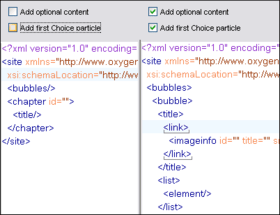
You can have a better control on the values that appear in your generated instances by specifying a set of possible values for attributes or elements. This is very useful also in situations when it is not possible to automatically generate a valid value. All the settings that you configured can be saved on disk in a configuration file and loaded later. You can reuse the options you defined at a later time, share them with other users or use them as input for the command line instance generator tool. You can run the XML instance generator tool from the command line. This allows integrating the instance generation in automated processes.

Content completion improvements

Completion proposals from included or imported XML Schema schemas
The content completion presents the global types, elements, attributes or groups defined in the included or imported XML Schemas together with the ones defined in the current schema. This helps to make references to components defined in other schema documents.

Completion proposals from included or imported XSLT stylesheets
The content completion presents the template modes or names, the variables, the parameters, etc. defined in the included or imported XSLT stylesheets together with the ones defined in the currently edited XSLT stylesheet.

Improvements in the Author mode

Resolve DITA content references through XML catalogs
The DITA content references are passed through the current XML Catalogs thus you can put references to remote resources and map them to local copies through the XML Catalogs.

The CSS url() function
The url() function accepts now more than one argument. This provides more flexibility in defining links in the oXygen XML Author mode.

Updated database connectors

Support for MarkLogic 4.0
The Mark Logic database support including the XQuery debugger was updated to work with MarkLogic 4.0.

Support for Oracle 11g R1
The Oracle database support was updated to work with Oracle 11g R1.

Support for Microsoft SQL Server 2008
The SQL Server database support was updated to work with SQL Server 2008.

Support for IBM DB2 9.5
The DB2 database support was updated to work with DB2 9.5 (Viper 2).

Support for EMC2 XHive 8
The XHive database support was updated to work with XHive 8.

Intel(R) XML Software Suite

XPath integration
When you install the Intel XML Software Suite in oXygen you can choose to have all the XPath 1.0 queries from the XPath query tool bar or from the XPath builder view of the XML editor evaluated using the Intel XML Software Suite XPath engine.

Validation against DTDs
You can use the Intel XML Software Suite for performing XML document validations against DTDs.

Updated processors

Updated the Saxon-B 9 XSLT / XQuery processor
The Saxon-B 9 XSLT and XQuery processor was updated to the latest version: 9.1.0.3.

Updated the Saxon.NET XSLT processor support
The Saxon.NET XSLT processor support was updated to the latest version: 9.1.0.1.

Updated the Apache FOP processor
The Apache FOP processor was updated to the latest version: 0.95.

Updated the LIBXML and LIBXSLT processors
The LIBXML processor was updated to version 2.6.32. The LIBXSLT processor was updated to version 1.1.23.

Updated the XSV validator
The XSV validator was updated to version 3.1-1.

Updated the XSLT validator and transformer based on the .NET framework
The nxslt processor which validates and transforms XSLT stylesheets based on the .NET framework was updated for .NET 2.0. The new version improves the error reporting and supports XHTML output mode, XSLT 2.0 character maps and XInclude references. Both .NET 1.0 and .NET 2.0 are supported.

Framework updates

Updated the DocBook XSL stylesheets
The DocBook XSL stylesheets were updated to the version 1.74.0.

Updated the TEI framework
The TEI P5 schemas were updated to the version 1.1.0. The TEI P4 stylesheets and TEI P5 stylesheets were updated to the version 5.12.

SVN Client
The SVN Client has been updated to support SVN 1.5 working copies and repositories.

Merge tracking
Starting with SVN 1.5 the revision at which a branch is merged is remembered. This is useful for the next merge operation when only the changes committed to the branch after the previous merge operation are considered.

Sparse checkout
Sometimes not all the files and subdirectories of a repository are needed in a working copy. In these cases only the needed subdirectories and files can be checked out from the repository by selecting one of the following checkout depths for a directory: recursive, immediate children, file children only, this folder only.

Update to revision
A new action "Update to revision" is available in the Working Copy view. It allows updating the resources selected in the working copy to a specified revision from the repository. The depth of the update operation on the folders can be selected from the values allowed by SVN 1.5 sparse checkout.

Improved merging support
A merge wizard was added to perform complex merge operations easier. Three types of merging are available: merge revision ranges, reintegrate a branch and merge two different trees. Advanced merge options can also be set.

Improved Open With action
The action works now on multiple file selection and is available in the Working Copy view, Synchronize view and Repository view.

Other improvements

Scenarios view
A new side view of the oXygen XML Editor is available listing all the defined transformation scenarios. This allows to quickly invoke a series of scenarios and also to easily manage the scenarios, adding new scenarios, deleting or editing existing ones.

Output message format for external processors
This allows a closer integration of external processors (external XML validators or external XSLT processors). If the processor output follows the format documented in the oXygen XML Editor User Manual then that processor messages will be presented similar with the built in processors messages, for instance it is possible to have location information and to just click on a message to open the file it refers to and highlight a specified line and column.

Save results as XML
Sometimes it is useful to process further the results you get in oXygen. Now, it is possible to get those results in an XML form, documented in the oXygen User Manual and apply further processing on that.


For information on the differences between Enterprise and Professional please see the "oXygen XML Features Matrix" document in the Evals & Downloads section.

Key features

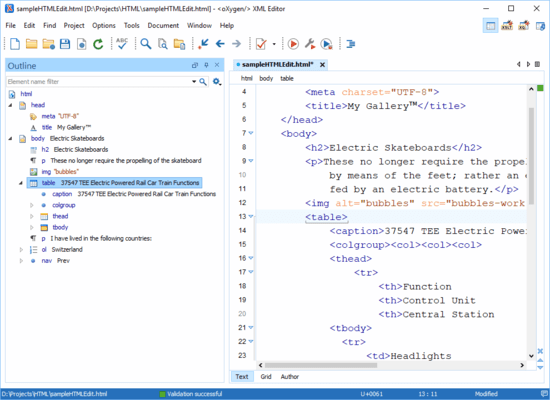
  • WYSIWYG XML Editor (Visual XML editor) - The Author mode of the <oXygen/> XML Editor demonstrates a new productive way of editing XML documents, similar to a word processor.
  • Intelligent XML Editing - The context sensitive content assistant is changing the way you edit documents, helping you create valid content all the time.
  • Extensible XML Editor - Starting with version 9 <oXygen/> adds a new concept called Document Type that solves the problem of providing ready to use support for a framework or an XML language. The Document Type concept is used to provide the built in support <oXygen/> has for a number of XML frameworks (DITA, DocBook, TEI) but, more importantly, it can be employed to provide support for a user defined framework that needs to be shared with other users.
  • XML Grid Editor - The <oXygen/>'s grid editor allows you to edit repetitive XML content in a special layout similar to a spreadsheet application, without the need to interact with markup.
  • XML Outliner - <oXygen/> XML Editor comes along with an outliner which is automatically synchronized with the document changes.
  • XInclude Support - <oXygen/> XML Editor supports XInclude which is a standard for building up XML documents from smaller pieces, being a replacement for the external entities.
  • XML Validation and Well-Formedness Check - The XML validation can be done by checking the documents against a schema. <oXygen/> XML Editor supports: XML Schema, DTD, Schematron and Relax NG schemas.
  • XML Formating and Indentation - A useful utility is the XML document formatter.
  • Unicode and Internationalization - <oXygen/> XML Editor supports a large number of text encodings. Unicode is fully supported.
  • XML Diff and Merge Tool - A complete diff and merge solution is available in <oXygen/> XML Editor. It offers both directory and file comparison, six different diff algorithms and multiple levels of comparison.
  • XPath support - XPath is a language for addressing specific parts of an XML document. XPath, like the Document Object Model (DOM), models an XML document as a tree of nodes. An XPath expression is a mechanism for navigating through and selecting nodes from the XML document. You can executes XPath queries on opened documents. Both XPath versions 1.0 and 2.0 are supported.
  • XML Digital Signature and XML Canonicalization - The digital signature is a requirement when exchanging information in an untrusted network. Since XML is used for content storage it is important to be able to sign the XML files or messages.
  • <oXygen/> Tree Editor - XML documents can be viewed/edited in a graphical tree. The tree editor is handy for large size documents.
  • Helper Views - There is a set of panels located at the side of the editing area helping the XML editing. They present the model of the edited XML element, the available attributes and entities.
  • XML Schema Editor - <oXygen/> XML Editor offers you the possibility to edit different types of schemas: XML Schemas, DTDs, Schematron and Relax NG Schemas.
  • XSL / XSLT Editor - Offering a content assistant for the XSL and FO documents and the possibility of selecting from different types of XSLT transformers, including FOP, <oXygen/> is one of the XSLT developers' favorite choice.
  • XSL / XSLT Refactoring - <oXygen/> XML Editor offers a wide range of actions designed to refactor/reorganize the content of XSL stylesheets.
  • XSL / XSLT Debugger - Making use of two XSLT transformation engines, Saxon and Xalan, the <oXygen/> XML Editor helps you spot the bugs that may be present in your XSL stylesheets. XPath dynamic evaluation, templates and nodes stacks are just a few of the information presented in the debugging perspective.
  • XQuery - XQuery is intended for labeling information extracted from multiple structured sources like XML documents, object repositories and relational databases including native XML databases. <oXygen/> offers help with editing, executing and debugging XQuery documents.
  • Native XML and Relational Databases - <oXygen/> XML Editor can perform XQuery/XPath queries against a native XML database through a connection to the database server. A dedicated collection of database exploring views are grouped together in a database perspective layout.
  • Subversion (SVN) Client - <oXygen/> XML Editor makes easier the document sharing between content authors by including a Subversion (SVN) client. The SVN client allows you to browse repositories, check for changes, commit changes, update your working copy and examine the revision history.
  • Other Features - Plugin for Eclipse, various editors for DocBook, TEI, XHTML, XSL:FO, SVG, XQuery, WSDL, remote editing, licensing policy, miscellaneous.

商品検索

検索したい単語を入力して下さい:

ComponentSourceから購入する理由

ComponentSourceでは、世界中1,000,000以上のソフトウェア開発者の皆様にユニークなグローバルサービスをご提供しています。

詳細 | About us

スクリーンショットギャラリー

Award