PDFXpress Reader Edition

by Pegasus Imaging Corporation - 製品のタイプ: コンポーネント / .NET WinForms / ActiveX OCX / VCL / VC++ Class Library

ご案内:特に説明のない限り、この商品は英語版商品になります。
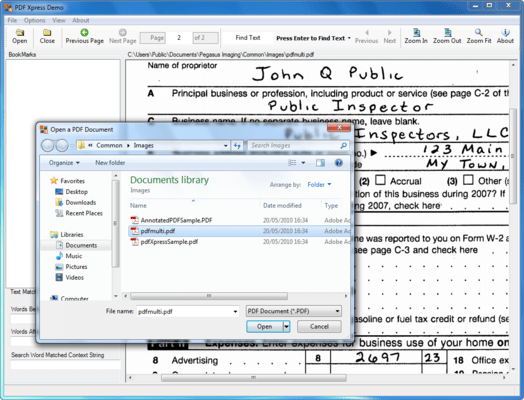
PDF Xpress - Reader Edition - V2.0 のスクリーンショットBuild applications to view PDF files. PDFXpress Reader Edition is offered for those requiring only PDF viewing capability. It is delivered as both a Microsoft .NET component and COM control. It offers full read support of all PDF formats, built using Adobe 3 technology. PDFXpress reads all PDF files that Adobe supports.

¥179,550 (税込)

一般向け価格については下記に表示されています。お客様用の割引価格をご覧になるには、ログインしてください。

PDFXpress Reader Edition V2.0

カートに追加 ¥ 179,550 (税込) 1 Developer License ダウンロード (180.4 MB)
カートに追加 ¥ 124,845 (税込) 1 Developer Upgrade License from PDFXpress Reader Edition V1.0 要確認 ダウンロード (180.4 MB)

PDFXpress Reader Edition V2.0 - Runtime Licenses

カートに追加 ¥ 13,650 (税込) 1-4 Installations (per CPU) ダウンロード (29 KB)
カートに追加 ¥ 11,025 (税込) 5-9 Installations (per CPU) ダウンロード (29 KB)
カートに追加 ¥ 9,030 (税込) 10-24 Installations (per CPU) ダウンロード (29 KB)
カートに追加 ¥ 7,350 (税込) 25-49 Installations (per CPU) ダウンロード (29 KB)

PDFXpress Reader Edition V2.0 - Server License

カートに追加 ¥ 207,690 (税込) 1 Server (CPU) License ダウンロード (180.4 MB)

すべてのご注文にて弊社標準の 契約条件および返品条件の内容が適用されます。 

一般向け価格については上記に表示されています。お客様用の割引価格をご覧になるには、ログインしてください。

What's New in V2.0:
The PDF Xpress v2 Software Development Kit (SDK) offers expanded capabilities to access and modify content within PDF documents. PDF Xpress empowers developers requiring PDF support within applications, and is delivered as both a .NET component and an ActiveX COM control.

PDF Xpress provides technology to software engineers building applications for creation, modification, and viewing of PDF files. Software engineers may extract text from PDF files, and use PDF Xpress v2 features to return the location and context of text search results. Annotations, bookmarks, thumbnails, and metadata can also be added, modified, or deleted. New page insert and move options offer PDF Xpress v2 users the flexibility to repurpose and reconfigure PDF documents – merging multiple PDFs or splitting a single PDF into multiple documents. Optimized rasterization enables high resolution display of large images, such as engineering drawings. Seamless interaction with PDF Xpress v2 is facilitated by new read-from-memory and write-to-memory support. By using PDF Xpress v2 in conjunction with other Pegasus Imaging components, developers can write applications to create highly compressed image-only or image-over-text PDF documents, and enable end users to view and modify PDF files.

PDF Xpress v2 Professional includes the following new capabilities:

  • Upgraded PDF support, taking advantage of many performance improvements and enhancements
  • PDF v1.6 document creation
  • Text extraction and use of PDF Xpress features to return location and context of text search results. (Extract text from Normal or Searchable Image PDFs then identify text matches using any desired technique. PDF Xpress will provide the context and location of the match phrase.)
  • Searchable Image (Image with Hidden Text) PDF Creation - using OCR Xpress with PDF Xpress sample code (PDF Xpress v2 provides the ability to construct an image-over-text PDF, using text output from OCR Xpress, and the associated image compressed by ImagXpress. This enables the developer to create highly compressed image-over-text PDFs, with searchable text.)
  • PDF Document Load From Memory & Save To Memory - without the need to store as a file
  • Page Insertion – Insert a page or range of pages from one PDF document into another (this capability can be used to merge multiple PDFs into one PDF or split one PDF into multiple PDFs)
  • Page Move – Move a page from one location to another in a PDF document
  • PDF Annotations Export to XFDF (XML) – Express annotations from the PDF document as XML data
  • PDF Annotations Import from XFDF (XML) – Create, modify, and delete PDF annotations using XML data
  • Thumbnail Delete – Delete a thumbnail in a PDF document, in addition to create and replace
  • Bookmark Modify & Delete – Modify and delete bookmarks in a PDF document, in addition to read and add
  • Document Metadata Read, Modify, & Write
  • Large File Optimized Rasterization (i.e. for display of large engineering drawings)

The Reader Edition contains a subset of features found within the Professional Edition. PDF Xpress includes the following new capabilities in the v2 Reader Edition:

  • Upgraded PDF support, taking advantage of many performance improvements and enhancements
  • Text extraction and use of PDF Xpress features to return location and context of text search results. (Extract text from Normal or Searchable Image PDFs then identify text matches using any desired technique. PDF Xpress will provide the context and location of the match phrase.)
  • PDF Document Load From Memory
  • PDF Annotations Export to XFDF (XML) – express annotations from the PDF document as XML data
  • Document Metadata Read
  • Large File Optimized Rasterization (i.e. for display of large engineering drawings)

Main Features Include:

  • Programming environments: Win32 visual development environments
  • Sample code is included for: C#, VB.NET, VB 6, Delphi 7/8
  • Deploys within .NET as a managed control
  • Can also be used in any development environment that hosts ActiveX/COM
  • Client/Server web development capabilities
  • Can be used in a multi-threaded environment
  • Customer-acclaimed technical support

Adobe PDF Support

  • Read single and multi-page PDF files
  • Support Native PDF files
  • Support Post Script-based PDF files
  • Support black and white image PDF files encoded to CCITT G3-1D, CCITT G3-2D, CCITT G4, and JBIG2
  • Support color image PDF files encoded to JPEG and JPEG 2000

商品検索

検索したい単語を入力して下さい:

スクリーンショットギャラリー

Award