Syncfusion Essential Chart WPF - 概要

by Syncfusion - 製品のタイプ: Component / .NET WPF / Source Code / JavaScript / AJAX

結果

Syncfusion Essential Chart WPF by Syncfusion

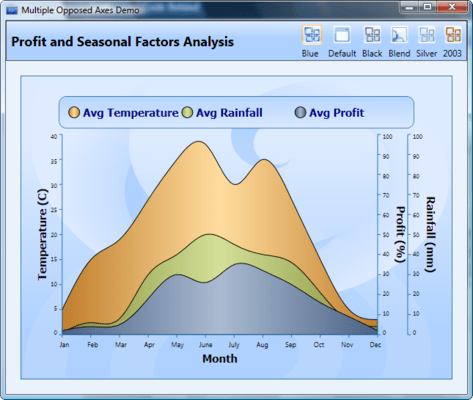
Add rich, interactive financial and business charts to your WPF applications. Essential Chart for WPF is a business-oriented charting component useful for visualizing data in advanced, innovative ways. It's one of the first of its kind for the WPF platform. It supports a wide range of chart types with rich user-interaction support. With Essential Chart WPF, you can add rich, interactive financial and business charts to your WPF applications. The package comes with 33 chart types, including common chart types such as column, line, and pie, and some financial chart types such as Kagi and Renko.

What’s included:

Chart Types - Essential Chart offers some 33+ chart types under the following categories:

Area Charts

Bar Charts

Column Charts

Line Charts

Financial Charts

Pie and Doughnut Charts

Bubble and Scatter Charts

Accumulation Charts

Circular Charts

Multiple chart types can also be combined within a single chart to represent multiple series.

Chart Data Types - Bind charts with unlimited series and unlimited data points in a series. There is also support for data binding to DataSets or to custom data models.

Visual Appearance - Several chart types can be rendered in 3D mode, the background for different portions of a chart can be customized with gradients or images, you can easily specify a custom palette that the chart can pick colors from automatically, and support for shadow effects, etc. is also included.

Axes Features - Support for secondary axes, grid lines in the chart area, auto-scaled axis ranges, axes ticks, axes strip lines, custom axis range origin, and more.

Visual Elements - Customizable Chart Legends used to represent series in a chart are available. Multi-row Chart Titles is also supported.

Export Options - A chart can be exported as an image into Excel or converted to an Excel Chart using Syncfusion Essential XlsIO. You can also export a Chart as an image or in SVG format into Word or PDF documents.

User Interaction - Essential Chart provides a very user-friendly runtime experience, with features such auto-highlighting, interactive cursors, tooltip at different chart areas, context sensitive menus, and more.

Benefits of working with Syncfusion:

Standardize to simplify: One vendor, one license, one suite of .NET components. Syncfusion’s wide range of solidly built components allows developers to streamline their toolkits and reduce dependence on multiple vendors.

Trusted architects: Industry-leading architects ensure each product is built for the most demanding of environments.

Full source code: 100% C# source code available, enabling seamless integration of our libraries with your projects.

Solid support infrastructure: First-rate tech support is available via Syncfusion’s online tracking system Direct-Trac, email, and phone. No per-incident charges. Syncfusion also provides an extensive knowledgebase, FAQs, and forums.

Built with the future in mind: Syncfusion components are geared towards long-lifecycle applications and architected to meet high standards for flexibility and long-term maintainability.

Flexible licensing model: Straight-forward per-developer licensing, with no runtimes, server deployment fees, or royalties. Each licensee may install on multiple personal machines.

Technical Support - Each Syncfusion license includes a one-year subscription for unlimited technical support and updates. Support for Syncfusion products is available 24 / 5 through a custom-built support system, with responses guaranteed within a single business day. Support is also available by e-mail and phone. Syncfusion’s Direct-Trac system can be used to create support incidents and track them to completion 24 hours a day, 7 days a week and allows Syncfusion licensees to maintain a complete overview of their support history.

Syncfusion suites - Essential Chart is also available as part of the Essential Studio Windows Forms Edition, Essential Studio ASP.NET Edition, and Essential Studio Enterprise Edition packages.

Please note: Syncfusion Essential Chart WPF also includes Windows Forms and ASP.NET components.

What’s new in Essential Chart WPF 2008 Vol 4?

New 3-D Chart Types - A 3-D mode for pie and line charts has been implemented, and it includes all of the 3-D chart features, such as rotating mouse drag and zooming on the mouse wheel. It also enables you to switch between 2-D and 3-D modes during run time.

Multiple Axes Support for 3-D Chart - Now, 3-D charts support multiple axes as well as give you the ability to customize all the axes in a chart; they also facilitate the customization of axes walls. New properties, such as TopWallBackground, TopWallThickness, RightWallBackground, and RightWallThickness, have been implemented for the customization of side walls.

OLAP Support - Essential Chart WPF now supports binding data from analysis services. Data from an OLAP cube can be bound to a chart. This feature helps to better analyze business objects by effectively using Essential Chart to visualize grouped data. Labels can also be grouped—allowing users to expand or collapse these groups in order to display or hide corresponding series segments in a chart.

Heat Map Control - To provide new insight into your data, the Essential Chart library now includes a Heat Map control. The Heat Map control helps visualize graphical representations of data where values are taken by variables in two measurements selected from items in a data source. Heat Map comes with powerful data binding support and the ability to effectively customize your business data representation by transforming volumes of data into actionable insights.

Please note: Syncfusion Essential Chart WPF also includes Windows Forms and ASP.NET components.

What’s new in Essential Chart WPF 2008 Vol 3?

New Chart 3-D Support -Chart WPF now comes with complete 3-D support for twelve different Chart types. Interactive rotation and zooming of the chart are built into the control. Camera projections and light settings can also be applied to the chart.

Extended Data Binding -Chart data binding support has been improved. Now a chart can be directly bound to an observable collection, LINQ query results, databases, collection views, and lists. Data context can be set at different levels in the chart and used across levels.

Improved Mouse Events -Mouse events in the Chart series now provide additional information about segments of the series including chart points.

Sample Modifications - As a part of this release, have altered all the existing Chart WPF samples and created new samples to demonstrate the efficiency of Essential Studio WPF.

PartNumbers: PC-515345-172266 515345-172266 PC-515345-172269 515345-172269 PC-515345-172277 515345-172277 PC-515345-172273 515345-172273 PC-515345-172267 515345-172267 PC-515345-172271 515345-172271 PC-515345-172278 515345-172278 PC-515345-172275 515345-172275

PurchaseOptions: Syncfusion Essential Chart WPF 2008 Vol 4 1 Developer License - with 1 Year Subscription , Syncfusion Essential Chart WPF 2008 Vol 4 1 Developer Annual Subscription Renewal License (for subscriptions soon to expire or up to 2 weeks past expiration) , Syncfusion Essential Chart WPF 2008 Vol 4 1 Developer Reinstatement of Lapsed Subscription License (for subscriptions lapsed longer than 2 weeks) , Syncfusion Essential Chart WPF 2008 Vol 4 1 Developer License without Subscription Upgrade from previous version , Syncfusion Essential Chart WPF 2008 Vol 4 with Source Code 1 Developer License with Source Code - with 1 Year Subscription , Syncfusion Essential Chart WPF 2008 Vol 4 with Source Code 1 Developer Annual Subscription Renewal License (for subscriptions soon to expire or up to 2 weeks past expiration) with Source Code , Syncfusion Essential Chart WPF 2008 Vol 4 with Source Code 1 Developer Reinstatement of Lapsed Subscription License (for subscriptions lapsed longer than 2 weeks) with Source Code , Syncfusion Essential Chart WPF 2008 Vol 4 with Source Code 1 Developer License without Subscription Upgrade from previous version with Source Code

Resources: View the Syncfusion Studio Matrix - Requires Acrobat Reader, Read the Syncfusion Company brochure - Requires Acrobat Reader, Read the Syncfusion Essential Chart brochure - Requires Acrobat Reader, Read the Syncfusion Essential Studio brochure - Requires Acrobat Reader, Read the Syncfusion License Agreement - Requires Acrobat Reader, Download the Syncfusion Essential Studio 2008 Vol. 4 evaluation on to your computer - Expires after 30 days

Operating System for Deployment: Windows Vista, Windows XP, Windows Server 2003, Windows 2000

Architecture of Product: 32Bit

Product Type: Component

Component Type: .NET WPF, Source Code, JavaScript, AJAX

Built Using: Visual C# .NET

Compatible Containers: Microsoft Visual Studio 2008, Microsoft Visual Studio 2005, Microsoft Visual Basic 2008, Microsoft Visual Basic 2005, Microsoft Visual C++ 2008, Microsoft Visual C++ 2005, Microsoft Visual C# 2008, Microsoft Visual C# 2005, .NET Framework 3.5, .NET Framework 3.0, .NET Framework 2.0

Product Class: User Interface Components

Search Items: New Product Sep 04, New Product Feb 05, New Product May 05, New Product June 05

Keywords: Syncfusion Sync fusion Chart Charting Charts Graph Graphing Graphs Corporate Partner Charting Graphing data line charts business charts, financial charts, line charts, bar charts, pie charts, accumulation charts, scatter charts, circular charts, combination charts, charting