by SyncRO Soft - 製品のタイプ: アプリケーション / Developer Application
Syncro SVN Client by SyncRO Soft
Cross Platform file history and version control management system. Syncro SVN Client makes it easier to share documents and code between content authors or developers. This multiplatform Subversion front-end allows you to browse repositories, check for changes, commit changes, update your working copy and examine the revision history. Features include: full SVN repository support for SVN versions 1.3 and 1.4: checkout, export, import, copy, mkdir, rename, branch, tag and delete support etc. It also includes a synchronize view which helps you spot all incoming and outgoing changes.
Key features
Full SVN repository support for SVN versions 1.3 and 1.4: checkout, export, import, copy, mkdir, rename, branch, tag and delete support.
The working copy view allows you to filter items and operate the whole range of SVN actions over the current selection.
Synchronize view helps you spot right away all incoming and outgoing changes.
SVN Properties table allows you to change all standard SVN properties and define your own.
Supported communication protocols include SSL, HTTP/HTTPS, File.
Responsive GUI. The actions on the repository do not freeze the user interface.
Includes an easy-to-use visual diff/merge tool. Can also compare images.
Support for merging the current working copy with a set of tags or revisions.
Browse and manage multiple repositories at once.
Easy management of more than one working copy.
Fast set up of the working copies.
Enhanced history revision details including a history graph of all revisions.
Independent from the command line subversion client.
Cross platform. Windows, Mac OS X and Linux are supported.
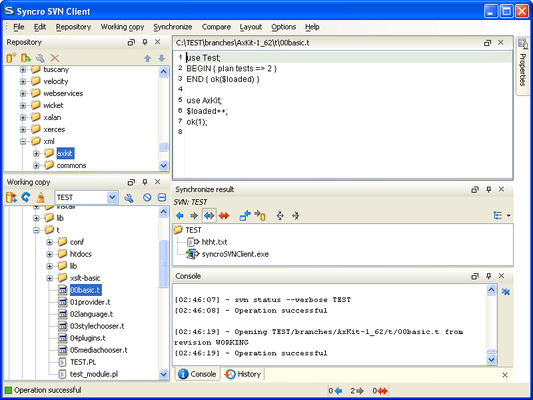
Flexible Layout of the User Interface - The Syncro SVN Client is composed of several views allowing you to browse the Subversion repositories and your local working copies, compare and merge modifications, check the revision history. All views are dockable, meaning that you can move them to create the optimal layout for your use case.
SVN Repository Browsing - You can add multiple SVN repositories to the list accessed through different protocols (SVN, SVN + SSH, HTTP(S)) and browse them in parallel. In this way you can identify the resources you need to checkout, or even create branches or tags directly in the repository.
Synchronize with SVN Repository - In the synchronize view you can see the overall status of your working copy resources when compared to the repository resources. The view focuses on incoming and outgoing changes, where incoming ones are the changes that other users have committed since you last updated your working copy. The outgoing changes are the modifications you made to your working copy as a result of editing, removing or adding resources.
SVN Resource History - In Subversion, both files and directories are versioned and have a history. If you want to examine the history for a selected resource and find out what happened at a certain revision you can use the History view.
Local Working Copy of a SVN Repository - Each author that shares the SVN repository with other authors works on a local copy of the repository called a working copy of the repository. The local copy must be synchronized with the repository by committing the local changes to the repository and by updating the local copy with the changes committed by other authors on the repository.
Author Information at Line Level - Sometimes you need to know not only what lines have changed, but also who changed specific lines in a file. The Annotations view displays the author and the revision number that changed every line in a file the last time. The view is synchronized with the History view and the source code view: clicking in any view updates the current selection in the other two views so that the author name and the revision number are displayed for any line of the source code view.
Check Differences Between Local Version and Repository Version - One of the most common requirements in project development is to see what changes have been made to the files from your working copy or to the files from the repository. You can examine these changes after a synchronize operation with the repository, by using the Open in Compare Editor action from the contextual menu.
Visual Conflict Editing - An update operation may bring the local copy of a file in a conflict state. The conflict state can be resolved more quickly if the conflicts are edited visually in a compare view which presents the two conflicting versions side by side like a Diff application. In the compare view the user decides for each conflict the variant which will remain and will be finally committed to the repository: the local one, the repository one or a manually edited combination of the two variants.
Revision Graph - The history of a SVN resource can be viewed as a graph in the form of a tree. One node of the graph represents a revision of that resource committed to the trunk or one of the branches of the SVN repository. The icon and the background color of a graph node represent the operation that generated a revision. A graph node contains also the repository path and the revision number.
What's new in Syncro SVN Client V4.0?
Syncro SVN Client V4.0 adds Subversion 1.5 features like merge tracking, sparse checkout and relative URLs for the svn:externals property and a merge wizard which simplifies the SVN merge operations.
PartNumbers: PC-518430-173904 518430-173904 PC-518430-173905 518430-173905 PC-518430-173906 518430-173906 PC-518430-173907 518430-173907 PC-518430-173916 518430-173916 PC-518430-173908 518430-173908 PC-518430-173909 518430-173909 PC-518430-173910 518430-173910 PC-518430-173911 518430-173911 PC-518430-173912 518430-173912 PC-518430-173913 518430-173913 PC-518430-173914 518430-173914 PC-518430-173915 518430-173915 PC-518430-173917 518430-173917
PurchaseOptions: Syncro SVN Client V4.0 1 Named User License & 1 year Maintenance Pack , Syncro SVN Client V4.0 5-9 Named User License & 1 year Maintenance Pack - price per license , Syncro SVN Client V4.0 10-19 Named User License & 1 year Maintenance Pack - price per license , Syncro SVN Client V4.0 20-49 Named User License & 1 year Maintenance Pack - price per license , Syncro SVN Client V4.0 1 Site Wide License (Allows Unlimited Users at a Single Physical Address) & 1 year Maintenance Pack , Syncro SVN Client V4.0 Upgrades 1 Named User License & 1 year Maintenance Pack Upgrade from previous version , Syncro SVN Client V4.0 Upgrades 5-9 Named User License & 1 year Maintenance Pack Upgrade from previous version - price per license , Syncro SVN Client V4.0 Upgrades 10-19 Named User License & 1 year Maintenance Pack Upgrade from previous version - price per license , Syncro SVN Client V4.0 Upgrades 20-49 Named User License & 1 year Maintenance Pack Upgrade from previous version - price per license , Syncro SVN Client V4.0 Renewals 1 Named User License Maintenance Pack Renewal , Syncro SVN Client V4.0 Renewals 5-9 Named User License Maintenance Pack Renewal - price per license , Syncro SVN Client V4.0 Renewals 10-19 Named User License Maintenance Pack Renewal - price per license , Syncro SVN Client V4.0 Renewals 20-49 Named User License Maintenance Pack Renewal - price per license , Syncro SVN Client V4.0 Renewals 1 Site Wide License (Allows Unlimited Users at a Single Physical Address) Maintenance Pack Renewal
Resources: Read the Syncro SVN Client User Manual - Requires Acrobat Reader, Read the Syncro SVN Client License Agreement, Download the Syncro SVN Client UNIX V4.0 evaluation on to your computer - Expires After 30 Days, Download the Syncro SVN Client Mac OS V4.0 evaluation on to your computer - Expires After 30 Days, Download the Syncro SVN Client Linux V4.0 evaluation on to your computer - Expires After 30 Days, Download the Syncro SVN Client Windows V4.0 evaluation on to your computer - Expires After 30 Days
Operating System for Deployment: Windows Vista, Windows XP, Windows 2000, Windows NT 4.0, UNIX System V Release 5, Sun Solaris 10, HP-UX 11.x, IBM AIX 6.x, Linux Kernel V2.6.x, Red Hat Enterprise Linux 5.x, RedHat Linux 9.x, SUSE Linux 10.x, Mac OS X
Architecture of Product: 32Bit, MAC
Product Type: Application
Application Type: Developer Application
Keywords: Version versioning versions Development Professional Partner
開発元/発売元
主要なカテゴリー
関連製品
関連のカテゴリー