THBImage - Professional - V5.0 - 概要

by THBComponentware - 製品のタイプ: コンポーネント / .NET WinForms / ActiveX OCX / DLL

結果

THBImage Professional by THBComponentware

Add professional graphics capability to your applications. THBImage control allows you to add professional graphics capability to your applications. Features include a PreviewScrollWindow for scrolling, Popup menu to access all zooming functions and integrated printing capabilities allowing you to print images with a single statement. You can copy/paste images from/to the clipboard, draw smooth shaded color gradients. THBImage products include .NET, C#, VB.NET, ActiveX, COM and Dll versions. Buying a license or upgrade license includes 1 Year product specific support and download access to software updates.

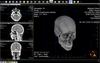
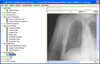
THBImage Professional displays an image with the ability to align, stretch, scroll, zoom and pan it. THBImage Professional includes a preview scroll window for convenient scrolling, a magnification window to take a closer look to any part of the image and a popup menu to access all zooming functions. THBImage Professional also includes advanced databinding capabilities and supports all common raster image formats BMP, PCX, JPG, TIF, PNG, TGA, PSD, many image processing operations like Resize, Rotate, Crop, Mirror, Brightness, Contrast, Invert and more.

THBImage Professional Edition includes:

File Format support:

Reading from file or directly from memory:

Windows Bitmap (BMP) - 1, 4, 8, 24, 32bpp Bitmap files and 4, 8bpp RLE encoded Bitmap files

Windows Icon files (ICO)

Windows Cursor files (CUR)

JPG - 8, 24bpp JPEG files, Lossless JPEG files

ZSoft PCX - 1, 2, 4, 8, 24bpp PCX files

Portable Network Graphics Format (PNG) - 1, 8, 24, 32bpp PNG files with Alpha Channel Support

Truevision TARGA Format (TGA) - 1, 8, 15, 16, 24, 32bpp TGA files

TIFF - 1, 4, 8, 24, 32bpp TIFF files

Deflate compression

JPG compression, Packbits (Macintosh RLE) compression

CCITT Group 3 fax encoding

CCITT Group 4 fax encoding

CCITT modified Huffman RLE

Multipage TIFF

Photoshop Format (PSD) - 1, 8, 24bpp RLE encoded or uncompressed PSD files

Writing to file or directly to memory:

Windows Bitmap (BMP) - 1, 8, 24bpp Bitmap files and 8bpp RLE, encoded Bitmap files

JPG - 8bpp Grayscale and 24bpp JPEG files

ZSoft PCX - 8, 24bpp PCX files

Portable Network Graphics Format (PNG) - 8, 24bpp PNG files with Alpha Channel Support

Truevision TARGA Format (TGA) - 8, 24bpp TGA files

TIFF - 1, 8, 24bpp TIFF files

Supported compression export modes:

No compression

Deflate compression(ZLIB ZIP)

JPG compression

Packbits (Macintosh RLE) compression

CCITT Group 3 fax encoding

CCITT Group 4 fax encoding

CCITT modified Huffman RLE

Multipage TIFF

Append to existing multipage TIFF files

Photoshop Format (PSD) - 1, 8, 24bpp RLE encoded or uncompressed PSD files

Add your own image import and export file format DLLs: You can write your own image import and export DLLs and add them to the THBImageEdit object to support any image format the THBImage.NET currently does not support. Userdefined DLLs are a powerful mechanism to implement your own special file formats and integrate them into THBImage

Integrated Intel JpegLib, integrates the IntelJpegLib Intel CPU optimized JPEG import and export library

Image processing operations:

Resize simple or bi-linear

Rotate to any angle from 0 to 360 degrees, optimized for 90, 180, 270 degrees

Crop any part of the Image

Mirror the image horizontally or vertically

Brightness

Contrast

Invert

Create image from DeviceContext

Overlay two images: With opacity from 0 to 100%

With tranparency color

With opacity and tranparency color

With 8bit grayscale mask

Direct pixel access

Palette manipulation

DropShadow to add a shadow effect

ScaleToGray to improve the quality of scanned or faxed black/white images

HSV Adjustment to change hue, saturation and value(brightness)of the image

Filter operations:

Sharpen

Blur

Median Blur

Antialias

EdgeDetection

User Defined filters

Multithreaded operations:

Simply set one property and many methods will run in its own worker thread. All filter operations and most of the image-processing operations support this feature. You can choose between blocking and non-blocking threads. Blocking threads hold the execution of your application and just return when they are ready. The opposite are non-blocking threads, you just start them and the execution of your application continues. When the operation is ready you'll get an event signaling the end of the thread

Color Conversion:

Convert between color modes, like 24-bit true-color, 8-bit palette, 1-bit black/white, 24-bit grayscale, 8-bit grayscale. Changing the color mode can be performed with palette optimization and color dithering.

Drawing:

Draw on a device context with aligning, stretching, and keeping proportion into a given rectangle.Drawing operations are no longer limited to pixel coordinates and work with many different coordinate units(inch, twips, metric, pixel,..)

Printing:

Draw on a printer device context with aligning, stretching, and keeping proportion into a given rectangle.Printing operations are no longer limited to pixel coordinates and work with many different coordinate units(inch, twips, metric, pixel,..)

Two different drawing modes:

High Quality drawing mode with dithered output on 256 color display devices.

THBImage products include .NET, C#, VB.NET, ActiveX, COM and Dll versions. Buying a license or upgrade license includes 1Year product specific support and download access to software updates.

PartNumbers: PC-513192-149146 513192-149146 PC-513192-149147 513192-149147 PC-513192-149148 513192-149148 PC-513192-149151 513192-149151 PC-513192-149149 513192-149149 PC-513192-156294 513192-156294 PC-513192-156295 513192-156295

Publisher PartNumbers: #7933 #7934 #7935

PurchaseOptions: THBImage V5.0 Professional Edition 1 Developer License , THBImage V5.0 Professional Edition 4 Developer License , THBImage V5.0 Professional Edition 1 Site Wide License (Allows Unlimited Developers at a Single Physical Address) , THBImage V5.0 Professional Edition 1 Developer Upgrade License from THBImage Professional V4.5 and V4.8 , THBImage V5.0 Professional Edition 1 Developer Upgrade License from THBImage Professional V4.0 and below , THBImage V5.0 Professional Edition 4 Developer Team Upgrade License from THBImage Professional V4.5 and V4.8 , THBImage V5.0 Professional Edition 4 Developer Team Upgrade License from THBImage Professional V4.0 and below

Resources: Read the THBImage Help File, Read the THBComponentware End User License Agreement, Download the THBImage V5.0 evaluation on to your computer - Displays Demo Label

Operating System for Deployment: Windows Vista, Windows XP, Windows 2000

Architecture of Product: 32Bit

Product Type: Component

Component Type: .NET WinForms, ActiveX OCX, DLL

Built Using: Visual C++ .NET 2002 / 2003

Compatible Containers: Microsoft Visual Studio 2008, Microsoft Visual Studio 2005, Microsoft Visual Studio .NET 2003, Microsoft Visual Studio .NET, Microsoft Visual Studio 6.0, Microsoft Visual Basic 2008, Microsoft Visual Basic 2005, Microsoft Visual Basic .NET 2003, Microsoft Visual Basic .NET, Microsoft Visual Basic 6.0, Microsoft Visual C++ 2008, Microsoft Visual C++ 2005, Microsoft Visual C++ .NET 2003, Microsoft Visual C++ .NET, Microsoft Visual C# 2008, Microsoft Visual C# 2005, Microsoft Visual C# .NET 2003, Microsoft Visual C# .NET, Microsoft Visual FoxPro 8.0, Microsoft Visual FoxPro 7.0, Microsoft Visual FoxPro 6.0, .NET Framework 3.5, .NET Framework 3.0, .NET Framework 2.0, .NET Framework 1.1, .NET Framework 1.0

Product Class: User Interface Components

Search Items: New Product Jun 03, New Product Aug 05, New Product Sep 05

Keywords: THB Componentware ware Imaging image images Author THBImage Professional, THBImage

商品検索

検索したい単語を入力して下さい:

クイック リンク