Altova MapForce Standard Edition - Installed Users - 2008

by Altova - 製品のタイプ: アプリケーション

この商品については、日本語の説明書きはございません。
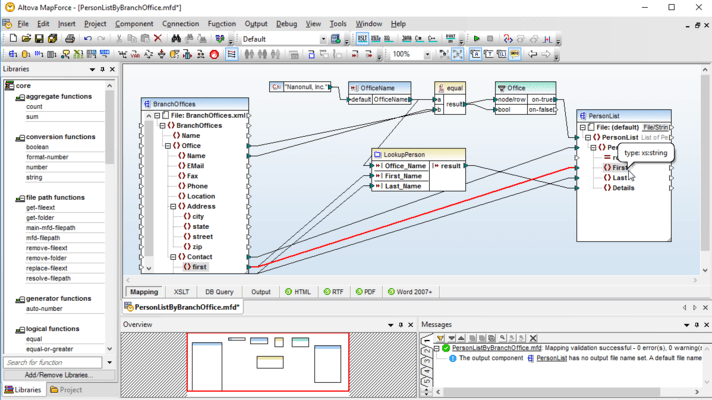
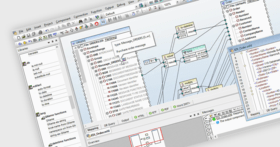
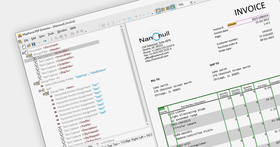
Altova MapForce Standard Edition - Installed Users - 2008 のスクリーンショットVisual data integration tool. Altova MapForce® Standard Edition is a visual tool that supports XML-to-XML mapping. Features include: XML editing and validation (well-formedness checking, validation (DTD & schema-based) text view with syntax-coloring, find and replace with enhanced XML capabilities, find and replace based on Regular Expressions), XSL/XSLT Editing (built-in XSLT 1.0 and 2.0 processor, XPath 1.0 and 2.0 support) and more.

¥34,125 (税込)

Best Seller


一般向け価格については下記に表示されています。お客様用の割引価格をご覧になるには、ログインしてください。

Altova MapForce 2008 Release 2 SP1 Standard Edition

カートに追加 ¥ 34,125 (税込) Installed Users (1)
メーカーパーツ番号: M08S-I001
ダウンロード (15.1 MB)
カートに追加 ¥ 160,755 (税込) Installed Users (5)
メーカーパーツ番号: M08S-I005
ダウンロード (15.1 MB)
カートに追加 ¥ 289,275 (税込) Installed Users (10)
メーカーパーツ番号: M08S-I010
ダウンロード (15.1 MB)
カートに追加 ¥ 563,430 (税込) Installed Users (20)
メーカーパーツ番号: M08S-I020
ダウンロード (15.1 MB)
カートに追加 ¥ 1,368,255 (税込) Installed Users (50)
メーカーパーツ番号: M08S-I050
ダウンロード (15.1 MB)

Altova MapForce 2008 Release 2 SP1 Standard Edition + SMP (1 year)

カートに追加 ¥ 42,630 (税込) Installed Users (1) + SMP (1 year)
メーカーパーツ番号: M08S-I001+M1
ダウンロード (15.1 MB)
カートに追加 ¥ 200,970 (税込) Installed Users (5) + SMP (1 year)
メーカーパーツ番号: M08S-I005+M1
ダウンロード (15.1 MB)
カートに追加 ¥ 361,515 (税込) Installed Users (10) + SMP (1 year)
メーカーパーツ番号: M08S-I010+M1
ダウンロード (15.1 MB)
カートに追加 ¥ 704,235 (税込) Installed Users (20) + SMP (1 year)
メーカーパーツ番号: M08S-I020+M1
ダウンロード (15.1 MB)
カートに追加 ¥ 1,710,345 (税込) Installed Users (50) + SMP (1 year)
メーカーパーツ番号: M08S-I050+M1
ダウンロード (15.1 MB)

Altova MapForce 2008 Release 2 SP1 Standard Edition + SMP (2 years)

カートに追加 ¥ 47,670 (税込) Installed Users (1) + SMP (2 years)
メーカーパーツ番号: M08S-I001+M2
ダウンロード (15.1 MB)
カートに追加 ¥ 225,120 (税込) Installed Users (5) + SMP (2 years)
メーカーパーツ番号: M08S-I005+M2
ダウンロード (15.1 MB)
カートに追加 ¥ 404,985 (税込) Installed Users (10) + SMP (2 years)
メーカーパーツ番号: M08S-I010+M2
ダウンロード (15.1 MB)
カートに追加 ¥ 788,760 (税込) Installed Users (20) + SMP (2 years)
メーカーパーツ番号: M08S-I020+M2
ダウンロード (15.1 MB)
カートに追加 ¥ 1,915,620 (税込) Installed Users (50) + SMP (2 years)
メーカーパーツ番号: M08S-I050+M2
ダウンロード (15.1 MB)

Altova MapForce 2008 Release 2 SP1 Standard Edition SMP renewal (1 year)

カートに追加 ¥ 8,505 (税込) Installed Users (1) SMP Renewal (1 year)
メーカーパーツ番号: MS+M1-I001
要確認 ダウンロード (15.1 MB)
カートに追加 ¥ 40,215 (税込) Installed Users (5) SMP Renewal (1 year)
メーカーパーツ番号: MS+M1-I005
要確認 ダウンロード (15.1 MB)
カートに追加 ¥ 72,345 (税込) Installed Users (10) SMP Renewal (1 year)
メーカーパーツ番号: MS+M1-I010
要確認 ダウンロード (15.1 MB)
カートに追加 ¥ 140,805 (税込) Installed Users (20) SMP Renewal (1 year)
メーカーパーツ番号: MS+M1-I020
要確認 ダウンロード (15.1 MB)
カートに追加 ¥ 342,090 (税込) Installed Users (50) SMP Renewal (1 year)
メーカーパーツ番号: MS+M1-I050
要確認 ダウンロード (15.1 MB)

Altova MapForce 2008 Release 2 SP1 Standard Edition SMP renewal (2 years)

カートに追加 ¥ 13,650 (税込) Installed Users (1) SMP Renewal (2 years)
メーカーパーツ番号: MS+M2-I001
要確認 ダウンロード (15.1 MB)
カートに追加 ¥ 64,365 (税込) Installed Users (5) SMP Renewal (2 years)
メーカーパーツ番号: MS+M2-I005
要確認 ダウンロード (15.1 MB)
カートに追加 ¥ 115,710 (税込) Installed Users (10) SMP Renewal (2 years)
メーカーパーツ番号: MS+M2-I010
要確認 ダウンロード (15.1 MB)
カートに追加 ¥ 225,330 (税込) Installed Users (20) SMP Renewal (2 years)
メーカーパーツ番号: MS+M2-I020
要確認 ダウンロード (15.1 MB)
カートに追加 ¥ 547,365 (税込) Installed Users (50) SMP Renewal (2 years)
メーカーパーツ番号: MS+M2-I050
要確認 ダウンロード (15.1 MB)

すべてのご注文にて弊社標準の 契約条件および返品条件の内容が適用されます。 

一般向け価格については上記に表示されています。お客様用の割引価格をご覧になるには、ログインしてください。

What’s new in Altova MapForce 2008 Release 2?

  • Mapping Excel 2007 (OOXML) data
  • Support for data streams for code generation
  • Sample XML Schema generation based on an XML instance
  • Support for SOAP 1.2
  • Support for SQL SELECT statements
  • Inline Primary Key / Foreign Key creation
  • Project generation for Visual Studio 2008

New features in MapForce 2008 include:

  • Support for aggregate functions: SUM, MIN, MAX, AVG, STRING-JOIN – allows users to perform computations on a range of data within a source field and return a single value to the target
  • ValueMap function for transforming field values – allows users to build a MapForce data processing function that maps one field value to another to ensure that values are written to the mapping target in the desired style
  • Enhanced options for XML output – including options for pretty printing, omitting schema references, and changing and setting encoding options

What's new in MapForce 2007 Release 3?


  • Integration of database XML fields – With MapForce 2007r3, users can map XML data directly to and from XML-enabled databases by assigning an XML Schema to the data (exclusive to IBM DB2 9 databases in this release). MapForce then renders the schema as a sub tree of the database field for direct mapping with disparate data formats via its visual drag-and-drop interface
  • Enhanced database connectivity – MapForce now includes a quick connect wizard to easily access, preview, and integrate database data. A new database query window is also provided, enabling users to directly analyze SQL data
  • Extended data filtering functionality – Adding to its extensive library of data processing functions, MapForce now supports the SQL-WHERE filter, which allows for precise, high-performance filtering of database sources used in data mapping projects. A SQL statement wizard aids in writing statements to filter database data that will be used as a source in data mapping projects

MapForce supports the following functionality:

  • Graphical data mapping 
  • Executing and saving mapping output  
  • Bi-directional XML, database, flat file and EDI data mapping 
  • Advanced data processing functions  
  • Mapping data to WSDL operations 
  • Visual function builder for creating custom functions 
  • Building Web services  
  • Project view for organizing mappings 
  • Mapping multiple sources to multiple targets 
  • Seamless integration with Eclipse and Visual Studio  
  • Parsing flat files using FlexText utility 
  • OLE and ActiveX controls 
  • XSLT 1.0, XSLT 2.0, XQuery generation
  • Java, C#, C++ program code generation

Simplify Web Services Development

Despite the advantages of Web services for exchanging information between disparate systems, writing the code to implement them by hand can be complicated, time consuming, and error-prone. Altova MapForce removes these drawbacks by allowing you to build Web services visually, then auto-generating the Java or C# code required to implement the Web service on a server.

To build a Web service, you simply load an existing WSDL (Web Services Description Language) file in the MapForce project view, and create a mapping for each transaction. All standard WSDL documents are supported, including those created in the graphical WSDL design view of Altova XMLSpy.

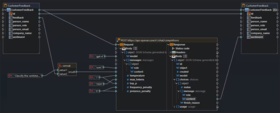
Once you’ve loaded a WSDL file, you simply define the operations for each transaction included in the Web service as a mapping design. MapForce represents the transaction’s input and output schemas graphically, and you can easily map data and perform operations by dragging connecting lines to link elements and dragging in function blocks from the library. Supported data sources include XML, databases, flat files, and EDI (EDIFACT and ASNI X12) formats, and you can map these in any combination to and from the operations in your WSDL transactions.

An extensible library of data processing functions is available for filtering and processing data before returning it to the output schema, and the MapForce visual function builder helps create and save complex functions for use in other mappings.

Once you’ve created mappings for the transactions in the WSDL file, you can generate code for a single transaction – or for the entire WSDL project – in Java or C#.

Now, instead of writing the hundreds to thousands of lines of code required to implement each Web services transaction, you can define mappings visually and let MapForce generate the code all at once. Code that used to take hours or days to write is now auto-generated in a matter of seconds. Visual design in MapForce removes the complexity from Web services development, allowing you to build standards-conformant Web services applications more quickly than ever before.

Integrate Enterprise Data

In addition to support for building Web services, MapForce allows you to design data integration applications for mapping any combination of XML, database, flat file, and EDI data.

  • XML mapping support is based on XML Schema
  • Database mapping support includes accessing database views and systems table in any relational database
  • Flat file mappingsupport includes CSV, tab delimited, and fixed-width text files. Support for arbitrary or mixed layout flat files is also provided through MapForce FlexText, a versatile flat file parsing utility
  • EDI mapping support includes the hundreds of messages covered by the two most popular EDI standards: UN/EDIFACT and ANSI X12

You can map XML, databases, flat files, and EDI in any combination, and multiple sources and multiple targets are supported. As with Web services creation, you define mappings between content models visually by dragging connecting lines linking corresponding elements in the source(s) and target(s) and inserting data processing rules. You can choose functions from the extensive MapForce function library, import your own function libraries, and create and save complex functions using the unique visual function builder.

The built-in MapForce Engine allows you to execute any mapping and view the output with one click. The output of the MapForce Engine can be saved as the result of a one-time mapping, or it can be used for previewing sample results, which simplifies the process of designing and testing complex mapping projects significantly. Then, with just one more click, MapForce auto-generates the software code required to programmatically marshal data from the source(s) to the target(s) for use in customized server-side data integration applications.


サポート

Altova provides free technical support for all customers for 30 days after the date of purchase.

If you wish to receive priority technical support beyond that date and receive software updates throughout the year, you need to purchase a "Support and Maintenance Package (SMP)" for your software. The Support & Maintenance Package is available in a one- or two-year plan. Please note that you can only add Support and Maintenance Package (SMP) to a product at the time you purchase the license (or up to 30 Days after you purchase).

Services included:

Priority Technical Support - Priority Technical Support is provided via a Web-based support form. Altova will respond within 1-2 business days during European or US business hours (MO-FR, 8am UTC - 10pm UTC, Austrian and US holidays excluded).

Free Minor & Major Versions - You will receive all maintenance releases and major software versions that are released during your Support Period. Updates that you receive cover the specific edition of the product that you have purchased and typically include many additional features.

Maintenance - During the Support Period you may also report any software problem or error to Altova using the same support process described above. If Altova determines that a reported reproducible material error in the software exists and significantly impairs the usability and utility of the software, Altova agrees to use reasonable commercial efforts to correct or provide a usable work-around solution in an upcoming maintenance release or update, which is made available at certain times at Altova's sole discretion.

Support Period

The Support & Maintenance Package that is currently offered with Altova products covers the product for which it is being purchased for a period of either one or two years. The support period begins on the day you purchase the product license and extends for a period of exactly 12 or 24 months, depending on whether you purchase the one- or two-year option. SMP may be purchased at the time you purchase a product license and during the 30 day period immediately thereafter. You may also renew an existing SMP for an additional one- or two-year period. During the Support Period, you will receive Support & Maintenance services from Altova as defined in section "6. SUPPORT & MAINTENANCE" in the Altova end-user license agreement ("EULA") or in the SMP Terms of Use, as applicable.