Automise - Application - V2.0

by VSoft Technologies - 製品のタイプ: アプリケーション / Developer Application

この商品については、日本語の説明書きはございません。
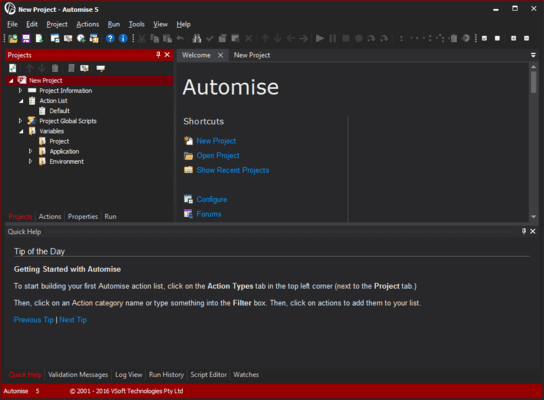
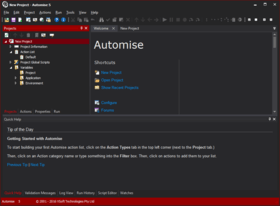
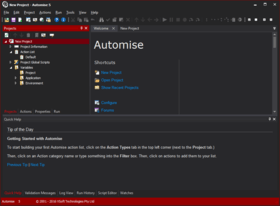
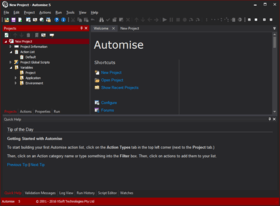
Automise - Application - V2.0 のスクリーンショットAutomise Windows. Automise is a Windows automation tool for system administrators and IT professionals that reduces the need for writing script to empower anyone to automate Windows. Automate with Automise to free yourself from repetitive tasks and provide faster, more reliable and consistent results. With Automise it's easy to create and maintain an automation project with drag-and-drop in its graphical interface. Once finished, anyone can run a project with a single click, keystroke or automatically on a schedule and save time with the power to run tasks automatically.

¥27,090 (税込)

一般向け価格については下記に表示されています。お客様用の割引価格をご覧になるには、ログインしてください。

Automise V2.0

カートに追加 ¥ 27,090 (税込) 1 Named User License ダウンロード (22.8 MB)
カートに追加 ¥ 32,550 (税込) 1 Named User License with 1 Year Software Assurance ダウンロード (22.8 MB)
カートに追加 ¥ 68,775 (税込) 1 Concurrent User License ダウンロード (22.8 MB)
カートに追加 ¥ 82,530 (税込) 1 Concurrent User License with 1 Year Software Assurance ダウンロード (22.8 MB)

Automise V2.0 Upgrades

カートに追加 ¥ 10,815 (税込) 1 Named User Upgrade License from Automise V1.0 1 Named User License 要確認 ダウンロード (22.8 MB)
カートに追加 ¥ 52,500 (税込) 1 Concurrent User Upgrade License from Automise V1.0 1 Named User License 要確認 ダウンロード (22.8 MB)
カートに追加 ¥ 27,510 (税込) 1 Concurrent User Upgrade License from Automise V1.0 1 Concurrent User License 要確認 ダウンロード (22.8 MB)

Automise Lite V2.0

カートに追加 ¥ 6,825 (税込) 1 Named User License ダウンロード (22.8 MB)
カートに追加 ¥ 8,190 (税込) 1 Named User License with 1 Year Software Assurance ダウンロード (22.8 MB)

すべてのご注文にて弊社標準の 契約条件および返品条件の内容が適用されます。 

一般向け価格については上記に表示されています。お客様用の割引価格をご覧になるには、ログインしてください。

What is Automise?
Traditionally, batch files and scripts have been used to automate Windows. These can take a significant amount of time to write for a complex process, especially one that is reliable enough to use regularly. They are also difficult to maintain, arduous for people to understand and suffer from a lack of proper error handling. Automise offers a quick and easy alternative for automating Windows tasks.

By reducing the need for writing script, Automise empowers anyone to automate Windows tasks. It's easy to create and maintain an automation project with drag-and-drop in its graphical interface. Once finished, anyone can run a project with a single click, keystroke or automatically on a schedule and save time with the power to run tasks automatically.

With a wide variety of built-in functionality for automating many common tasks and support for 3rd party applications, Automise is also a very versatile Windows automation tool. It even includes flow control and error handling to develop dynamic automation projects and ActionStudio for making custom actions.

What can Automise automate?
It’s easy to automate Windows tasks by adding any of over 380 built-in actions to workflow.
Built-in functionality can automate:

  • Batch file operations (copy, move, create, delete, etc)
  • Mouse click and movement
  • CD/DVD burning
  • Active Directory management
  • IIS 5 and 6 operations (start, stop, create website, etc)
  • Downloading and uploading websites
  • Batch image manipulation
  • Database manipulations using SQL or stored procedures
  • FTP operations (put, get, create directory, etc)
  • Iteration through files, folders, file content, lists
  • Creating zip files, unpack RAR files, etc
  • Manipulate XML files
  • PDF conversion and manipulation
  • WMI operations
  • and much more

Why automate Windows?
There are many benefits in automating Windows, including:

  • Efficiency: once a task is automated, you have a one click solution to a complex problem.
  • Consistency: the same process is repeated to produce the same result every time.
  • Dependability: automating Windows removes the potential for human error.
  • Productivity:
    • Relieves people of repetitive tasks, freeing time for more stimulating work
    • Schedule tasks to run at night and off-peak times to ease the drain on resources during the day
    • Regular tasks can be scheduled to run automatically to reduce workload

Why automate Windows with Automise?
There are also many distinct benefits to automating Windows with Automise, including:

  • Versatility - With over 380 built-in actions to automate many repetitive Windows tasks; and ActionStudio for developing custom plugins to empower you to automate anything
  • Reliability - advanced automation engine; and stable and mature code base
  • Graphical development process - lowers the upfront time required to automate a task compared to scripting; facilitates more efficient and effective project maintenance and debugging; and assists in project sharing and collaboration between different team members
  • Full logging - to facilitate quick and easy debugging of projects; and automate the process of record-keeping and reporting
  • Free run-time - Automise Runner empowers anyone to run automation projects, enabling Automise users to freely share their projects

Automise Plugin Architecture - ActionStudio
Automise ActionStudio is a companion product included with Automise. Its and IDE for defining and developing actions to allow anyone to create custom actions for Automise.

Actions can be developed in any of the following languages:

  • Active Script (VBScript, JScript)
  • .Net languages

ActionStudio is used to create Action Packages, which contain one or more Automise Actions.  The action package file defines the action properties, events, options, and property pages in an XML file format.  Actions written in Active Script are completely contained within the action package, whereas .Net based actions refer to external dlls and assemblies for the implementation of the action.

What are Automise Plugins?
Automise Plugins are extra functionality (actions) for Automise.  The plugins are developed in ActionStudio, and are then installed into the Automise ActionDefs folder.  The plugin definition file is simply an XML file, which can be edited by hand but is much easier to edit the action within ActionStudio.  Actions that are implemented with .NET will require the assembly file to be placed in the ActionDefs\Assemblies folder.

To launch ActionStudio, click on "Action Studio" under the "Tools" menu in Automise and Automise Lite.

Automise is available in different editions.
Everyone performs repetitive tasks. So to make the benefits of automation accessible to a variety of different users, VSoft offer a range of editions and licensing options. These are designed to make Automise available to everyone from the home power user performing batch image processing to the System Administrator managing 1,500 servers.

Automise
The full featured version of Automise empowers System Administrators and IT Professionals to automate enterprise level IT processes. It is packed with almost 400 actions for automating many of the complex repetitive processes present in large corporate environments. Included only in this version are actions for automating the management of:

  • Active Directory
  • COM+
  • IIS 5 and 6
  • NTFS junction points
  • Microsoft Message Queuing (MSMQ)
  • Registry values and INI files
  • Virtualization software

If Automise does not include the built-in functionality you need for automating an IT process, it also features ActionStudio for developing custom actions.

ATCMD Run-time licensing
VSoft offer ATCMD run-time licensing to facilitate large scale distribution of Automise's full functionality. ATCMD run-time licenses allow Automise projects to be triggered to run on remote computers, without requiring the purchase of the more expensive full Automise IDE licenses.
ATCMD licenses are included in enterprise licensing to offer better value for System Admins, Network Admins and other IT Professionals wanting to automate their repetitive tasks across the entire organisation.

Automise Lite
Automise Lite is for the PC power user. It offers functionality that is useful for automating many repetitive tasks. It doesn't include the functionality required in enterprise environments so is available for a price tag affordable to an individual. Automise Lite can be used to automate Windows tasks like:

  • Downloading and uploading web content
  • Sending email, ICQ and MSN messages
  • Batch image processing (resize, change image format, rotate, flip, mirror)
  • Batch file operations (rename, move, copy, create, delete)
  • Sending mouse clicks and keystrokes
  • Backing up files
  • CD/DVD burning
  • Disk management

If this this edition does not include the built-in functionality you need for automating a Windows task, it also features ActionStudio for making custom actions.

Automise Runner
Automise Runner is a free application for running Windows automation projects. It allows Automise users to share their projects with clients, colleagues and family, empowering them to automate Windows tasks with a single click or keystroke. Without the full IDE, automation projects cannot be created or scheduled in Automise Runner, but variables and other options can be edited to ensure projects effectively automate Windows' tasks across different computers.


サポート

Software Assurance
Software Assurance provides the purchaser with access to all Upgrades & Updates at no further cost for a period of 1 year. Usually upgrades are sold at a cost of around 35 - 60% of a full purchase, whilst Software Assurance is priced at 20% of a full purchase. This provides you with a discount on the next version of FinalBuilder should it be released within your software assurance period.

Software Assurance can only be purchased at the time you purchase or upgrade FinalBuilder. You will be able to renew your software assurance when your current software assurance expires.

Without Software Assurance you may : Download and use every minor update made available for the purchased version, for example if you purchased version 4.x, you can upgrade free of charge to 4.0.0.408, 4.0.1.500, 4.1.2.600, 4.5.0.700 etc
To upgrade to the next major release (eg. 5.0) will require the payment of an upgrade fee.

With Software Assurance you may : Download & use every minor update and any new Major Version made available within your Software Assurance Period, for example if you purchased 4.x, you can upgrade free of charge to 4.0.0.408, 4.0.1.500, 4.1.2.600, 4.5.0.700, 5.0.0.0, 5.5.0.300 etc.
In the above example, if version 5 is released within your Software Assurance Period then you would receive that upgrade at no extra cost.

商品検索

検索したい単語を入力して下さい:

クイック リンク

開発元/発売元

主要なカテゴリー

関連製品