Codejock Xtreme ToolkitPro (英語版) - Visual C++ MFC - 2008 Vol 1

by Codejock Software - 製品のタイプ: コンポーネント / DLL / VC++ Class Library / Source Code / Windows Static Link Library

ご案内:特に説明のない限り、この商品は英語版商品になります。
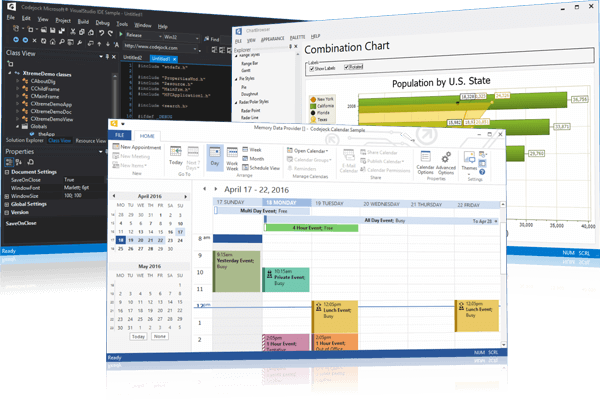
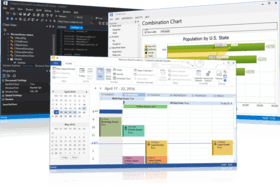
Codejock Xtreme ToolkitPro (英語版) - Visual C++ MFC - 2008 Vol 1 のスクリーンショットプロフェッショナルなGUIアプリケーションを容易に作成。Xtreme Toolkitは、数百のMFCコンポーネントからなるツールキットであり、洗練されたGUIアプリケーションを容易に構築することができます。この膨大なオブジェクト指向のコンポーネント群は、GUIアプリケーションのあらゆる開発要求を満足できるように設計されています。Professionalエディションには、Xtreme Suite(MFC edition)と同様の、Xtreme Command Bars、Xtreme Docking Pane、Xtreme Property Gridなどの高度な機能が追加されています。


¥53,760 (税込)

Best Seller

  |  

Top Download

一般向け価格については下記に表示されています。お客様用の割引価格をご覧になるには、ログインしてください。

Xtreme ToolkitPro 2008 Vol 1 (V12.0.2) - with 30 Days Subscription

カートに追加 ¥ 53,760 (税込) 1 開発ライセンス - ソースーコード付き ダウンロード (32.7 MB)
カートに追加 ¥ 40,740 (税込) 1 開発アップグレードライセンス - ソースーコード付き – 他のCodejock製品から 要確認 ダウンロード (32.7 MB)
カートに追加 ¥ 69,300 (税込) 2 Developer License - includes Source code ダウンロード (32.7 MB)
カートに追加 ¥ 83,160 (税込) 3 Developer License - includes Source code ダウンロード (32.7 MB)
カートに追加 ¥ 94,080 (税込) 4 開発チームライセンス - ソースーコード付き ダウンロード (32.7 MB)
カートに追加 ¥ 75,285 (税込) 4 開発チーム アップグレード ライセンス - ソースーコード付き – 他のCodejock製品から 要確認 ダウンロード (32.7 MB)
カートに追加 ¥ 110,985 (税込) 5 Developer License - includes Source code ダウンロード (32.7 MB)
カートに追加 ¥ 124,845 (税込) 6 Developer License - includes Source code ダウンロード (32.7 MB)
カートに追加 ¥ 138,810 (税込) 7 Developer License - includes Source code ダウンロード (32.7 MB)
カートに追加 ¥ 147,945 (税込) 8 開発チーム ライセンス - ソースーコード付き ダウンロード (32.7 MB)
カートに追加 ¥ 118,440 (税込) 8 開発チーム アップグレード ライセンス - ソースーコード付き – 他のCodejock製品から 要確認 ダウンロード (32.7 MB)
カートに追加 ¥ 537,285 (税込) 1 サイトワイド ライセンス (指定された場所内での開発ライセンス無制限) - ソースーコード付き ダウンロード (32.7 MB)

Xtreme ToolkitPro 2008 Vol 1 (V12.0.2) - with 1 Year Subscription

カートに追加 ¥ 67,200 (税込) 1 開発ライセンス - ソースーコード付き ダウンロード (32.7 MB)
カートに追加 ¥ 50,925 (税込) 1 開発アップグレード ライセンス – 他のCodejock製品から - ソースーコード付き 要確認 ダウンロード (32.7 MB)
カートに追加 ¥ 83,160 (税込) 2 Developer License - includes Source code ダウンロード (32.7 MB)
カートに追加 ¥ 97,125 (税込) 3 Developer License - includes Source code ダウンロード (32.7 MB)
カートに追加 ¥ 107,625 (税込) 4 開発チーム ライセンス - ソースーコード付き ダウンロード (32.7 MB)
カートに追加 ¥ 86,100 (税込) 4 開発チーム アップグレード ライセンス - ソースーコード付き – 他のCodejock製品から 要確認 ダウンロード (32.7 MB)
カートに追加 ¥ 124,845 (税込) 5 Developer License - includes Source code ダウンロード (32.7 MB)
カートに追加 ¥ 138,810 (税込) 6 Developer License - includes Source code ダウンロード (32.7 MB)
カートに追加 ¥ 152,670 (税込) 7 Developer License - includes Source code ダウンロード (32.7 MB)
カートに追加 ¥ 161,490 (税込) 8 開発チーム ライセンス - ソースーコード付き ダウンロード (32.7 MB)
カートに追加 ¥ 129,150 (税込) 8 開発チーム アップグレード ライセンス - ソースーコード付き – 他のCodejock製品から 要確認 ダウンロード (32.7 MB)
カートに追加 ¥ 672,000 (税込) 1 サイトワイド ライセンス (指定された場所内での開発ライセンス無制限) - ソースーコード付き ダウンロード (32.7 MB)

Xtreme ToolkitPro - Subscription Renewal

カートに追加 ¥ 22,785 (税込) 1 開発ライセンス 要確認 ダウンロード (29 KB)
カートに追加 ¥ 30,450 (税込) 2 Developer License 要確認 ダウンロード (29 KB)
カートに追加 ¥ 37,380 (税込) 3 Developer License 要確認 ダウンロード (29 KB)
カートに追加 ¥ 42,945 (税込) 4 開発チーム ライセンス 要確認 ダウンロード (29 KB)
カートに追加 ¥ 51,240 (税込) 5 Developer License 要確認 ダウンロード (29 KB)
カートに追加 ¥ 58,170 (税込) 6 Developer License 要確認 ダウンロード (29 KB)
カートに追加 ¥ 65,100 (税込) 7 Developer License 要確認 ダウンロード (29 KB)
カートに追加 ¥ 69,930 (税込) 8 開発チーム ライセンス 要確認 ダウンロード (29 KB)
カートに追加 ¥ 227,535 (税込) 1 サイトワイド ライセンス (指定された場所内での開発ライセンス無制限) 要確認 ダウンロード (29 KB)

すべてのご注文にて弊社標準の 契約条件および返品条件の内容が適用されます。 

一般向け価格については上記に表示されています。お客様用の割引価格をご覧になるには、ログインしてください。

What’s new in Codejock 2008 Vol. 1?

  • XAML Markup Support: Markup can be used to add hyperlinks, buttons, images, beautify the text, etc. inside Codejock controls such as the ShortctBar, TaskPanel, Label, etc. Usually this applies to the ToolTip, Caption and Text properties for a control.
  • Outlook 2007 Style Caption Bar: The new caption bar gives users new ways to change the current day\view of the calendar view.
  • Codejock Skinbuilder Tool:Codejock Software’s new Skinbuilder tool allows users to edit existing skins or create their own to be used with SkinFramework.
  • Access 2007 Style Tabs:Access 2007 style tabs are available for CommandBars, Docking Pane and Tab Control.
  • Visio Style Side Docking Panes: Side docking enables panes to be docked to the inside edge of the client area of an application, keeping the currently set width and height.
  • Office 2007 Black, Blue, and Silver Colors: All Codejock controls that support the Office 2007 style can use blue, black and silver colors.
  • Mini Toolbar: MiniToolbar is an Office 2007 style context toolbar used to display options relevant to the task at hand.
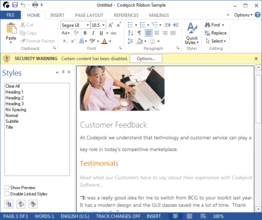
  • Message Bar: The Office 2007 style message bar similar to that displayed when opening a document with an "unsafe" macro or other "unsafe" content in MS Word 2007. It can be used to display any custom message to the user.
  • All Ribbon Elements Implemented: With the addition of the Mini Toolbar and Message Bar the Ribbon now complies with all of the Office 2007 UI Guidelines. All Office2007 elements are now implemented, both required and optional.
  • Statusbar Switches, Progressbar and Sliders: Office 2007 style switches and sliders can now be used in the Statusbar.
  • Visual Studio 2008 Style Theme: CommandBars can now be themed to look like Visual Studio 2008.
  • Button DropDowns: The button control has been enhanced to look like a button dropdown.
  • Hyperlink, Bitmap and Markup Label CommandBar Controls: Hyperlink, Bitmap and Markup Label controls bring even more options to get user input from CommandBars and Ribbon.

What’s new in Codejock Xtreme ToolkitPro 2007 Vol 2?

  • Office 2007 Style HTML SuperTips: HTML tooltips allow valid snippets of HTML to be used to format tip windows
  • Outlook 2007 Style Calendar Appointment Categories: Categories replace the old appointment labels and there can be several categories set to any appointment
  • Excel Style Header and Footer Rows: Header and footer rows allows rows in the report to always remain visible at the top and bottom of the report
  • Multiple In-place Property Grid Buttons: Each property grid item can have several buttons associated to make it easier for users to select data for the item
  • Tabbed List and Tree View: Tabbed list and Tree view controls have the same functionality as a tab control, only they use an alternative method of navigation

What’s new in Codejock Xtreme ToolkitPro 2007 Vol 1?

Vol 1 is the 1st major release for 2007 that introduces Vista style Task Dialog, SkinFramework for .NET with RTL support, built-in Slider and Spin Button controls for Property Grid, Multiple Resources for Each Calendar Day, Enhanced Report Control Memory Management, updated language translations including support for Bulgarian and Turkish languages.

What's new in Codejock Xtreme ToolkitPro 2006 Q4?

Q4 is the fourth major release for 2006 incorporating several new enhancements that include the new Office 2007 silver theme, RibbonBar Vista glass effect, Ribbon and CommandBar Office 2007 Style ScreenTips, variable Ribbon and CommandBar font sizes, Office 2007 style system popup menu, Vista Skins for SkinFramework, brand new Syntax Editor control, CommandBar Radio button, CommandBar color picker control, Docking Pane keyboard navigation, Print Preview for Calendar and Report Control, MDI and Context menu manager, Built-in calendar dialogs, and the ability to automatically convert standard VB6 menus to commandbars.

What's new in Codejock Xtreme ToolkitPro Vol 3?

Vol 3 is the third major release for 2006 incorporating several new enhancements that include new Office 2007 style Galley Components, full support for Right-To-Left (RTL) languages, Skin Framework support for PNG file format, new Ribbon Bar themes Obsidian (black) theme and Office 12 (Aqua) color theme from Beta 1, Office 2007 style Ribbon and Command Bar animation effects, improved compatibility with automated testing tools, and full support for Windows Vista and Windows x64 platforms.


Xtreme Toolkitは多くの機能を備えており、さまざまな高機能をアプリケーションに付加することができます。Xtreme ToolkitのOffice Colorization Manager(Office配色マネージャ)には、OfficeがWindowsで使用しているカラー設定と同一の色数が扱えるので、アプリケーションにとっては、Officeとほとんど同様の配色が可能になります。Xtreme Toolkitを使用すると、わずかコード1行でOfficeスタイルや洗練されたメニューを作成することができ、開発時間を大幅に短縮できます。また、メニューに既存のツールバーリソースを使うように設定することも、ユーザがシェブロンスタイルのボタンを押して(あるいはホバリングして)メニューを展開するまでメニューを非表示にする一連のコマンドを定義することもできます。さらにアニメーションや影付き効果を使用して、メニューをお望みのように表示することもできます。アニメーションのディレータイム(切り替え)は簡単に設定可能で、Random(ランダム)、Unfold(展開)、Slide(スライド)、Fade(フェード)やNone(効果なし)などのあらかじめ定義されている中から効果設定を選ぶことができます。さらにユーザが独自の効果設定をすることもできます。

Accelerator Key Manager(アクセラレータキーマネージャ)は、メニューコマンドにショートカットを素早く簡単に割り当てる機能を備えています。これらの設定情報を、アプリケーション全体として保存することも、ドキュメントごとに保存することもできます。Xtreme Toolkitのカスタマイズが可能なツールメニューを使用すれば、ワークスペースにツールメニューを簡単に挿入することができです。また、メニューコマンドをプログラムファイルやWebページに割り当て、アプリケーションから直接実行することもできます。メニューバーコンポーネントには、ドッキングが可能なメニューバー用のツールバースタイルもあります。ワークスペースウィンドウの任意の場所に、アプリケーションメニューを分離することや、ドッキングすることも簡単です。

Xtreme Toolkitには、多種多様のコントロールバーが完備されています。たとえば、Officeスタイルのツールバーとメニューバー、ハイカラーツールバー、マルチフレームドッキング、カラーピッカーツールバーのボタン、ティアオフポップアップウィンドウ、カスタムステータスバー、ドッキングウィンドウ、Rebarコントロールなど、コントロールバーに必要とされるすべてを備えています。また、"Tip of the day dialog"(その日のヒントダイアログ)やフォルダ参照ダイアログ、サイズの変更が可能なレイアウトマネージャやMDI Windowsマネージャなどたくさんのダイアログオプションも含んでいます。Xtreme Toolkitのショートカットバー機能としては、Officeスタイルのショートカットバー、VS.NETスタイルのツールボックス、ページに共通のコントロールなどがあります。

Xtreme Toolkitはさらに数多くの機能を装備しています。上にあげた以外の機能として、ボタンコントロールやコンボボックスコントロール、WindowsシェルAPI、静的コントロール、編集コントロール、ツリーコントロール、リストボックスコントロール、タブコントロール、各種のビューや、Visual Studioとのシームレスな統合などをあげることができます。

Xtreme Toolkitではドキュメントの充実も図っています。このドキュメントを利用して、Microsoft OfficeやVisual Studio.NET、Internet Explorerと同等の洗練されたGUIを作成することができます。Xtreme Toolkitには、継続的に機能の拡張と改善がなされており、新しいバージョンが頻繁にリリースされています。このような状況の下、常に最新バージョンをフルサポートでご利用いただけます。最新の機能拡張版とバグ修正情報にアクセスしていただけるよう、Xtreme Toolkit自体とサンプルプロジェクトのソースコードが同梱されています。

Codejock Software's Xtreme Toolkit Professional provides all of the features found in the standard version of the Xtreme Toolkit plus all of the advanced features found in the Xtreme Suite, including Xtreme Command Bars, Xtreme Docking Pane and Xtreme Property Grid.

Xtreme Command Bars

Codejock Software's Xtreme Command Bars provides Windows developers with a sophisticated Office style Command Bars and One Note style MDI tab windows. The framework fully supports menu and toolbar customization to give you more control over your applications workspace. Xtreme Command Bars comes with built in theme support that will allow you to choose from predefined themes such as Officexp, Office 2003, Visual Studio .NET, or create your own custom theme.

Xtreme Command Bars supports all the features you would expect from an enterprise class component.

  • MicrosoftStyle Toolbars
  • MicrosoftStyle Menus
  • MicrosoftStyle MDI Tabs

Xtreme Command Bar provides complete menu and toolbar customization.

  • Intelligent Menus
  • Tear-Off Menus and Toolbars
  • Drag and Drop Commands
  • Edit, Copy, Delete and Modify Commands
  • Add and Remove Toolbar Commands Dynamically
  • User Defined Toolbars
  • Toggle Large or Small Toolbar Icons
  • Toggle Screen Tips
  • Hide and Show Toolbars

With Xtreme Command Bar you can choose from different display styles for your command icons.

  • Windows XP Theme Support plus Alpha Icons
  • Faded Menu and Toolbar Icons
  • Disabled Menu and Toolbar Icons
  • Menu and Toolbar Icon Shadows
  • Menu Animations and Shadows

In addition to full menu and toolbar control, Xtreme Command Bar offers several specialized controls that you can use in your application.

  • Office Colorization Manager
  • Office Style Combo Box
  • Office Style Edit Box
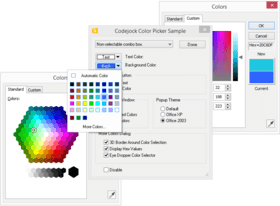
  • Color Selector
  • Popup Window
  • Popup Toolbar
  • Font Selection Combo Box
  • Font Size Combo Box

Xtreme Command Bars provides several built in themes that are ready to use. You can choose from several predefined themes or create your own.

  • Office 2003
  • Office XP
  • Office 2000
  • Custom

Xtreme Docking Pane

Codejock Software's Xtreme Docking Pane provides Windows developers with a sophisticated Visual Studio.NETstyle docking pane. Windows developers can easily create tear off tabs and auto hide windows that allow for a more manageable application workspace. The docking panes comes with built in theme support that will allow you to choose from predefined themes such as Visio and Visual Studio .NET, or create your own custom theme.

Xtreme Docking Pane supports many standard features you would expect from an enterprise class component.

  • Nested Grouping
  • Tear Off Tabs
  • WYSIWYG DotNET and Visio Style Docking
  • Sliding Auto Hide Windows
  • Pinnable Panes
  • Float and Dock Panes
  • Drag-n-Drop Pane Positioning
  • Active Pane
  • Hide and Show Panes

Xtreme Docking Pane provides several built in themes that are ready to use. You can choose from any of the predefined themes or create your own.

  • DotNET
  • Visio
  • Grippered
  • Default
  • Custom

Xtreme Docking Pane provides the ability to load and save your panel layouts to an XML format. You choose to define several layouts and load them dynamically during runtime.

  • XML and Resource Pane Layout Serialization

Xtreme Property Grid

Codejock Software's Xtreme Property Grid provides Windows developers with a sophisticated Visual Studio.NETstyle property grid. Windows developers can easily create a hierarchical list of editable properties and represent any data type or sub-item. The property grid comes with a built in toolbar for easy sorting and grouping, and a help panel to display information on each selected item.

Xtreme Property Grid supports many standard features you would expect from an enterprise class grid component.

  • Integrated Toolbar
  • Integrated Help Panel
  • Hierarchical List of Editable Properties
  • Data Sorting
  • Customizable appearance

Xtreme Property Grid provides several built in data types that are ready to use. You can choose from any of the predefined data types or define your own.

  • Text
  • Boolean
  • Color
  • Font
  • Size
  • Number
  • Read Only

Xtreme Property Grid can support an unlimited number of data types by allowing you to create your own customized type. Our sample projects show you how to do this easily, here are just a few.

  • Combo List
  • Check Box
  • File Selection
  • Icon
  • Mask Edit
  • Slider
  • Spin Button