by ComponentOne - 製品のタイプ: コンポーネント / .NET WinForms / 100% Managed Code
ComponentOne Spell for .NET by ComponentOne
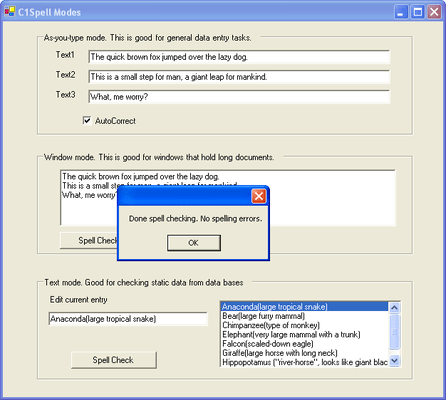
Add complete spell-checking and thesaurus functionality to your .NET applications. ComponentOne Spell for .NET is the .NET version of VSSPELL 6.0. This Windows Forms .NET product includes two powerful components: C1Spell and C1Thesaurus. ComponentOne Spell for .NET allows you to easily create custom dictionaries and thesaurus files that you may distribute with your .NET applications. Simply place the C1Spell and C1Thesaurus components on your form and you instantly have the power of extensive spell-checking and thesaurus functionality. Visual Studio 2005 and Visual Studio 2008 compatible (VS2005, VS2008)
ComponentOne Spell for .NET is sold as part of ComponentOne Studio Enterprise and the ComponentOne Studio for WinForms.
C1Spell Component
The C1Spell component features a built-in dialog box, the ability to generate alternate spelling for suspect words, create new main dictionaries based on existing main dictionaries (such as those created in Microsoft Word), and ignore or change all suspect words.
Building and maintaining dictionary files - ComponentOne Spell for .NET includes a utility program that allows you to create and maintain dictionary files. You can use it to add words to the main dictionary or to create new dictionaries in languages other than English.
C1Thesaurus Component
ComponentOne Spell for .NET is your solution for adding thesaurus functionality to your .NET applications. Give your users a professional thesaurus similar to the one provided by Microsoft Word with C1Thesaurus! Time-saving features of C1Thesaurus include: a built-in dialog box; the ability to create new thesaurus files based on existing thesaurus files; and the ability to add complete thesaurus functionality with minimal code.
ComponentOne Spell for .NET is your choice for adding professional spell checking and thesaurus functionality to your .NET applications quickly and easily with little code.
Features
ComponentOne Spell for .NET was designed to help you easily add spell checking and thesaurus functionality to your application, while providing you with advanced features including:
As-you-type spell-checking - Use the CheckTyping method to monitor and underline spelling mistakes as the user types or provide users with custom warnings when they make typing errors
AutoLink to RichTextBox components - Link C1Spell to regular TextBox controls or link to RichTextBox controls and correct spelling mistakes without disturbing the text format
New CheckControl method - Use the new CheckControl method to link C1Spell to a control. While spell-checking, C1Spell will automatically highlight suspect words when the user interacts with the built-in spelling dialog box
Unlimited text length - Spell-check entire documents at once if you desire. You can assign strings larger than 64k to the Text property, or use the CheckControl method to link C1Spell to regular or rich text editors with documents of unlimited length
Improved spelling dialog box - Give your application a consistent look by setting the font to be used in the spelling dialog box. Users can also click a checkbox to enable or disable suggestions. The new spelling dialog box even remembers its position when the user moves it around the screen, making it much easier and more intuitive to use
Custom dictionaries - ComponentOne Spell for .NET features a powerful utility that allows the creation of custom-built dictionaries and thesaurus files that you may distribute with your application. At design-time, building a custom dictionary (or thesaurus) is as simple as launching the included DictUtil.exe utility (ThesUtil.exe, respectively) and "dumping" the specified dictionary file (.DCT) into a text file with a single button click. Once in the .TXT format, you may open and edit the file with any word processing editor to build up to five different custom libraries. The Dictionary Utility allows you to set read-only or read/write permissions to any dictionary file you create with the simple selection of a checkbox, allowing users to add new words, or not, to your dictionary. Once you are finished modifying the .TXT file, you may use the utility to convert it back to the .DCT format and distribute it with your application. Customized dictionaries and thesaurus files are particularly helpful for words and phrases specific to certain industries
Maximized efficiency - ComponentOne Spell for .NET employs a word caching technique to maximize speed and efficiency
PartNumbers: PC-512171-147265 512171-147265 PC-512171-147266 512171-147266 PC-512171-147267 512171-147267
Publisher PartNumbers: ENT-STUDIO-GOLD-U ENT-STUDIO-U ESD-ENT-STUDIO-GOLD-U ESD-ENT-STUDIO-U ESD-N-SPELL-R
PurchaseOptions: ComponentOne Spell for .NET (To renew your current C1 Spell for .NET Subscription - Minimum Quantity 5)* 1 Developer Subscription Renewal License - Minimum Quantity 5 , ComponentOne Studio Enterprise 2008 v2 (To upgrade your expired C1 Spell for .NET Subscription to a C1 Enterprise Studio Subscription)* 1 Developer Upgrade Subscription License - from any Individual ComponentOne Product Subscription , ComponentOne Studio Enterprise 2008 v2 (To upgrade your expired C1 Spell for .NET Subscription to a C1 Enterprise Studio Subscription)* 1 Developer Upgrade Subscription License with Gold Support - from any Individual ComponentOne Product Subscription
Resources: Read the ComponentOne Spell for .NET help file, Read End-User License Agreement for ComponentOne Software, Download the ComponentOne Studio for WPF 2008 v2 evaluation on to your computer - Displays Nag Screens, Download the ComponentOne Studio for ASP.NET 2008 v2 evaluation for .NET 1.1 on to your computer - Displays Nag Screens, Download the ComponentOne Studio for ASP.NET 2008 v2 evaluation for .NET 2 and higher on to your computer - Displays Nag Screens, Download the ComponentOne Studio for WinForms 2008 v2 evaluation for .NET 2 and higher on to your computer - Displays Nag Screens, Download the ComponentOne Studio for Mobile Devices 2008 v2 for .NET 2 or higher evaluation onto your computer - Displays Nag Screens, Download the ComponentOne Studio for Mobile Devices 2008 v2 for .NET 1.1 evaluation onto your computer - Displays Nag Screens, Download the ComponentOne Studio for WinForms 2008 v2 evaluation for .NET 1.1 on to your computer - Displays Nag Screens, Download the ComponentOne Studio ActiveX 2008 v2 evaluation onto your computer - Displays Nag Screens
Operating System for Deployment: Windows XP, Windows 2000, Windows NT 4.0
Architecture of Product: 32Bit
Product Type: Component
Component Type: .NET WinForms, 100% Managed Code
Built Using: Visual C# .NET
Compatible Containers: Microsoft Visual Studio 2008, Microsoft Visual Studio 2005, Microsoft Visual Studio .NET 2003, Microsoft Visual Studio .NET, Microsoft Visual Basic 2008, Microsoft Visual Basic 2005, Microsoft Visual Basic .NET 2003, Microsoft Visual Basic .NET, Microsoft Visual C++ 2008, Microsoft Visual C++ 2005, Microsoft Visual C++ .NET 2003, Microsoft Visual C++ .NET, Microsoft Visual C# 2008, Microsoft Visual C# 2005, Microsoft Visual C# .NET 2003, Microsoft Visual C# .NET, Delphi 2006 (10.0), Delphi 2005 (9.0), Delphi 8.0, C#Builder, .NET Framework 3.5, .NET Framework 3.0, .NET Framework 2.0, .NET Framework 1.1, .NET Framework 1.0
Product Class: User Interface Components
Search Items: New Product Jan 03, New Version Feb 04, New Product Apr 04, New Version Apr 04, New Product May 04, New Product Aug 04, New Product Oct 04, New Product Jan 05, New Product Feb 05, New Product May 05, New Product Sep 05
Keywords: Spelling spell spel speling check spellcheck componentone, component1, componentone studio, component one, componentone studio enterprise, componentone com, www componentone, componentone llc, componentone review, componentone activex, component one studio, studio enterprise, studio for winforms Enterprise Partner ComponentOne Spell for .NET