ExpressScheduler Suite - VCL - V3.40 - 概要

by Developer Express - 製品のタイプ: コンポーネント / VCL

結果

ExpressScheduler Suite by Developer Express

A scheduling library for Delphi/C++Builder developers with unrivaled features and flexibility. ExpressScheduler is a scheduling library built upon Developer Express’s industry-leading visual infrastructure, ExpressScheduler will help you build scheduling applications that mimic the UI of Microsoft Outlook and blow away your end-users each time they start your application. With ExpressScheduler, you will not have to spend any unnecessary time on customization options or inadequate visual elements. Designed to be a cohesive and integrated solution to address the needs of software developers it will help you solve your business requirements without frustration - from the moment you install it into your IDE.

Building scheduling capabilities into your application requires that you deliver features end-users have come to expect from today's leading PIMs. An advanced scheduling system is not just about appearances but how information can be presented and processed by end-users in an efficient manner. Building upon the interface options introduced in Microsoft Outlook, ExpressScheduler gives you the ability to create a superior UI with unrivaled flexibility and design options. Once you begin using ExpressScheduler, you will find it one of the most capable products of its kind in the market and loaded with dozens and dozens of features that are a simple property setting away from implementation.

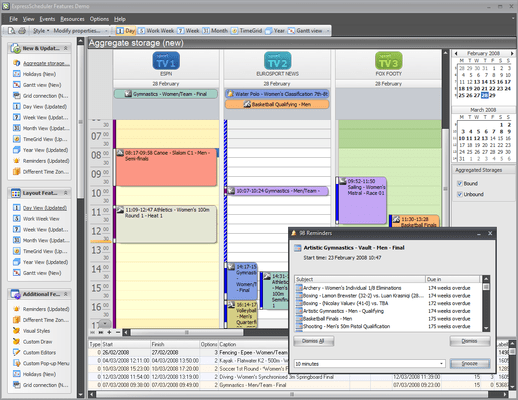
Days View and Time Rulers - The Day View offers the most detailed picture of events for a given day. It displays events within vertical timelines where an event's top-most edge corresponds to its start time and its bottom-most edge is the finish time. The primary features of this layout option are:

Work time display - You are able to specify work hours within the timeline for more efficient end-user scheduling

Multi-Day View - You can easily switch from a single day view to multiple days to obtain a better perspective of time availability

The Day view displays the current date/time by highlighting the header corresponding to the current date and indicating the current time on the time ruler

Display all-day events above the timeline

An advanced time ruler with a customizable scale offering you the ability to display an additional time ruler for a different time zone

Scroll buttons displayed at the top or bottom of time rulers that indicate whether additional events exist in any non-visible region of the Day view. These buttons can be clicked to scroll to the next/previous event

Week View - The ExpressScheduler Week view displays events for any given weekly period. Its primary features include:

Weekend compression (also available for multiple resource views when grouping by dates - in this instance, week days are arranged horizontally)

Able to display an event's start and end times using either digits or clocks

Optional suppression for the end time of individual events

Buttons indicating that additional events exist but which did not fit into the screen region. Clicking this button switches the view to the corresponding date

Current date indication by highlighting the corresponding date header

Multi-Week View - The weeks view is the least detailed view designed to allow your end users to browse and analyze long-term plans. This view positions days one after another horizontally so that they construct weeks while weeks are placed one under another. Its primary features include:

Automatic coloring for dates corresponding to different months

Optional weekend compression

Optional suppression of event end times

Showing event start time as digits or clocks

Buttons indicating that additional events exist but which did not fit into the screen region. Clicking this button switches the view to the corresponding date

Current date indication by highlighting the corresponding date header

Multiple Resources Display - The multiple resources display enables your end users to browse several plans (for any entity such as an individual or office location, etc) simultaneously. To enable this feature, you simply need to provide several resources in the bound storage. Each resource is just an ID for a particular plan - it has a unique label and a caption to display within the calendar. As such, it doesn't matter which resource types you need to display - human resources, department resources, etc. Once resources have been created, the scheduler will display several parallel timelines. Following is a brief overview of the features available within the multiple resource view:

If resources are present, you can specify whether plans should be grouped first by dates or by resources. Note that you can change the default grouping style and override it for particular view types (days view, week view and weeks view)

Timelines for different resources are automatically colored (You can also provide colors for resources manually.)

The scheduler provides a context menu allowing you to invoke the resource customization window. This enables end users to show, hide and rearrange resources with ease

Date Navigator - The ExpressScheduler's built-in date navigator offers extremely intuitive access to desired time frames. It doesn't matter whether you need to select a particular day, a range of days, a week or multiple weeks - everything is done with a single mouse operation! Each date selection change automatically updates the scheduler's view but this is not the end of the story - you can also use the date navigator as a separate control for any purposes you need. Its features include:

Ability to display week numbers

Optional bold mark-up for dates that have events assigned

Switching between integral or live sizing

Quick month navigation by clicking the month header and scrolling the popup month list

Control Box - The ExpressScheduler allows you to insert any control into the region under the built-in date navigator. This gives you the ability to provide really consistent user interfaces whenever you need to add custom control elements to a scheduler, imitate the MS Outlook's task list or display any other scheduling related information.

What's new iu ExpressScheduler Suite V3.x

Gantt View - This view type allows you to specify complex tasks sequences - a task or multiple tasks can be required to be completed before other tasks can be started. Once you've specified a required sequence, it is automatically visualized across a horizontal timeline. Task dependency is shown via connector lines.This view type can display completion percentage for each individual task. An overall progress indication option is also available.

Task Pane (requires the ExpressQuantumGrid Suite) -

Holiday Events Sub-System Improved - The ExpressScheduler now provides a holiday management sub-system

Storage Component Enhanced - You can now bind the scheduler to several data storage components simultaneously

Office 2007 Style Navigation

Enhanced Month View

Extended TimeGrid View Improved

PartNumbers: PC-515322-176589 515322-176589 PC-515322-176591 515322-176591 PC-515322-176590 515322-176590

PurchaseOptions: ExpressScheduler V3.40 1 Developer License includes Source Code , ExpressScheduler V3.40 1 Developer License with Source Code - Upgrade from V2.x , ExpressScheduler V3.40 1 Developer License with Source Code - Upgrade from V1.x

Resources: Read the ExpressScheduler help file

Operating System for Deployment: Windows XP, Windows 2000, Windows NT 4.0

Architecture of Product: 32Bit

Product Type: Component

Component Type: VCL

Compatible Containers: C++Builder 2009, C++Builder 6, Delphi 2009, Delphi 2006 (10.0), Delphi 2005 (9.0), Delphi 8.0, Delphi 7.0

Product Class: User Interface Components

Search Items: New Product Aug 04, New Product Oct 05

Keywords: Calendar calendaring calendars Scheduling Schedule Schedules planning plan scheduling schedule schedules scheduler Developer Express devexpress Enterprise Partner Express Scheduler Schedule planning planner timetable

商品検索

検索したい単語を入力して下さい:

スクリーンショットギャラリー

Award