Sax CommStudio - .NET - Fall 2008

by Sax.net - 製品のタイプ: コンポーネント / アプリケーション / .NET WinForms / .NET Class / 100% Managed Code / Managed/Unmanaged Code - without COM

この商品については、日本語の説明書きはございません。
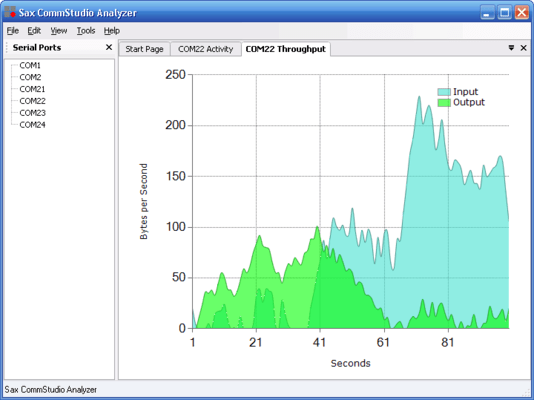
Sax CommStudio - .NET - Fall 2008 のスクリーンショットConnect to serial ports and transfer files using 100% managed .NET code. Sax CommStudio makes it easy to let your application communicate using the serial port and modems. Sax CommStudio is a comprehensive set of components and visual debugging tools that integrate remote systems and devices with Visual Studio 2005 and Visual Studio 2008. Developing software that integrates with legacy systems and external devices presents significant challenges, including the need for real time communications and the lack of direct control over external systems. Sax CommStudio’s integrated debugging tools extend the power of Visual Studio beyond the desktop to external systems and devices.

¥110,985 (税込)

一般向け価格については下記に表示されています。お客様用の割引価格をご覧になるには、ログインしてください。

Sax CommStudio Professional Fall 2008

カートに追加 ¥ 110,985 (税込) 1 Developer Subscription License ダウンロード (1.3 MB)
カートに追加 ¥ 55,440 (税込) 1 Developer Subscription Renewal License 要確認 ダウンロード (1.3 MB)

すべてのご注文にて弊社標準の 契約条件および返品条件の内容が適用されます。 

一般向け価格については上記に表示されています。お客様用の割引価格をご覧になるには、ログインしてください。

Sax CommStudio
Connect to serial ports and transfer files using 100% managed .NET code. Sax CommStudio is up to four times faster than regular .NET. It supports robust X/Y/ZModem file transfers and has integrated debugging tools. With Sax CommStudio you can connect to serial ports, dial modems with TAPI and perform robust file transfers.

Connect to Serial Ports
Up to four times faster than regular .NET
CommStudio is very fast: Smart design and highly-optimized code make CommStudio up to four times faster than regular .NET SerialPort and SerialStream classes.

Why performance matters
Performance affects more than just the speed of your application. It impacts the overall system load, power usage, and battery life. Higher performance also results in increased scalability. Many CommStudio developers have deployed application that service hundreds of serial ports on a single system. The entire CommStudio assembly is less than 250K of highly optimized managed C# code, including all serial port, file transfer, and barcode classes.

Dial Modems with TAPI
Plug and Play Modem Dialing
Let the Windows Telephony API (TAPI) do all the hard work for you. With Sax CommStudio, you never have to worry about modem setup again. In addition to modem device independence, your users will also enjoy automatic handling of dialing rules based on the user's location and area code.

Make your application easier to use
Reduce technical support and increase end user satisfaction by using the settings defined in the the Windows Control Panel.

Modem Information At Your Fingertips
Sax CommStudio provides simple access to the Windows Telephony API (TAPI) though an elegant object model. For example, to show a list of available modems in the system, you can use the following code:


Dim modem As CommStudio.Connections.ModemInfo

For Each modem In CommStudio.Connections.ModemInfo.Modems
ModemList.Items.Add(modem)
Next

Once the user has selected a modem, dialing a number and establishing a connection is very easy:


ModemConnection1.PhoneNumber = "+1 (541) 555-1234"
ModemConnection1.Open()

Sax CommStudio automatically dials the correct number based on the current location defined in the Windows Control Panel. Once the connection is established, you can start sending and receiving data.

Robust File Transfers

File Transfer Protocols
Sax CommStudio includes robust, time-tested implementations of the XModem, YModem, and ZModem file transfer protocols.
Each protocol implementation has been proven to interoperate flawlessly with a very wide variety of systems, ranging from mobile devices to mainframe computers.

ZModem YModem XModem

Optimized for reliability and performance
Sax CommStudio contains the most advanced implementation of ZModem available. You'll enjoy advanced error recovery, automatic streaming, and block size adjustment to get the fastest transfer under even the most difficult bandwidth circumstances.

About ZModem
The ZModem protocol was developed by Chuck Forsberg in 1986 for the Telnet packet switching network. ZModem has several important advantages over XModem and YModem:

  • Variable block size allows the size of blocks to grow or shrink depending on the quality of the connection
  • Sliding window support allows the protocol to keep sending data without having to wait for an acknowledgment for each block. This results in a significant performance increase
  • Autostart makes it possible for applications to recognize the start of a new transfer, making the application easier to use
  • 32-bit CRC checking further ensures the accuracy of the contents of each file transferred
  • Auto-resume allows a failed transfer to pick up where it left off, which significantly helps the transfer of large files over bad connections

Even though ZModem's name is similar to XModem and YModem, the protocol itself is very different and much more advanced.

Extensive Device Support
Each release of CommStudio is tested to work with a wide variety of communications devices, including third-party hardware and virtual serial ports.

Reduce Support Cost
It’s likely that your application will be used in a wide and unexpected variety of environments.

By choosing a communications component with broad third-party hardware and software support you will save your organization tons of technical support time.

Free Up Processor Resources
If you’re going to handle multiple ports at once, it’s a good idea to use intelligent serial port adapters.

Every version of CommStudio is extensively tested with intelligent multi-port devices such as Digiboards and Edgeport USB to Serial adapters.

User Serial Ports Remotely
CommStudio supports serial connections over Windows Terminal Server and Remote Desktop Connection, right out of the box.

Common UI Elements
CommStudio hides the complexity of device configuration and status reporting. It provides elegant and easy to use dialogs that takes less than a few minutes to integrate in your application.

If you have time on your hands you could write the UI code for choosing and configuring serial ports yourself. For low-level settings you could tell you users to go to the Control Panel, and the high-level settings could handled by dialog boxes you create.

Getting everything working just right takes a surprising amount of effort, though: What happens if the user unplugs a USB cable and the hardware changes from underneath you? How do you handle (and test!) third party devices from different vendors?

Automated Login Scripts
Write Automated Login Scripts With Ease

Using CommStudio you can quickly build a visual front-end for a legacy terminal system. Customer research found that the large majority of serial communications applications interact step-by-step with devices or remote systems: the application would repeatedly send some data and then read the results back as a predetermined sequence of characters. Using the built-in .NET Framework SerialPort control this ends up being unnecessarily slow and complicated: you have to read the characters one by one and parse them on the fly.

Because so many developers are building login-style scripts, CommStudio equips you with an entire set of functions that make this task simple and elegant.

Compare Editions
Sax CommStudio Express is the free edition and offers a fast and convenient way to connect to serial devices.
The Professional Edition saves additional time by providing common user interface elements, file transfer protocols, and debugging tools. It also comes with a year of free upgrades and technical support.

Common Features:

  • High-performance serial communications

Additional Features in the Professional Edition

  • XModem, YModem, and ZModem File Transfers
  • Login-script helper methods
  • Common User Interface Dialogs
  • CommSpy Debugger
  • One year upgrade and support subscription
  • Plug & Play Modems using TAPI

サポート

Subscription includes free upgrades and support for 1 year.

商品検索

検索したい単語を入力して下さい:

クイック リンク

開発元/発売元

主要なカテゴリー

関連製品

関連のカテゴリー