ScanFix Xpress
by Pegasus Imaging Corporation - 製品のタイプ: コンポーネント / .NET WinForms / .NET Class / .NET WF / ActiveX OCX / VCL / VC++ Class Library
ご案内:特に説明のない限り、この商品は英語版商品になります。
Bitonal image enhancement toolkit. ScanFix Xpress is delivered as a .NET and ActiveX/COM software development toolkit, offering bitonal document image enhancement technology. Create smaller file sizes and cleaner images, ultimately resulting in higher OCR rates. Clean up images using deskew, noise removal, dot shading removal, hole punch removal, line removal, text repair, auto inverse text correction, auto negate, auto binarization, auto border crop, blank page detection, image registration, and rotate. ScanFix Xpress includes ImagXpress Professional.
一般向け価格については下記に表示されています。お客様用の割引価格をご覧になるには、ログインしてください。
ScanFix Xpress V5.1
| カートに追加 |
¥ 347,130 (税込) |
1 Developer License |
|
ダウンロード (51.8 MB) |
ScanFix Xpress V5.1 - Runtime Licenses
| カートに追加 |
¥ 27,615 (税込) |
1-4 Installations (per CPU) |
|
ダウンロード (29 KB) |
| カートに追加 |
¥ 23,520 (税込) |
5-9 Installations (per CPU) |
|
ダウンロード (29 KB) |
| カートに追加 |
¥ 20,055 (税込) |
10-24 Installations (per CPU) |
|
ダウンロード (29 KB) |
| カートに追加 |
¥ 16,905 (税込) |
25-49 Installations (per CPU) |
|
ダウンロード (29 KB) |
ScanFix Xpress V5.1 - Server License
| カートに追加 |
¥ 207,690 (税込) |
1 Server (CPU) License |
|
ダウンロード (51.8 MB) |
すべてのご注文にて弊社標準の 契約条件および返品条件の内容が適用されます。
一般向け価格については上記に表示されています。お客様用の割引価格をご覧になるには、ログインしてください。
Features
- Programming environments: Win32 visual development environments
- Sample code is included for: VB.NET, Visual C#, Delphi .NET, VB, VC++
- Deploys within .NET as a managed control
- Can be used in any development environment that hosts ActiveX/COM controls
- Confidence values are available for many operations
- User configurable debug settings to control level of detail
Image Input, Image Output, and Image Handling
- Provided through the included ImagXpress Professional .NET component and ActiveX/COM control
- Features include image viewing, compression, conversion, TWAIN scanning, annotation, printing, image processing, and more
Deskew
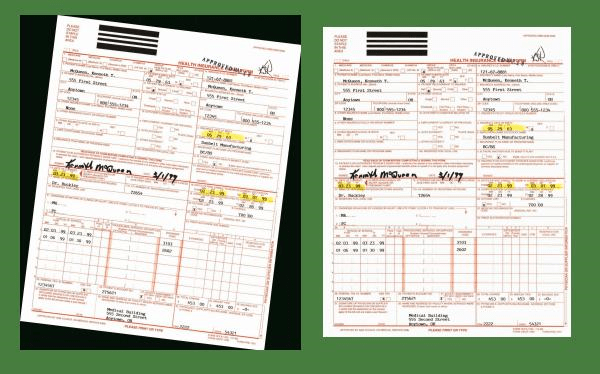
- Automatically straighten crooked images and report correction angle
- Deskew images in a fraction of a second
- Uses content of the images, not just the document
- User configurable High Quality vs. High Speed setting
- High Quality sets a higher number of places to check around the image, ultimately providing the highest level of deskew accuracy, but the image processing speed is slower
- High Speed sets a lower number of places to check around the image, ultimately providing the fastest image processing speed, but offers a slightly lower level of accuracy
Noise Removal
- Remove random specks or noise from images
- Configurable user specification of speck size, or use automatic settings
- Special Isolated Despeckle algorithm prevents removal of desired dots such as punctuation
Dot Shading Removal
- Automatically remove dot shading surrounding text for improved OCR accuracy
- Remove scanner noise caused by colored backgrounds (gray, blue, etc.)
- Reduce files sizes caused by additional pixels, without destroying text
Hole Punch & Blob Removal
- Remove hole punches and larger areas of black
- User configurable threshold settings
- Specify full page or a specific area of interest
- Reduce file sizes and storage requirements with cleaner pages
- Return count of objects found
Line Removal
- Automatically remove solid or broken lines (both horizontal and vertical) from scanned forms and documents
- Automatically repair text that intersects with lines (fill broken characters), essential for forms processing
Comb Removal (commonly used in ICR forms)
- Automatically remove data entry combs from forms
- Automatically repair text that intersects with lines (fill broken characters), essential for forms processing
Character Completion & Smoothing
- Repair, smooth and thicken incomplete characters
- Repair broken or incomplete characters to create complete characters
- Especially good on poor dot matrix text
- Smoothes ragged edges on letters
- Thickens or thins letters as needed
Auto Inverse Text Correction
- Detect and automatically convert inverted text zones
- Change white-on-black text to normal black-on-white
- Recognize inverse zones in any shape, including circular
- Remove the fill color of text
- Reduce file sizes by eliminating unnecessary black pixels
Auto Negate
- Automated reporting of black on white (normal) or white on black (negative) images
- Automated correction (user configurable to simply report or to automatically correct)
- Creates black on white images, which are often required for many other ScanFix image processing actions
Auto Binarize
- Automatically convert grayscale and color images to black and white, and clean up noisy images
- Optimize binarization results using the user configurable options
Auto Border Crop
- Automatically convert black borders to white
- Reduce image file size (both physical dimensions and compressed file size)
- Automated border crop (user configurable to simply report or to automatically correct)
- Use on microfilm or small document images that have been overscanned
Blank Page / Blank Rectangle Detection
- Identify and report blank pages, or blank areas of interest
- Configure settings to accommodate bleed-through or noisy images (i.e. ignore hole punches)
- Reduce file sizes and storage requirements by eliminating blank pages
Sub-Image Processing
- Separate out an area from the original document image prior to image processing
- Speeds up processing and outputs only the smaller area of interest
Reporting of Process Results
- Reports the location of lines, shaded regions and inverse text regions for forms recognition
- Useful in forms processing solutions for form identification and registration
Additional Image Processing
- Flip
- Mirror
- Rotate
- Smooth-Zoom
- Scale
- Set Resolution