書式設定をすばやくコピーしてオブジェクトに適用
HelpXplain 1.8.0では、プロジェクト内の複数の要素を書式設定するプロセスを簡略化する新しい書式貼り付けツールを追加
HelpXplain は、アニメーション付きの手順チュートリアル、インフォグラフィック、スクリーンキャストを作成するための包括的なツールです。スクリーンショットユーティリティ、グラフィックスエディター、アニメーションエンジンの機能を組み合わせることで、これらの魅力的なビジュアルを作成するプロセスをより効率化します。
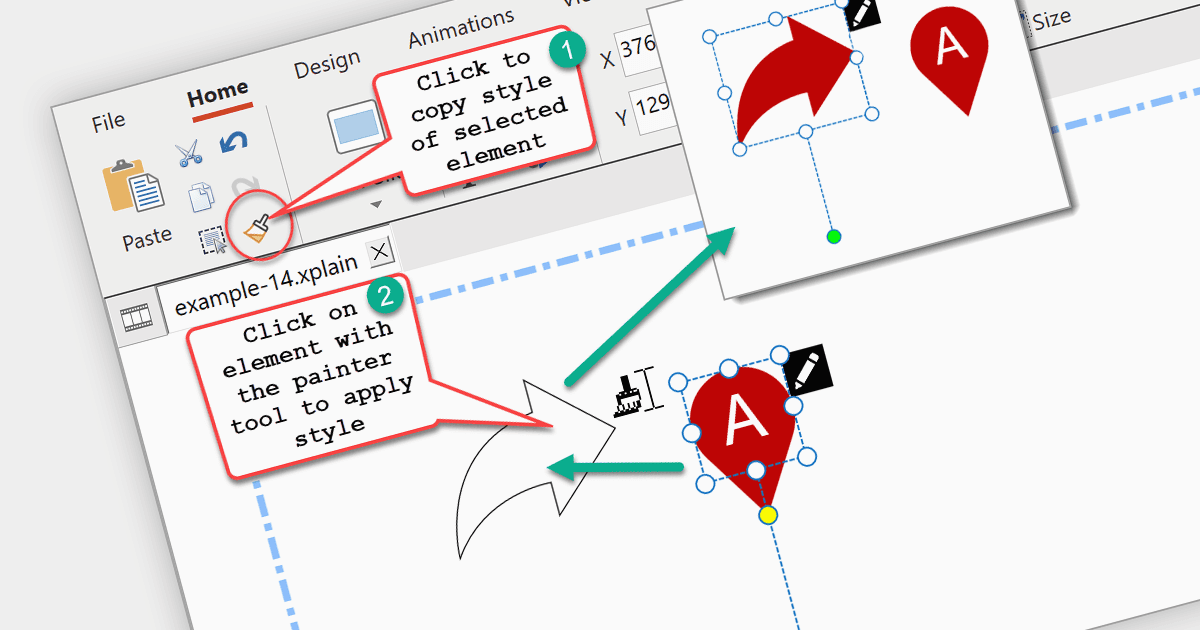
HelpXplain 1.8.0 のリリースでは、新しい Format Painter ツールが追加されました。このツールを使うと、1 つのオブジェクトの書式をすばやくコピーして別のオブジェクトに適用できます。HelpXplain プロジェクト内で複数の要素を書式設定する手順が簡素化され、統一感が保たれ、時間を節約できます。Format Painter は Microsoft Office と同様の動作をします。まず、複製したいスタイルの「元の要素」を選択し、次に Format Painter ツールをクリックしてから、スタイルを適用したい「目的の要素」をクリックします。目的の要素をダブルクリックすると、複数の要素に対してすばやくスタイリングを適用できます。
バージョン 1.8.0 で追加された内容の完全な一覧は、リリースノートをご覧ください。
詳細については、HelpXplain の製品ページをご覧ください。