グリッドインターフェースで進行状況を明確に表示
.NET WinFormsグリッドのProgressBarセルで、構造化された表形式レイアウト内でタスクまたはデータの補完を直接視覚的に表示する方法を提供
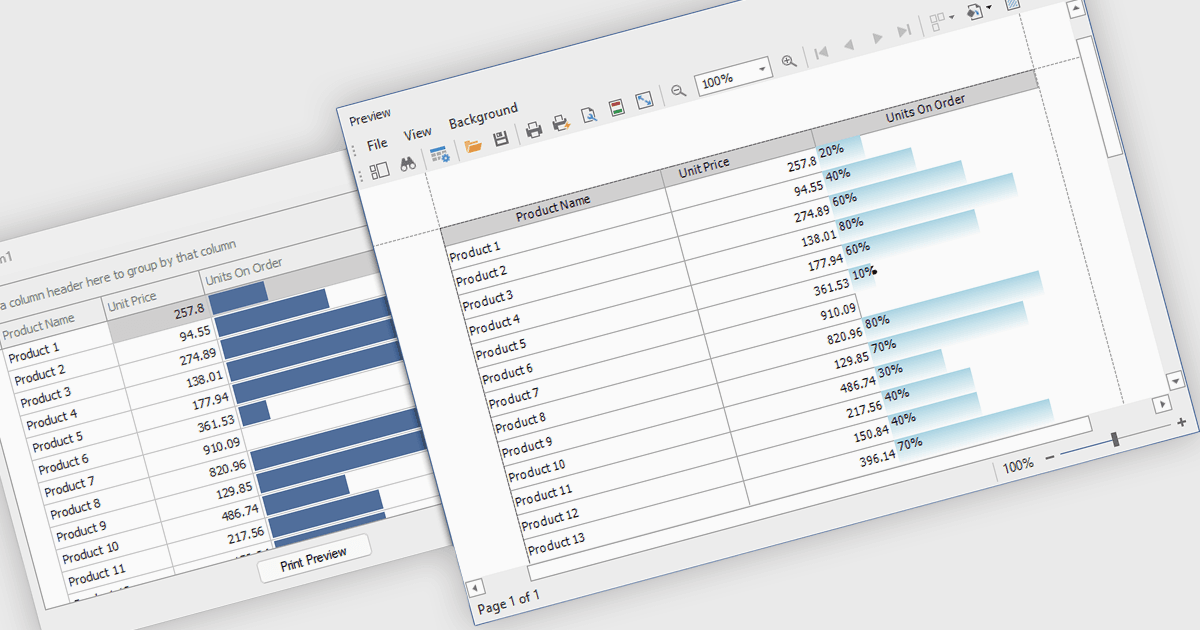
.NET WinForms グリッドコントロールにおけるProgressBarセルタイプは、水平方向のプログレスバーを使って進捗または完了レベルを視覚的に表現する、特殊化されたセルです。これらのセルは、タスク完了やデータ処理の割合などのステータス指標を、表形式のビュー内で直接追跡するのに特に役立ちます。数値の生データを解釈する必要がなく、数値の進捗状況を明確で即時に表すため、可読性が向上します。開発者にとっては、ProgressBarセルを統合することで、データ駆動型インターフェイスで進捗関連情報を伝える作業が簡素化され、標準のWindows Formsコントロールに沿った、なじみのある一貫したユーザー体験を提供します。
いくつかの.NET WinFormsグリッドコントロールは、ProgressBarセルタイプのコントロールを提供しています。たとえば:
- DevExpress WinForms Data Grid(DevExpress WinFormsの一部)は、複雑なデータ駆動型インターフェイス内でタスクの完了を明確に伝える、視覚的にリッチなProgressBarセルを組み込めます。
- True DBGrid for WinForms(MESCIUSによるComponentOne Studio WinFormsの一部)は、グリッドセルでのProgressBarの動的レンダリングを可能にし、処理中や読み込み状況などのリアルタイム指標の追跡に最適です。
- Infragistics WinDataGrid(Infragistics Ultimate UI for Windows Formsの一部)は、進捗値を視覚的に伝えるProgressBarセルをサポートし、構造化されたデータビュー内でリアルタイムのステータスを開発者が提示するのに役立ちます。
- Bunifu UI WinForms DataGrid View(Bunifu UI WinFormsの一部)は、洗練されたProgressBarセルを使ってグリッド行に直接完了状態を表示でき、モダンで応答性の高いインターフェイスに適しています。
機能と価格の詳細な分析については、.NET WinFormsグリッドコントロールの比較をご覧ください。