ブラウザーでPDFフォームフィールドを作成して編集
JavaScript PDFビューアを使用して、PDFフォームでフィールドを直接追加、名前変更、または削除。外部エディターの必要なし
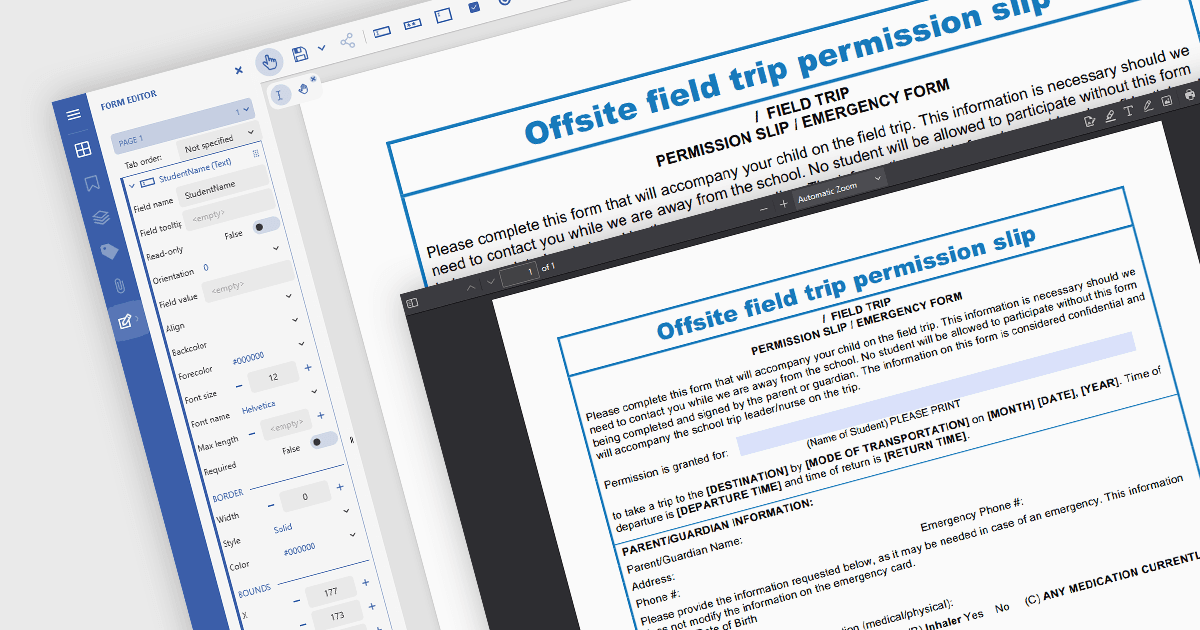
JavaScriptベースのPDFビューアでは、AcrobatスタイルのPDFフォーム内でフォームフィールドの追加、編集、削除、名前変更を行えることにより、開発者やユーザーがブラウザ上でフォームの構造とコンテンツを動的に管理できます。この機能により、外部のPDFエディターを必要とせずに、対話型PDFドキュメントをリアルタイムでカスタマイズ可能になります。新しいテキストフィールドの挿入、既存フィールドの調整、未使用フィールドの削除、データスキーマに合わせてフィールド名を更新するといった操作をサポートすることで、PDFフォームの柔軟性と使いやすさが大幅に向上します。ドキュメント自動化、デジタル署名、データ収集などのワークフローに役立ちます。特に、ユーザー主導またはプログラムによるフォーム操作が、特定のタスクやデータソースに合わせてドキュメントを調整するうえで不可欠なアプリケーションで有効です。
いくつかのJavaScript PDFビューアコンポーネントでは、PDFフォームからフォームフィールドを追加、編集、削除できます。たとえば:
- Document Solutions for PDF のMESCIUSは、Professional版にJavaScript PDFビューアを含み、開発者がフォームフィールドを変更・管理できるようにします。
- PrizmDoc Viewer(AccusoftのPrizmDocの一部)は、JavaScriptインターフェイス内でPDFフォームフィールドを調整、名前変更、削除できるHTML5ドキュメントビューアを提供します。
- Syncfusion PDF Viewer(Syncfusion Essential Studio Enterpriseの一部)は、JavaScriptアプリケーションにPDFフォーム機能を提供し、対話型フォームフィールドの操作を含みます。
機能と価格の詳細な分析については、JavaScript PDFビューアコンポーネントの比較をご覧ください。