データグリッド全体でテーマを即座に切り替え
テーマのサポートが組み込まれているため、グリッドの外観をアプリケーション設計標準にすばやく合わせることが可能
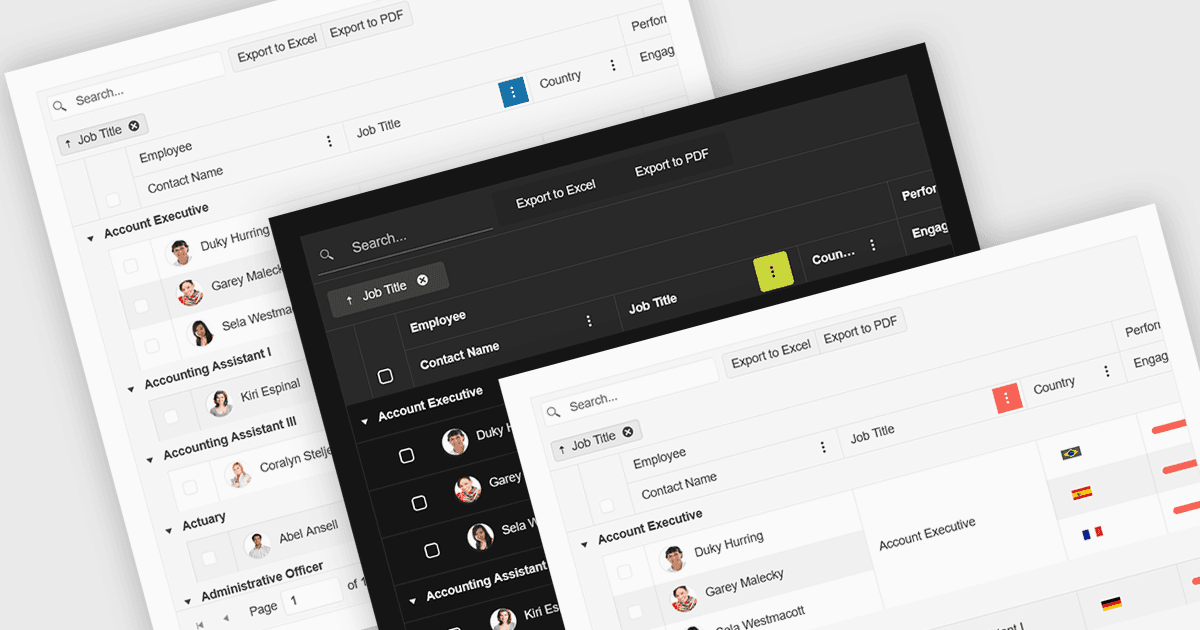
Reactのグリッドにおける組み込みテーマ対応とは、コンポーネントが、広範なカスタムCSSを必要とせずに、あらかじめ用意されたビジュアルスタイルをネイティブに統合し、適応できることを指します。この機能により、開発者はMaterial UI、Bootstrap、またはカスタムのエンタープライズブランディングなど、広く使われているUIフレームワークに合わせた、統一感のあるプロフェッショナルなデザインを素早く適用できます。アプリケーション全体でのビジュアルの一貫性を維持する作業が簡単になり、フロントエンド開発の時間が短縮され、特にアップデート時やテーマを切り替える際に、グリッドがユーザーインターフェース全体と視覚的に調和した状態を保てます。
いくつかのReactグリッドコントロールは、組み込みテーマのサポートに対応しています。主なものは以下のとおりです。
- KendoReact Data Grid(TelerikによるKendoReactの一部)では、Default、Bootstrap、Material、Fluent、Classicなどのビルトインテーマから選択できるほか、SCSS変数によるカラースウォッチにも対応しています。
- DevExtreme HTML5 JavaScript Data Grid(DevExtreme Completeの一部)では、Generic、Material Design、Fluentといった事前定義テーマの利用が可能です。さらに、カラースキーム間でLight/Dark/Compactのバリアントに対応しています。
- Handsontable(Handsoncode)には、ライト、ダーク、オートのカラー・モードに加えて、きめ細かなCSS変数ベースのカスタマイズを提供するビルトインテーマが含まれています。
- jQWidgets Grid(jQWidgetsの一部)では、20以上のビルトインテーマから選択でき、テーマプロパティまたはCSSファイル経由で適用できます。これにより、一貫した見た目のスタイルを実現できます。
機能と価格の詳細な分析については、Reactグリッドコントロールの比較をご覧ください。