視覚的なコンテキストのためにグリッドセルに画像を追加
グリッドセル内に画像を直接表示して情報を即座に明確にし、使いやすさ、視覚的な魅力、全体的なデータ理解が向上
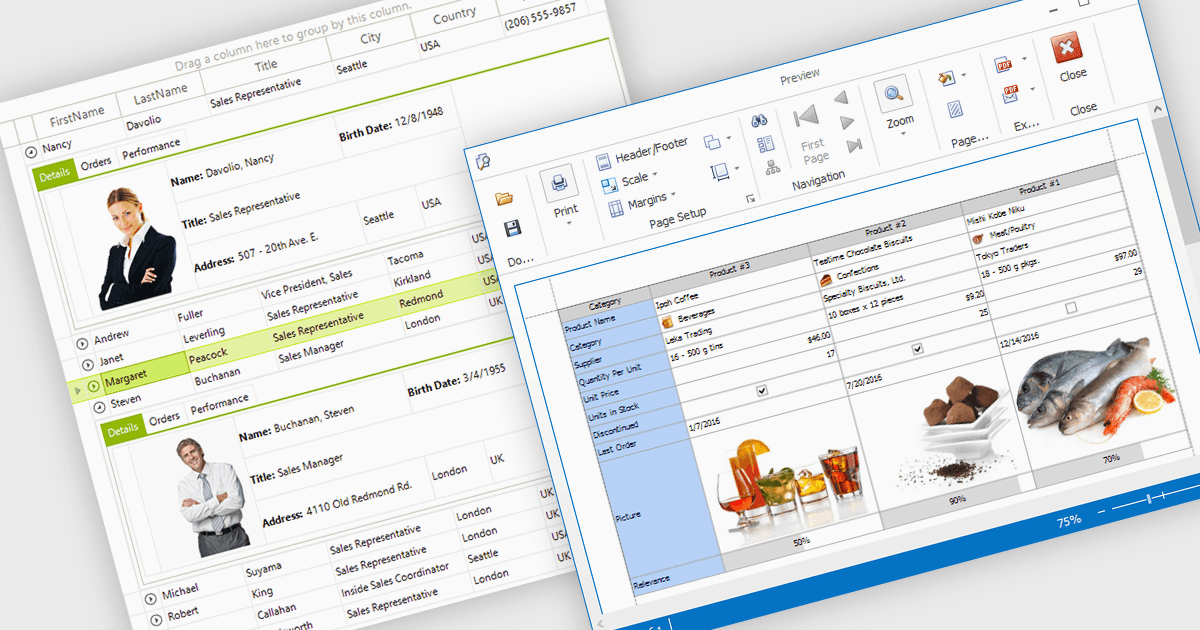
グリッドセル内に画像を表示することで、開発者は視覚情報とテキスト情報を組み合わせられ、情報をより直感的で魅力的にできます。この機能により、アイコン、製品写真、ユーザーのアバターなどの画像を関連する値のすぐそばに直接表示でき、即時の視覚的な文脈を提供することで、ユーザーが複雑なデータセットをすばやく解釈するのに役立ちます。その結果、より動的でユーザーフレンドリーなインターフェースとなり、明確さ、認識性、そして全体的な使いやすさが向上します。よくある活用例としては、在庫リストで製品画像を表示すること、ディレクトリで従業員の写真を表示すること、国際的な販売レポートで国旗を表示することなどがあり、視覚とデータを結びつけて、より迅速な理解と意思決定の改善につながります。
多くの .NET WinForms グリッドコントロールでは、セル内に画像を表示できます。たとえば:
- DevExpress WinForms Data Grid(DevExpress WinForms の一部)では、画像をセルに直接埋め込み、直感的で視覚的に分かりやすい要素によってデータ表示を豊かにできます。
- Telerik UI for WinForms GridView(Telerik UI for WinForms の一部)では、セルの内部で画像を表示でき、視覚とデータを組み合わせて洗練された対話的なグリッドインターフェースを作成できます。
- FlexGrid for WinForms(MESCIUS による ComponentOne Studio WinForms の一部)では、テキストと並べて画像を表示でき、視覚的に魅力的なデータビューを作成できます。
- Infragistics WinDataGrid(Infragistics Ultimate UI for Windows Forms の一部)では、複雑なデータセットにわたって明確さを高めるために、セル内での画像の統合を容易にします。
機能と価格の詳細な分析は、.NET WinForms Grid Controls の比較をご覧ください。