デスクトップアプリケーションでPDFを再構築
ページシーケンスを変更して、文書構造を改善し、コンプライアンスニーズをサポートし、複雑なPDFをより効率的に管理
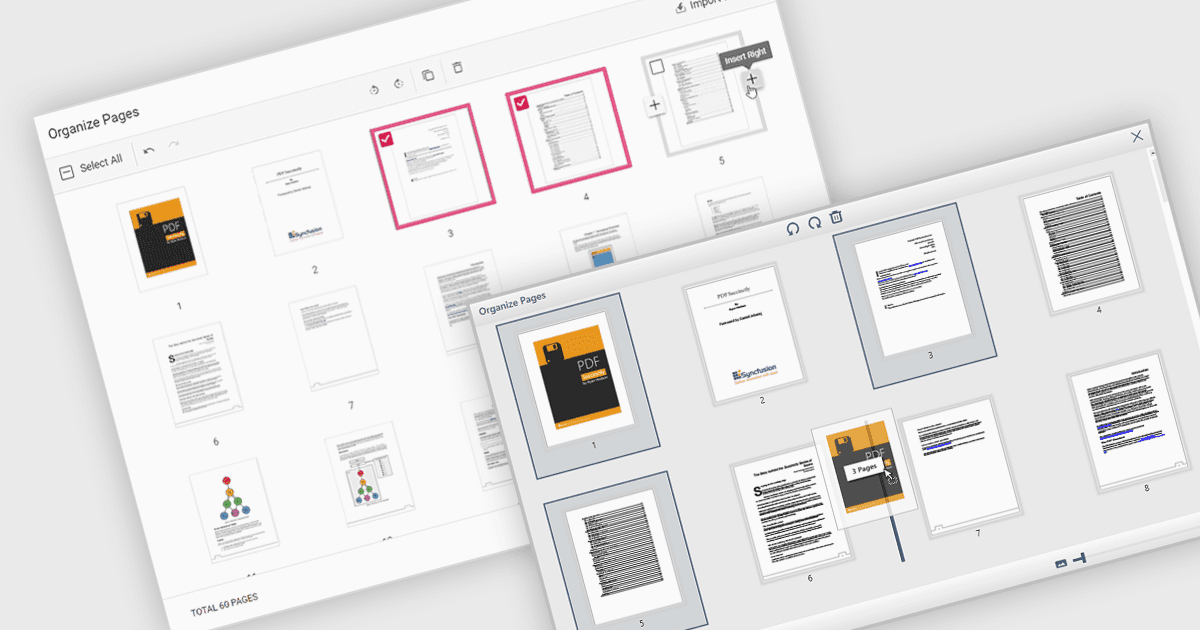
PDFファイル内でページを移動することとは、ドキュメント内の個々のページの順序を変更できることを指します。通常は、ページを新しい並び順にドラッグ&ドロップするか、ページを移動すべき場所を指定することで行います。この機能の主な利点は、特に内容を明確さ、関連性、または書式要件への準拠のために再構成する必要がある場合に、ドキュメントの整理が改善される点です。また、レポートの取りまとめ、複数のソースの結合、印刷および配布のためのドキュメント準備などの作業も簡素化され、大規模または複雑なPDFファイルを効率的に管理しやすくなります。
いくつかのWPF PDFコンポーネントでは、PDF内のページを移動できます。たとえば:
- Telerik UI for WPF PdfProcessing(Telerik UI for WPFの一部)では、WPFアプリ内でのドキュメントを動的に再構成できるように、PDFページをプログラムで並べ替えることができます。
- IronPDF for .NET(Iron Software)では、コードでPDF内のページの位置を変更でき、開発者がドキュメントの流れをカスタマイズし、出力やレビュー用にファイルを準備するのを支援します。
- XFINIUM.PDF WPF/UWP EDITIONは、PDF内でのページ移動を可能にし、UWPおよびWPFアプリに対して、ドキュメントのレイアウトやシーケンス調整を精密に制御できるようにします。
- Syncfusion WPF PDF(Syncfusion Essential Studio Enterpriseの一部)では、APIを通じてPDFファイル内のページを並べ替えることができ、ドキュメント編集や構造化された表示をサポートします。
機能と価格の詳細な分析については、WPF PDFコンポーネントの比較をご覧ください。