より明確なフィードバックのためにPDF内注釈を有効化
ユーザーがドキュメント内にメモ、ハイライト、視覚的マーカーを直接追加でき、フィードバックをわかりやすくして一箇所でアクセス可能。
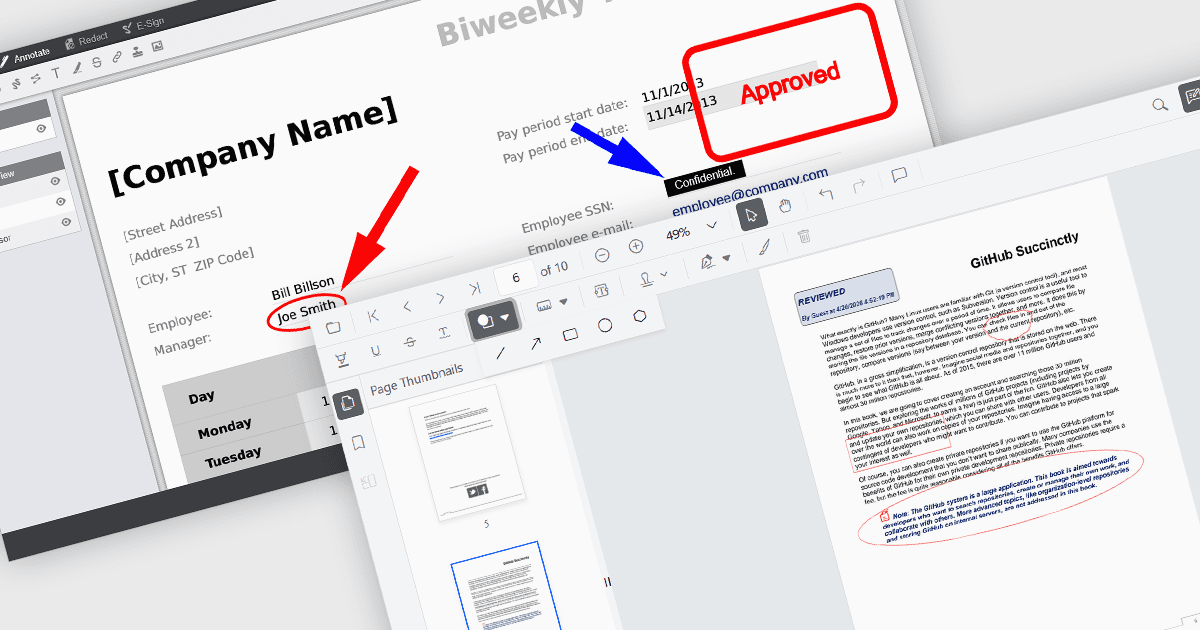
PDF Viewer コンポーネントの注釈機能により、ユーザーは視覚的および文字によるマークアップを通じてドキュメントとやり取りでき、レビュー、共同作業、文書化のプロセスを支援します。Line、Rectangle、Free text などのツールは構造を強調し、明確さを加えるのに役立ち、Sticky note と Stamp の注釈は文脈に沿ったフィードバックとステータス表示を提供します。これらの機能をビューアーに直接組み込むことで、アプリケーションは外部ソフトウェアを必要とせずに PDF を編集およびレビューするための一貫した体験を提供できます。
一般的な注釈には次のものがあります:
- Ellipse 注釈は、長方形の注釈よりも柔軟な形式で領域を強調するための、円形または楕円形のツールを提供します。
- Free text 注釈を使用すると、ページ上の任意の場所に編集可能なテキストを挿入でき、インラインのコメントや修正に利用できます。
- Freehand draw (Ink) 注釈により、署名、スケッチ、手書きメモのために、ペンのような自然な入力が可能になります。
- Line 注釈では、ユーザーが点と点の間に直線の接続線や強調線を描くことができ、関係性や配置を示す際によく使用されます。
- Rectangle 注釈は、関心のある領域を囲む方法を提供し、ページの特定部分を強調するのに役立ちます。
- Stamp 注釈は、承認やレビュー状態などの事前定義またはカスタムのラベルを文書に直接適用します。
- Sticky note 注釈は、文書の見た目を乱さずに詳細なフィードバックを保存できるコメントマーカーを追加します。
機能と価格の詳細な分析については、JavaScript PDF viewer components comparison をご覧ください。