機能
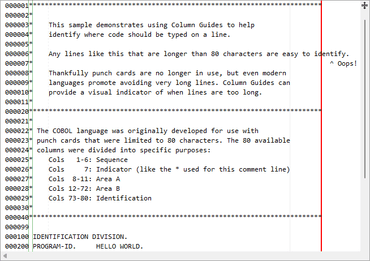
- Added a new Column Guides feature to designate where line breaks should occur.
- Added a new Compare Files QuickStart to demonstrate side-by-side file comparison.
- Improved logic for adding manual outlining nodes.
- Improved HighlightingStyleRegistry.Import to match classification types by key and to ignore colors defined as '0x01000000'.
- Improved NavigableSymbolSelector to update its ComboBox selections quicker for simple selection changes in the attached SyntaxEditor.
- Improved DelimiterAutoCompleter to function in more scenarios.
- Improved performance of StartsWithFragmentCompletionItemMatcher and updated RegexCompletionItemMatcherBase to generate capturing and non-capturing regular expression patterns for improved matching performance when captures are not necessary.
- Updated the IntelliPrompt repositioning logic to ensure it remains horizontally within the text area.
- Updated SyntaxEditor to ignore vertical mouse wheel scrolling when IsMultiLine is false (single-line mode).
- Updated open IntelliPrompt completion sessions to refresh selection/filters if Items collection changes are detected.
- Updated SquiggleTagQuickInfoProvider to show quick info for the last tagged range (highest in z-order) instead of the first, when there are overlapping ranges.
- Microsoft .NET Languages Add-on
- Improved VBTextFormatter logic.
- Improved IntelliPrompt completion for VB With statements.
- Improved IntelliPrompt completion after VB For statements.
- Improved IntelliPrompt for variables defined within switch case blocks.
C#とVBのIntellisenseオプションが付いた豊富な機能の構文強調表示コードエディタコントロール。
ご質問がありますか?
今すぐ Actipro Software ライセンススペシャリストとライブ チャット。

2002に公式ディストリビューターとして登録