Devolutions PowerShell Universal

WebベースのIT、DevOps、ヘルプデスクの各ツール

Devolutions 社の製品
2017 年より日本国内にてComponentSourceで販売中。

価格:¥ 103,730 (税込)〜 バージョン: v5.6.x 更新日: Jan 7, 2026
i

Please note: Ironman Software PowerShell Universal is now known as Devolutions PowerShell Universal.
PowerShell Universal was acquired from Ironman Software by Devolutions on January 1st 2026.

Ironman Software PowerShell Universal v5.0.0

Released: Aug 20, 2024

v5.0.0 での更新項目

機能

  • New Admin Console
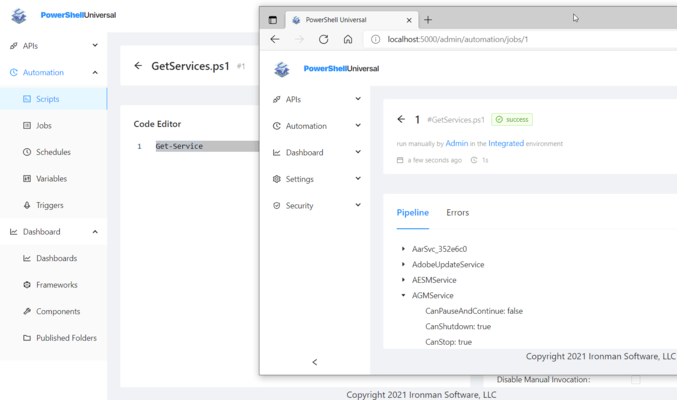
    • A new admin console has been developed based on Microsoft's Blazor technology. Some of the new features include:
      • Multiple Language Support.
      • Improved Job Filtering and Searching.
      • API Test Lab.
      • New Homepage Dashboard.
      • Inline Debugging.
      • PowerShell-based Widgets.
  • End User Portal
    • As part of the new admin console, a new end user portal has been developed. The portal is a simplified user interface that allows end users to interact with PowerShell Universal apps, scripts, and widgets without having to learn the complexity of the admin console. The portal takes advantage of role-based access to provide resources to only the users that need them.
  • Portal Pages and Widgets
    • As part of the Portal development, the concept of Portal Pages and Widgets has been introduced. Portal Widgets take advantage of the same Blazor technology as the rest of the admin console. You can develop custom widgets using Razor XML syntax and PowerShell to create tables, interactive forms and more. The PowerShell Universal library provides pre-built widgets for consumption in your pages. Pages provide a visual designer for arranging and setting the properties of Widgets.
  • Script Library
    • The Ironman Software Script library provides pre-built solutions for PowerShell Universal. It's open source and integrated directly into the platform. You can install the latest version of the library and then save library modules into your environment. This provides features like apps, widgets and scripts. Every resource is a module and can be easily added and removed without modifying the rest of your configuration.
  • Fine Grained Permissions
    • The authorization system has been overhauled to take advantage of a fine grained permission system. You can now assign permissions to individual users or groups to provide access to specific types of resources. This feature replaces Access Controls but provides full coverage across the platform. Additionally, existing role-based access takes advantage of these new permissions internally to ensure that a single mechanism is used to control access to resources.
    • New built-in groups have been added to allow for easier management of permissions without having to define custom roles.
  • PowerShell Universal Agent
    • The new PowerShell Universal Agent is the successor to the Event Hub Client. That said, it currently serves the same function as the Event Hub Client, to provide a way to run scripts on remote machines.
    • Event Hubs have been enhanced to allow for execution of arbitrary commands on remote machines when the agent is connected. There isn't a need to define a script to handle these commands.
  • Changes to Database Support
    • This release drops support for LiteDB in favor of SQLite. The latter is much more widely used and provides better performance and reliability. The psudb.exe tool has been provided to migrate from LiteDB to SQLite. Additionally, support has been added for PostgreSQL. PostgreSQL is a powerful, open source database system. While PostgreSQL is free to use you will need a PowerShell Universal license to use it with the platform.
  • Persistent Caching
    • You can now use Set-PSUCache and Get-PSUCache to store data directly in the PSU database. This provides distributed caching as well as the ability to store data between restarts of the PSU service. Role-based access has also been introduced to cache data to ensure that only the users that need access to the data can access it. Objects cached with Set-PSUCache are serialized with CLIXML and are rehydrated when retrieved with Get-PSUCache.
  • App Modules
    • Apps now contain a .psm1 PowerShell module file that you can use to define functions and variables that are available to the app. This reduces the amount of code you'll need to write directly in your app.
  • Reduced Technical Debt
    • Big strides have been made to help reduce technical debt within the platform. This includes removing features that are no longer used, refactoring code and consolidating functionality as much as possible.
  • Hosting Executables
    • New hosting executables have been developed that provide better compatibility with third-party modules. Rather than running features in pwsh.exe or powershell.exe by default, PowerShell Universal will use the new hosting executables that can take advantage of assembly loading order and other features that are not available in the default PowerShell host.
    • You can still use pwsh.exe for your scripts and apps but powershell.exe is no longer supported. This is replaced by the Windows PowerShell 5.1 environment.
  • gRPC Cmdlets
    • The cmdlets now use gRPC to communicate with the PowerShell Universal service. This provides better performance and reliability than the previous REST API. It also ensures that you can use the same API surface for both internal and external communication. Additionally, role-based access is enforced for all API calls in a consistent manner.
    • The REST API will still be provided and can easily add gRPC and REST endpoints at the same time, with the same code.
  • Removed Desktop Support
    • Desktop support has been removed. Many users relied on this functionality to run PowerShell Universal locally, without having to install it as a service. It also provided features such as hotkeys, shortcuts and system tray icons. While these features were novel, they were not widely used and added complexity to the platform.
    • Instead, the PowerShell Universal installer has been updated to include the ability to perform user-mode installs that will run PowerShell Universal as a background process in the current user's session. While it doesn't provide the same desktop features, it does provide a way to run PowerShell Universal without having to install it as a service.
  • Increased Test Coverage
    • Pester, Playwright, bUnit and ASP.NET Core Integration Testing are now being used to increase test coverage.
  • Redesigned Configuration System
    • The in-memory configuration system has been replaced with a temporary SQLite database. This allows for relational data to be stored in the configuration system. In addition to the benefits of using such a data storage paradigm, it also provides the plumbing for a configuration system that can be distributed across multiple nodes without the need for git.
    • It also means all the data access uses the same Entity Framework context to provide a consistent and reliable data access layer.
  • Other
    • The following have also been added:
      • Script Documentation.
      • New App Components and Features.
      • Published Folder Uploads.
      • New Health Checks.
      • Module Update Notifications.
      • Inline Script Debugger.
      • Password Complexity and Expiration.
      • Environment Discovery.
      • Emoji Favicons.
      • Dynamic Parameters for Scripts.
      • Custom PSScriptAnalyzer rules for PSU.