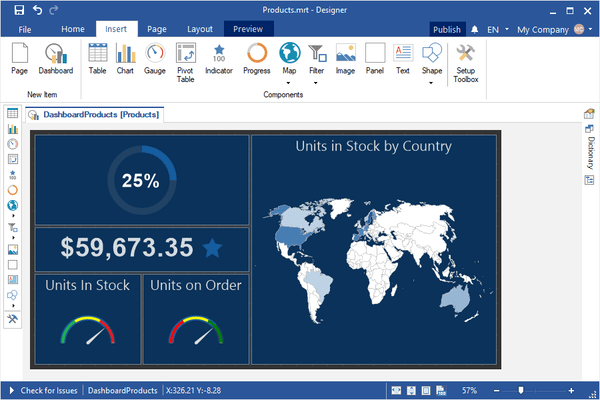
Stimulsoft Dashboards.WIN のリリース
Released: Oct 4, 2019
2019.3.7 での更新項目
機能
- Added sort button to an element's action buttons.
- Optimized rendering dashboards.
- Improved table exporting in all image formats.
- Redesigned style selection menu. Now styles are displayed in several columns for easy viewing.
Released: Sep 23, 2019
2019.3.6 での更新項目
機能
- Added "if", "choose" and "switch" functions.
- Added additional conditions for string types.
- Full Row Select and Drill-Down Filtered options were added to Table element interaction.
- Added conditions for Indicator element.
- Added the ability to use icons in Image element.
- Added new filter types in Data Transformation for string types: "between", "greater than" and "less than".
- Added support for Nullable Dates in Data Transformation filters.
Released: Sep 6, 2019
2019.3.5 での更新項目
機能
- Added Stimulsoft.Report.Toolbox.StiToolboxSetup class which helps you configure the status of the designer ToolBox from code.
- Added new maps: Benelux and Scandinavia.
- Added Chart mode in OnlineMaps.
- Added Scale Mode option to designer.
- Added a selection of different icons for Pictorial series.
- Added new window for creating maps. Now all types are displayed as tiles and support for search has been added.
- Added interaction property to Progress element.
- Small improvements in variable editor.
- Use...
Released: Aug 7, 2019
2019.3.4 での更新項目
機能
- Icon chooser to OnlineMap.
- Data from Other Data Source is supported in Dashboards.
- Constant Lines for Chart.
- Conditions for Chart.
- Support for Online Maps on Dashboards for WPF viewer.
- Icon Alignment property for Indicator.
- SeriesShowBorder property for the chart style.
- Improvements of Drill-down reports from the Dashboards.
不具合の修正
- Footer is added to TableElement. It's possible to show summary.
- Some issues with dashboards element's buttons.
- Changed MinimumSize Ribbon Designer.
- Issue with...
Released: Jul 22, 2019
2019.3.3 での更新項目
機能
- Added the ability to save an image from the image editor.
- Added interaction property for Image and Text elements.
- Added Edit Expression button to all expression fields.
- Added the ability to close dashboard preview tabs.
- Added Labels property to all types of Chart element.
- Added Sybase ADS data adapter to the designer.
Released: Jun 19, 2019
2019.3.2 での更新項目
機能
- Expressions are now used in gauge ranges in Gauge element.
- Improvements to drawing indicators in Table element.
- Dashboards WPF viewer - cache clearing before loading a new report.
- Optimizations of view data form.
- Code editor improved for better working with dashboards.
Released: May 20, 2019
2019.3.1 での更新項目
機能
- Updated viewer - Now you may view reports and dashboards, connect report collections from local and cloud storage, create a list of favorite reports and call the report designer to design or modify reports and dashboards.
- Variables for dashboards - In the new version you can use variables when filtering data on dashboards. You can use variables with or without user selection or entry of values. Create a variable in the dictionary and add a filter for the dashboard items using this variable...
Released: Mar 23, 2019
2019.2.3 での更新項目
機能
- Added PositiveColor and NegativeColor options to indicator dashboards.
- Added AlternatingCellForeColor option to pivot table dashboards.
- Added ForeColor option to gauge dashboards.
- StiOptions.Viewer.Windows.Exports.Show properties are now available in dashboard viewer.
- Added async versions of the Print, Export, Render and Compile methods.
Released: Mar 13, 2019
2019.2.2 での更新項目
機能
- Variables now are supported.
- An applied filter is now shown on elements.
- New tool button added to easily change element type in designer.
- FilterOn property added to the element filter.
不具合の修正
- Dashboards WPF. Table Element, hid an empty list for a Sparkline type column.
- MapStyle, GaugeStyle, ChartStyle. If you set an empty array in the properties of the Color[] type, then an error occurred while drawing.
- Incorrect painting of the interlaced rows.
- Issues with full screen mode.
Released: Feb 14, 2019
2019.2.1 での更新項目
機能
- Pareto Chart - When designing reports and dashboards, you now have the ability to create Pareto charts. This type of chart contains both bars and a line graph, where individual values are represented in descending order by bars, and the cumulative total is represented by the line.
- Top N Values - Chart, Indicator, Progress and Pivot dashboard elements can now display top values.
- Disabling columns in Table - You can now hide columns in dashboard Table elements. In order to apply this, select...