Syncfusion Essential Studio UWP(英語版)

ユニバーサルWindowsプラットフォームアプリを簡単に作成

Syncfusion 社の製品
2002 年より日本国内にてComponentSourceで販売中。
バージョン: 2026 Volume 1 SP1 (33.2.5) 新機能 更新日: May 5, 2026

i

Please note that new Timed Subscription Licenses for Syncfusion Essential Studio for UWP are available as part of Syncfusion Essential Studio Enterprise.

Syncfusion Essential Studio UWP のリリース

Released: May 18, 2017

2017 Volume 2 での更新項目

機能

  • Chart
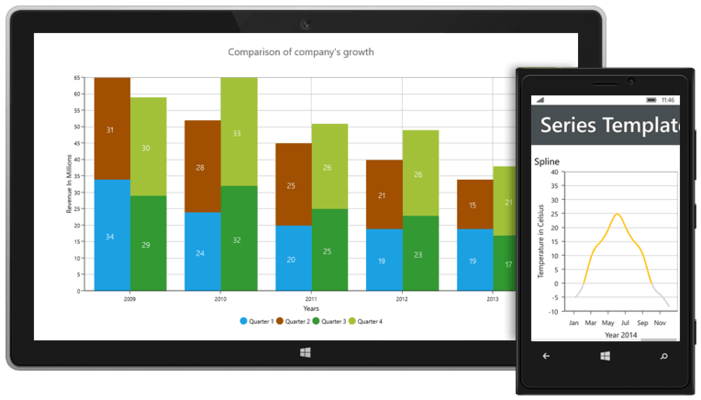
    • Segment color binding - Color mapping support has been added for each segment in a chart series.
    • Multiple spline types - The chart control now supports multiple spline types for spline and spline-area series.
  • Diagram
    • Segment decorator - A new decorative element has been added for connectors to indicate the flow of a connection over another connector or segment.
  • PDF
    • PDF Security Enhancements - PDF 2.0 security features (AES Revision 6) are now supported.
  • Pivot Chart
    • Fast chart types...

Released: Feb 27, 2017

2017 Volume 1 での更新項目

機能

  • Barcode
    • UPC-A Barcode Support - Now provides support for rendering UPC-A barcodes.
  • Chart
    • Box and Whisker Series - Box and whisker series charts are now supported.
    • Localization - SfChart provides localization support.
  • Pivot Client
    • Measure Groups - Measure groups support has been provided to filter dimensions, measures, KPI, and named sets based on their relationship.
    • Member Editor Paging - Paging support has been provided in order to load and view members with ease.
    • Drill Through - Drill...

Released: Dec 7, 2016

2016 Volume 4 での更新項目

機能

  • Compatible with Visual Studio 2017.
  • Chart
    • Z-Axis Support - The 3D chart now supports the z-axis.
  • Data Grid
    • StackedHeader Printing - The data grid supports printing the StackedHeader.
    • Placeholder for AddNewRow - The data grid supports NewItemPlaceHolderPosition when adding a new record using AddNewRow.
    • Fill Column Support - Support to fill the remaining width of a column based on other column widths.
  • Pivot Grid
    • Exporting - Pivot grid contents can be exported to Excel, CSV, PDF, and Word...

Released: Sep 28, 2016

2016 Volume 3 での更新項目

機能

  • Chart
    • Waterfall Series - The chart control now supports waterfall series.
    • Strip Lines for Polar and Radar Series - Strip lines can be added in polar and radar chart series.
    • Doughnut Hole Customization - A doughnut chart’s hole size can be customized.
    • Grouping and Aggregation - The chart control supports data grouping and aggregation when using a category axis.
  • Data Grid
    • Context Menu - Custom context menu items can be added for end users.
    • Performance Improvements - Filtering performance has...

Released: Jul 7, 2016

2016 Volume 2 での更新項目

機能

  • Tree Grid
    • The tree grid is a data-oriented control that displays and manipulates self-relational and hierarchical data that can be loaded on demand.
  • Cell Grid Control
    • The cell grid is a cell-oriented control that displays tabular data. It can be customized down to the cell level, and it does not make any assumptions on the structure of the data. It can be used in a virtual manner, where data is provided on demand, in real time, or it can be used in a manner where it maintains data within its...

Released: Apr 21, 2016

Updates in this release

Updates in 2016 Volume 1

Chart

  • Selection Cursor - Selectable series or segments can be identified by changing the cursor symbol.
  • Axis Header Alignment - Axis headers can be positioned outside of the plot area when an axis is placed inside the plot area with a custom origin.
  • Axis Label Rotation Enhancement - Axis label rotation will always correspond to tick lines for better readability. An option has been provided to enable rotation when labels overlap.
  • Toolbar Customization - The size and...

Released: Jan 15, 2016

Updates in this release

Updates in 2015 Volume 4

  • Chart Control
    • Multiple Selection - The chart control allows multiple selection and single selection of series and segments.
    • Histogram Adornments - Data labels have been added for histogram series to identify data values.
    • Interactive Explode - Pie, pyramid, funnel, and doughnut slices can be interactively exploded.
    • Adjustable Data Labels - Data labels can be positioned based on the type of series.
  • Range Navigator
    • Appearance Customization - The range navigator control...

Released: Oct 12, 2015

Updates in this release

Updates in 2015 Vol 3

  • New Ribbon Control - The ribbon control provides an easy-to-configure and design UI with a backstage and a quickaccess toolbar.
  • New Essential PDF Viewer - A 100% native control that has no dependency on Adobe. It supports searching specific text, selecting text across pages, and copying text to the clipboard.
  • New Data Grid - Includes several advanced features like interactive grouping, sorting, filtering, and displaying summary rows. The contents of the grid and its...