Features
Frameworks and Technologies
- Astro support - You can now get Astro support through the new Astro plugin, which can be installed from Preferences / Settings | Plugins. The plugin provides basic functionality including syntax highlighting, code completion with automatic imports, refactorings, navigation, correct formatting, and more.
- Support for TypeScript in Vue templates - Previously, JavaScript was used regardless of the lang attribute in the script tag. WebStorm will now provide support for inline casting, improved type narrowing, and correct information about inferred types in quick documentation in templates of Vue Single-File Components.
- Custom component event completion in Vue - You will now get code completion for your custom component events in Vue templates. This works identically in both JavaScript and TypeScript.
- Component imports added on copy-paste - When you copy and paste code from one file to another, WebStorm automatically adds all the required imports. This was previously the case with plain JavaScript, TypeScript languages, and React templates. In this release it now works for Vue, Svelte, Astro and Angular templates as well.
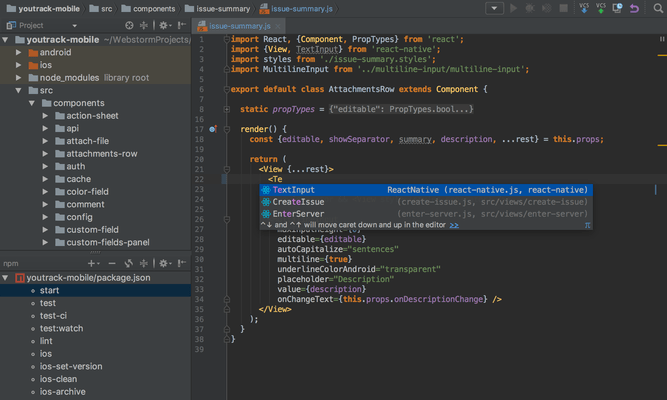
- Parameter information for React props - Added a new way to show the expected type for a component prop. If you press Ctrl+P where props are passed to a component, you'll get a popup with type information. Before, this information was available only via hover, which was inconvenient for keyboard-centric users.
- New features for Angular - WebStorm will now automatically add an import for global and exported symbols into your components on code completion when you are working in Angular templates. The IDE also supports the Angular 15 'NgoptimizedImage' directive by providing an inspection that suggests using ngSrc instead of src for img.
- Ability to run Jest tests in folders - You can now run all the tests in a specific folder through the right-click context menu. This feature worked for Vitest, and now it is also implemented for Jest.
- Docker improvements - The Dashboard tab of the Docker-compose node now pulls all the container logs together and displays them all in one place. Additionally, you can now connect to the Microsoft Azure Container Registry.
- Svelte bug fixes - Reworked the way WebStorm evaluates $types in SvelteKit apps and fixed the issue with TypeScript-specific keywords in svelte files.
JavaScript and TypeScript
- Automatic conversion of strings to template literals - WebStorm will now transform your single- or double-quoted strings into template literals automatically whenever you type ${. This works for raw strings as well as for JSX properties.
- Better prioritization of imported libraries for auto-import - Improved the IDE's behavior when adding auto-imports from different libraries with the same exported element name. Auto-imports are now added based on existing imports in the project. If you need to add an import for an element from another library, the import statement must be added manually. WebStorm will provide a popup like in previous versions.
- Aligned import behavior between TypeScript and JavaScript - Aligned the import behavior for TypeScript and JavaScript. In TypeScript, you'll be shown the import options in the context actions as you would in JavaScript.
- Support for TypeScript features - WebStorm includes support for major features from the upcoming TypeScript 5.0. It now also provides full support for multiple config inheritance, the const modifier for type parameters, and the allowImportingTsExtensions flag.
- Universal approach to handling file references - Improved the way WebStorm handles references in JavaScript, TypeScript, HTML, CSS, and various frameworks in this release. References are now handled in a more generic way across your projects.
Markup Languages and CSS
- Tailwind CSS configuration - In this release, support for configuration options has been added, such as custom class name completion under the classAttributes option, or experimental ones like tailwindCSS.experimental.configFile.
- Option to configure HTML code completion - WebStorm 2021.3 introduced completion for HTML that would show you tag names or abbreviations as you typed. This behavior can be distracting when entering plain text in HTML, so an option to disable it has been added.
- Markdown improvements - You can now use a quick-fix to correct the formatting of Markdown tables. Also, there's a new Fill Paragraph editor action that makes it easy to break long pieces of text into several lines of equal width. A dedicated Markdown settings options page has been introduced under Preferences / Settings | Editor | General | Smart Keys.
- Option to choose line comment style in PostCSS - There's a new option in Preferences / Settings | Editor | Code Style | Style Sheets | CSS | PostCSS that allows you to specify which line comment style is used in your PostCSS files. You can comment out lines using Ctrl+/, and it will be done using the line comment style you've chosen.
New UI
- Vertical split for tool windows - This release lets you split the area of the tool windows and arrange them so you can see two at once. Drag the tool window icon from the sidebar and drop it under the separator. Alternatively, you can right-click the icon and assign the new placement for the tool window using the Move to action.
- Compact Mode - To make it easier to work on smaller screens, Compact Mode has been introduced. It provides a more consolidated look with a leaner toolbar and tool window header, scaled-down spacing and padding, and smaller icons and buttons.
- Project tabs on Apple macOS - When you have several projects open, you can now switch between them using the project tabs displayed under the main toolbar.
- Redesigned Run widget - Redesigned the Run widget in the main window header to make it less obtrusive and easier on the eyes.
- Popular features re-implemented - Added some popular features people were missing in the new UI. For example, the Show Hidden Tabs selector is back along with the Fetch action in the Branches popup. Also, improvements have been made to Distraction Free and Zen Modes by hiding the main toolbar elements and displaying the name of the file in scope.
User Experience
- Full IDE zoom - It is now possible to zoom into and out of WebStorm, increasing or decreasing the size of all UI elements at once. From the main menu, select View | Appearance | Switch Zoom IDE. You can also press Ctrl+` and adjust the IDE's scaling via Zoom from there.
- Remember size for each tool window setting - Introduced a new layout option that allows you to unify the width of the side tool windows or retain the ability to adjust their sizes as you customize your layout.
- Setting to configure Actions on Save for new projects - This release adds an option to predefine the behavior of Actions on Save for new projects.
- ML-powered search for classes - To provide you with more relevant and accurate search results, machine-learning ranking has continued to be integrated into the Search Everywhere (Double Shift) functionality. The sorting algorithm in the Classes tab is now also powered by machine learning by default, along with the results in the Actions and Files tabs.
- Option to restore the old copy-cut-paste behavior - Added an option to restore the copy-cut-paste behavior to how it was in earlier versions of WebStorm. This will allow you to paste clipboard contents at the caret, rather than pasting them on the preceding line.
- Scanning files to index in smart mode - Improved the IDE startup experience by performing the Scanning files to index... process in smart mode, which should reduce the delays caused by waiting for indexing on startup. When opening a project, WebStorm will use the project's existing caches from a previous session and look for any new files to index. The IDE will be ready to go if it finds no changes with the scan.
- Suggestion to change Microsoft Defender settings - This release includes a new notification that is triggered when Microsoft Defender with Real-Time Protection is enabled. WebStorm suggests adding certain folders to Defender's list of exclusions, as these antivirus checks can significantly decrease the IDE's speed.
Version Control
- Improved code review workflow for GitHub - To simplify the process of reviewing code inside the IDE, the Pull Request tool window has been reworked. It now features a dedicated tab for each pull request you open. The tab instantly displays the list of changed files, and there's a dedicated button to execute the most relevant action according to the pull request's current state.
- Auto-completion in the Create New Branch popup - Auto-completion has been implemented in the Create New Branch popup. Once you start typing a name for your new branch, the IDE will suggest relevant prefixes based on the names of existing local branches.
- Improved Branches popup - Improved the usability of the Branches popup. Navigating between branches is now easier, as they are grouped and stored in expandable lists.
- VCS status color hints in the Structure view - To make tracking changes to files more convenient, color hints have been added to the Structure tool window. The names of modified objects now turn blue, whereas the names of newly added objects appear in the tool window in green.
- Background commit checks - Reworked the behavior of Git and Mercurial commit checks to speed up the overall commit process. Checks are now performed in the background after you commit but before you push.