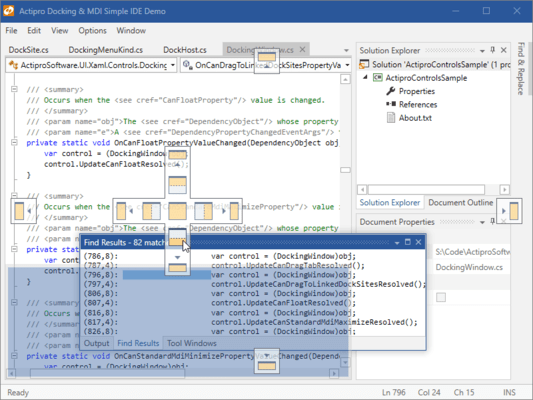
Actipro Docking and MDI for WPF 2016.1 released
Released: Feb 3, 2016
Updates in this release
Updates in 2016.1
- Completely Rebuilt - The Docking/MDI product has completely rebuilt product internals, which are optimized and now support next generation features found in Visual Studio 2015.
- Subtle Animations - Quick subtle animations have been updated and added throughout the product to give it a more vibrant feel. Dragging tabs uses smooth animations, dock guides and drop targets pop into place, and auto-hide popups slide in and out.
- AdvancedTabControl - New AdvancedTabControl control extends the native TabControl while adding many new features (appearance customization, animation, multiple tab kinds, new tab buttons, etc.), and is used as the primary UI mechanism within the ToolWindowContainer and TabbedMdiContainer templates.
- Desired, Minimum, and Maximum Container Sizes - Layout logic has been updated to try to adhere to optional new desired, minimum, and maximum docked size hints on docking windows when space is available.
- Splitters Can Render Above Interop Content - A problem in the old version was the dragged splitter highlights didn't render above interop (WinForms, etc.) content due to WPF's airspace issue. This scenario now works as expected when interop support is enabled.
- Default Locations - Several DockingWindow members have been added to designate preferences for initial dock location when opened, such as with other windows in a group, on a specific side, or at a dynamic location based on an event handler's logic.
- Docking Window Tabs - A new optional property lets you specify alternate text to render on tabs, generally shorter than the Title text.
- Contextual Content - New properties have been added that allow custom content like buttons or status indicators to be easily injected into title bars and tabs.
- Layout Serialization - A new property has been added that can uniquely identify a docking window with any string value, instead of using the Name property as before, which was limited to identifier syntax. A new properly can prevent a docking window from being included in layout serialization.
- Floating Windows - Floating windows now support Aero snap when dragging, meaning you can drag to the top of the screen to maximize the window, etc. When dragging a tab to float, as long as the docking window can float, it will instantly detach and track in a floating window with the mouse.
- Tabbed MDI - Tabbed MDI has three modes of tab display (normal, pinned, preview), which are similar to those found in Visual Studio 2015.
- Standard MDI - Dock guides now show over standard MDI so that dragged windows can be dropped into it. A context menu is now available when clicking a standard MDI window's icon or right-clicking its title bar.
- MVVM - Many improvements in the area of MVVM have been made. Properties like IsOpen, IsActive, IsSelected, and State are now fully settable and can be bound to view models. Default locations (see above) can be specified via new properties designed for MVVM compatibility.
- Switchers - The standard switcher UI has been improved to a new, more modern user interface that animates on display and supports scrolling when there is overflow.
- Prism 6.1 Support - The Prism sample has been updated to use Prism 6.1 and includes all source for Prism integration right in the sample instead of in a separate interop assembly.