このページは既にアーカイブ化され、その後の更新はありません。
この製品の販売は終了しました。
Silverlight Studio adds printing support
Released: Nov 17, 2010
Updates in this release
Updates in 2010.2
SyntaxEditor
- LL(*) Parser Framework
Actipro Software have ported the new LL(*) Parser Framework (recently added to the WPF SyntaxEditor) to the Silverlight SyntaxEditor in its entirety. It is a custom parser-building framework with SyntaxEditor that features grammars written in C#/VB using EBNF-like notation, customizable AST construction, advanced error handling/reporting, easy code injection, a complete debugger UI, and much more. - Redesigned Getting Started Sample Series
The new series is now 17 parts and shows step-by-step how to add features to a syntax language. The resulting language can do everything from parsing and code outlining, to text formatting and automated IntelliPrompt. This is now the best place to go to learn how to tie SyntaxEditor’s features together using best practices. - Printing Support
The Silverlight SyntaxEditor now has printing support, with optional built-in margins and the ability to inject custom margins. - IntelliPrompt Quick Info Provider for Parse Errors
A new built-in language service can be registered to automatically show an IntelliPrompt quick info tip when the mouse hovers over a parse error. - Ident Provider and Text Formatter Services
New language services have been created to support customizable smart indent for a language, and the ability to format part or all of a document based on language-specific rules.
Views
- Book Control
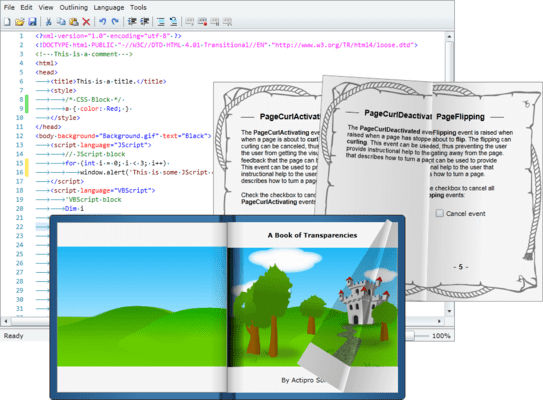
Added a new book control that allows you to render any Silverlight content within its pages. - Realistic Page Turning Animations
Page transitions are completely animated using sophisticated curling algorithms. Hot spot areas at the page corners curl towards the mouse and the page turn follows the mouse exactly like a real book’s pages would turn. - Fully Data-Bindable
The items/pages of the book can be specified explicitly or you can bind the book to an existing collection, including support for DataTemplates and Styles. We have several samples that show how to bind the book to a custom data source. - Supports Virtualization
The Book control fully support for UI virtualization, which increases performances and decreases memory. Enabled by default, only the pages required to render the view correctly are created. - Embed Any Control
Like any other ItemsControl, the Book control can host any WPF content or controls. - Page Transparency
Semi-transparent pages are fully supported too, meaning that you can layer multiple pages on top of each other. Each layer can then be presented as a union of all the pages below it.