
Add-in Express for Microsoft Office and .net
Microsoft Office で使用できる優れた拡張機能(COMアドイン、スマートタグ、リアルタイムデータサーバー、ユーザー定義関数など)を簡単に記述
Add-in Express 社の製品
2006 年より日本国内にてComponentSourceで販売中。
価格:¥ 81,950 (税込)〜 バージョン: 10.4.4741 更新日: Mar 11, 2026 

 (3)
(3)
Microsoft Office で使用できる優れた拡張機能(COMアドイン、スマートタグ、リアルタイムデータサーバー、ユーザー定義関数など)を簡単に記述
Add-in Express 社の製品
2006 年より日本国内にてComponentSourceで販売中。
価格:¥ 81,950 (税込)〜 バージョン: 10.4.4741 更新日: Mar 11, 2026 (3)
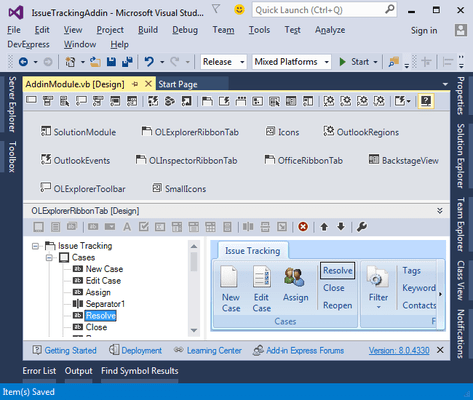


Use a set of Office-specific solution templates, wizards, visual designers and components to build various types of application-level extensions including Office COM Add-ins, Outlook plug-ins, Excel XLL, Automation add-ins, RTD servers and Smart tags.


画像1 / 3
With support for version-independent extensions, there is no longer a need to create multiple version-specific projects. You create one project, one setup scenario and one code base compatible with all versions of Microsoft Office. You write a single code base to support all versions of Microsoft Office. No application-specific solutions, no version-specific projects, no shared assemblies. Selective version-neutrality. All you need to do is specify the minimum version of Microsoft Office you want to support.
画像1 / 3
Add-in Express includes many Office-specific components and classes developed especially to help you build solutions faster and more effectively. With the Add-in Express components and their visual designers you will never have to code the most common tasks such as creating new or rebuild existing toolbars and menus, customizing the Ribbon, Quick Access Toolbar, Office Menu and Backstage View and adding new keyboard shortcuts or intercepting built-in Office controls.
画像1 / 3
Add-in Express encompasses and broadens much of the Outlook Object Model through its own Extensibility API and Outlook-specific components and classes.
画像1 / 3
Advanced View and Form Regions allow Outlook developers to create additional regions for the Outlook Explorer and Inspector windows and embed custom .NET forms into Outlook panes. You can embedded into any Outlook form as well as any Outlook view, add to the Navigation pane, Folder view pane, Reading pane or To-Do bar.
画像1 / 3
For your Excel, Word and PowerPoint add-ins, you can use the Advanced Office Task Panes to extend document views with your own .net forms.
画像1 / 3
Get the maximum flexibility for your installations. Choose the installation type and deployment model and Add-in Express automatically creates a setup project for you including Windows Installer based setup projects, ClickOnce deployment, MSI-based web-deployment, Per-user and per-machine installations, Corporate deployment and InstallShield and WiX setup projects.
画像1 / 3
The new version of Add-in Express for Microsoft Office and .NET focuses on Visual Studio and .NET Framework. It complies with VS UI guidelines and extends the IDE with wizards, designers and components that simplify Office solution development. Also, for all Office application-level plug-ins, you can use .NET Framework which is the target platform for Office and its extensions.
画像1 / 2
電話: (888) 850 9911
Fax: +1 770 250 6199


