amCharts 5: Gantt について

JavaScript Gantt control for interactive, customizable project timeline and task dependency visualizations.

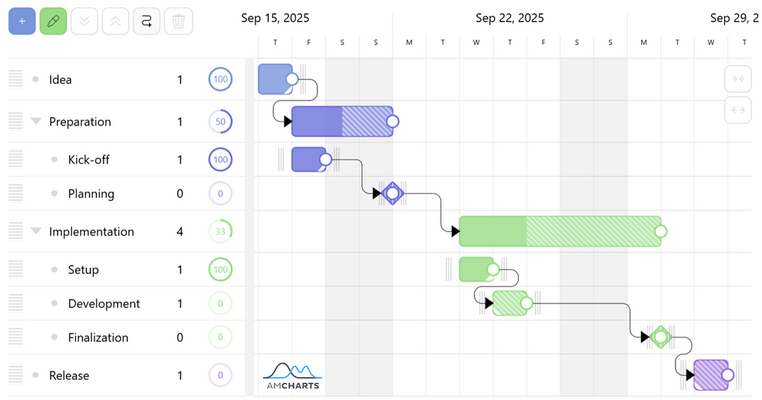
amCharts: Gantt is a powerful JavaScript-based charting library component designed for creating highly interactive and visually appealing Gantt charts, which are commonly used to illustrate project schedules, timelines, and task dependencies. Built as part of the amCharts 5 framework, it leverages modern web technologies to deliver responsive, fast-rendering visuals with extensive customization options, including support for hierarchical task structures, progress indicators, tooltips, and dynamic data updates. Developers can easily integrate amCharts: Gantt into web applications or dashboards to visualize project management data, resource allocation, and workflow timelines with rich interactivity and professional-grade aesthetics.

Visual representation of complex projects

  • Category grouping
    • Gantt chart supports multi-level, unlimited, collapsible category grouping, offering easier management and focus.
  • Task linkage
    • Linked tasks will automatically update their start/end dates based on parent tasks.
  • Dual-axes
    • The two-line timeline axes offers dual granularity for easy perception of the time scale and grid.
  • Zero-length tasks
    • Tasks can have any duration, including zero, which allows adding momentous, event-type tasks.
  • Adaptive zooming
    • A special "zoom to fit" button allows zooming in on the tasks in the visible area.
  • Bird's eye progress view
    • The categories display a small progress meter, both for individual and collective group tasks.
  • Read-only or edit mode
    • The Gantt chart can either display data for viewing only, or allow it to be edited.
  • Markers
    • Besides categorized, hierarchical tasks, Gantt chart allows additional markup using vertical guides, used to indicated project's thresholds.
  • Holidays and weekends
    • The tasks will automatically adjust to account for weekends and known holidays.

Full-on editing capabilities

  • Adding and removing tasks
    • Tasks can be easily added and removed with a click of a button.
  • Auto-linking
    • An auto-link feature offers automatic linkage of newly added tasks, offering faster editing.
  • Everything draggable
    • Tasks, categories and even links can be dragged on screen for easier resizing, repositioning, or even editing hierarchy.
  • Toggling of markers
    • Toggling project threshold markers is as easy as clicking on the timeline axis.
  • Configurable time units
    • With default in days, Gantt can be configured to automatically treat task durations and timeline granularity ranging from years down to a second.
  • Color-coding
    • A built-in color picker tool can be used to set colors for new or existing tasks.

Powerful API

  • Event handlers
    • Everything that happens on chart invokes specialized events, which can be used to save changes to chart's data in local or server storage.
  • Data serialization
    • The data can be easily retrieved and serialized for storage. Restoring data is as easy, as setting it on a couple of objects.
  • Modes
    • API offers an easy way for dynamic toggling between read-only and edit modes.