
Total Access Speller(英語版)
Accessのプログラムにスペルチェック機能を追加
FMS 社の製品
2003 年より日本国内にてComponentSourceで販売中。
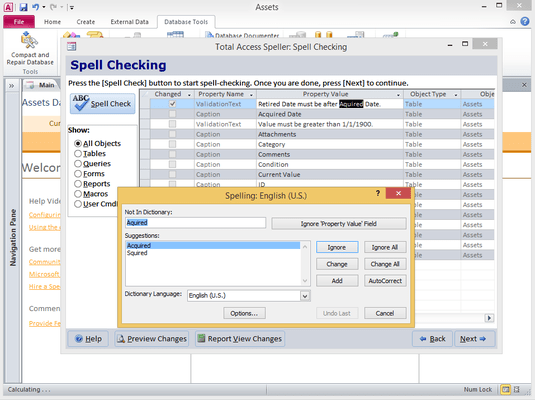
Accessのプログラムにスペルチェック機能を追加
Total Access Speller はオブジェクトプロパティとデザインからスペルチェックが簡単にできるようにする、Microsoft Accessのアドインです。Accessは、スペリングチェックを含みますが、テーブルの中でしかデータを処理することができません。フォーム、レポート、ラベル、キャプションとバリデーション、テキストのタイプミスがあったらどうしますか?Total Access Speller は、テキストを含むすべてのプロパティをスペルチェックする使いやすいウイザードを提供します。Total Access SpellerはMicrosoft Office のスペルチェッカーの各言語とユーザー辞書を利用します。
Total Access Speller is designed exclusively for Microsoft Access. Simply open your database, and select Total Access Speller from the Add-ins menu. The wizard appears, making it easy to select the objects you want, perform spell checking, and save your results.
100% Easy to Use
Total Access Speller is designed exclusively for Microsoft Access. Simply open your database, and select Total Access Speller from the Add-ins menu. The wizard appears, making it easy to select the objects you want, perform spell checking, and save your results.
Total Access Speller performs spell checking on properties for the following object types:
The built-in list of properties covers all properties that can contain text that appears in your applications user interface, and you can enable or disable properties or add your own. With Total Access Speller, you are in complete control of spell checking. Total Access Speller can even write corrected property values back to your database for the following object types:
電話: (888) 850 9911
Fax: +1 770 250 6199


