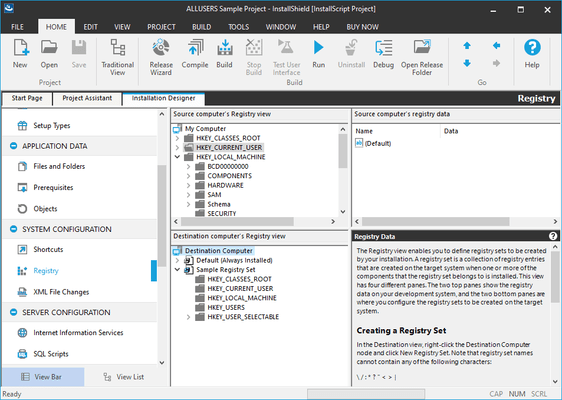
InstallShield Premier Features
Create Professional Installations
- Support for Azure Key Vault signing using Custom Signing
- Support for .NET Core in Custom Actions
- Ability to create hourly scheduled tasks
- Support for signing using a custom sign tool
- Support for Custom Extensions in MSIX Projects
- Create MSIX Packages Checking for Updates Using App-Installer
- Support for Cloud Builds
- Full ARM Support
- Support for fonts in MSIX
- Build InstallShield Projects in a Azure DevOps Pipeline
- MSIX - Modification Packages
- MSIX - Support for MSIX Core
- Pure 64 installers
- MSIX Bundles
- MSIX - Support for Services
- AWS CloudHSM-based Digital Signing
- Simplified Builds Within Docker
- Automated Patch Design
- Create Windows® Installer (MSI) Installations
- Create Windows Installer Patches (MSP)
- Create MSIX packages
- Easily convert any MSI file into an MSIX package
- Create InstallScript (setup.exe) Installations
- Create Advanced Bootstrappers with Suite Installations
- Streaming Installations that Download Installation Components as Needed
- Install/Upgrade Multi-instance Installations
- Check for the Latest Version of a Setup Any Time an Installation is Run
- Advanced UI Editor
- Windows Installer Dialog Editor
- End-User Dialog Themes for Windows Installer-Based Projects
- Billboard Support for Custom Branding
- One-Click Installations from the Web
- DLL, EXE, VBScript, and JScript Custom Actions
- Extend Suite/Advanced UI Projects with C# and InstallScript Actions
- PowerShell Custom Actions
- Managed-Code Custom Actions
- Easily View MSI Table Relationships'
- Support for Microsoft® Certificate Requirements including SHA 1 and SHA-256
- Design DPI-Aware Installations
Develop and Deploy Globally
- Multilingual Support - 35 Languages
- Unicode Support in Most InstallShield Views
- Create Pure 64-Bit Installations (Windows Installer)
- Install 64-bit Applications
- Install Windows Device Drivers Using DIFx 2.1.1
- Support for .NET Framework 4.5 (32-bit and 64-bit)
- Multi-Tier Installation Template
- Install Web Applications to Microsoft® Azure™ and Microsoft® IIS using Microsoft Web Deploy
- PowerShell Suite Actions for Server Configuration
- Enable Windows Roles and Features During Your Installation
- Deploy Databases to Microsoft SQL Server/Oracle/MySQL/Microsoft Azure SQL Databases
- Database Import Wizard
- Deploy Websites to IIS 8 with SSL Certificates Limited
- IIS Web Services Support
- IIS Tools for Web Apps
- XML File Updating
- Configure Windows Users and Groups
Save Time and Develop Efficiently
- Ability to create hourly scheduled tasks
- Integration with Visual Studio 2022
- Install Packages from Windows Package Manager
- Identify what existing InstallShield projects require change to meet Microsoft MSIX standards
- Provision Virtual Machines from the InstallShield IDE for Testing Installations
- Monitor for COM Extraction (32-bit and 64-bit)
- Registry-Free COM Registration (Application Manifests)
- COM+ Support
- Library of Redistributable Prerequisites for Windows Installer Installations
- Library of Redistributable Prerequisites for InstallScript Installations
- Associate Prerequisites with Features
- Prerequisite Editor
- Network Repositories to Share Dialogs, Scripts and Templates with Team Members
- Local Repositories to Share Dialogs, Scripts and Templates Across Multiple Projects
- Automate Events at Build Time
- Reusable Project Templates
- LZX Compression Option (Windows Installer Projects)
- Display Installation Progress on the Taskbar
- Easily Edit Installation Strings
- Specify Custom Icon and Version Resource Properties
- Virtual Machine Detection
- Easily Edit XML Files During Installation
- Easily Edit Text Files on the Destination Machine During Installation
- Easily Create System Searches Limited
- Mark Files for Deletion as Part of an Installation Through Interaction with MSI RemoveFiles Action
- Enforce End User License Agreement (EULA) Reading Before Installing
- Call .NET Assemblies from InstallScript
- Command-Line Builder
- Complete Project Debugging
- Source Code Control Integration
- Microsoft Team Foundation Server Integration
- Microsoft Build Engine (MSBuild) Support
- Microsoft® Visual Studio® 2019 Integration
- InstallShield Command-Line Interface - 5 Instances


 (3)
(3)