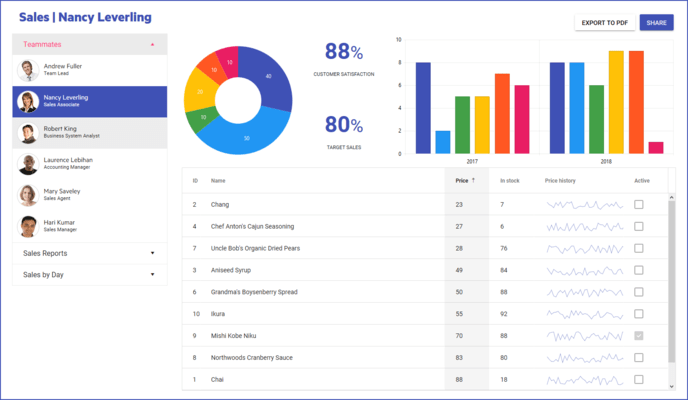
KendoReact について

Reactを使用する開発者向けのネイティブUIとデータ可視化コンポーネント

KendoReact is a professional UI kit to build and design apps much faster. The comprehensive React component library has 120+ fully accessible and customizable components, plus 3 Figma design kits. KendoReact saves substantial amounts of time with its ready-to-use professional React UI components, helping you meet all your present and future requirements. What’s more, it will set you up for an easy start of your design system and is flexible enough to be integrated into an existing one.

KendoReact Key Features

  • 120+ responsive and customizable components.
  • 3 design kits for Figma.
  • Theme Builder tool for effortless customization.
  • Can be used with existing design languages (such as Material and Bootstrap) or integrated with your own design system.
  • Small bundle size.
  • Intuitive API.
  • Award-winning technical support.
  • Full accessible: compliant with WCAG 2.0, Section 508 and WAI-ARIA accessibility standards.
  • AI Coding Assistant enables generation and insertion of production-ready React components directly into your codebase using natural language prompts.

100% React
KendoReact is written with TypeScript from the ground up for React. The library is always up to date with the latest framework and browser versions - no maintenance overhead for you.

Kendo UI Kits for Figma
As part of the library, you also get matching Figma design kits, which, together with the React components, can be the perfect foundation of your own design system. The Kendo UI Kits for Figma are design files that make it easier for app developers and designers to collaborate, allowing a seamless transfer of the design to the developers. Each UI kit is a representation of the KendoReact components in visual form. Kendo UI Kit Default, Bootstrap, and Material are the three Kendo UI Kits available for Figma, one for each of the themes included with the KendoReact UI component library.

Kendo UI Theme Builder Tool
The Kendo UI Theme Builder Tool makes it simple to customize UI components to follow your brand guidelines. Your designers can use the Figma kits, change the styles, and apply your brand colors in their projects. You can then enter these colors in the ThemeBuilder app and style the components to match them with the brand requirements.

Popular React UI Components include:

  • React Data Grid - Fast and feature-rich data grid that’s extensible, well maintained and documented. Fully accessible.
  • React Pivot Grid - This customizable Pivot Grid comes with a handful of powerful features, including filtering, sorting, a configurator interface and more.
  • React Charts - Powerful data visualization tool that can fit into any application. This one component includes over 17 different types of charts.
  • React Scheduler - With support for time zone conversions, resource visualization, grouping, editing, and recurring events, this Scheduler component can do a lot with just a few lines of code.
  • React DatePicker - Highly customizable and flexible interface for end users to enter and pick dates supporting different locales.
  • React PDF Generator - Export a selection of or the entire content of a web page to a PDF file - whether the website is built with KendoReact or any other UI library.
  • React AIPrompt - Empower users to easily execute tasks leveraging intuitive AI commands with the KendoReact AIPrompt.

Animation

  • Animation

Barcodes

  • Barcode
  • QR Code

Buttons

  • Button
  • ButtonGroup
  • Chip
  • ChipList
  • DropDownButton
  • Floating Action Button
  • SmartPasteButton
  • Speech-to-Text Button
  • SplitButton
  • Toolbar

Charts

  • Area Chart
  • Bar Chart
  • Box Plot
  • Bubble Chart
  • Bullet Chart
  • Chart Wizard
  • Charts
  • Donut Chart
  • Drilldown
  • Funnel Chart
  • Heatmap Chart
  • Line Chart
  • OrgChart
  • Pie Chart
  • Polar Chart
  • Pyramid Chart
  • Radar Chart
  • Range Area Chart
  • RangeBar
  • Sankey Diagram
  • Scatter Chart
  • Sparkline
  • Stockchart
  • Waterfall

Conversational UI

  • AI Prompt
  • Chat
  • Inline AI Prompt
  • PromptBox

Data Query

  • Data Query

Data Grid

  • Data Grid

Data Tools

  • Filter
  • Pager

Spreadsheet

  • SpreadSheet

Date Inputs

  • Calendar
  • DateInput
  • DatePicker
  • DateRangePicker
  • DateTimePicker
  • MultiViewCalendar
  • TimePicker

Date Math

  • Date Math

Dialogs

  • Dialog
  • Window

Drawing

  • Drawing Library

Dropdowns

  • AutoComplete
  • ComboBox
  • DropDownList
  • DropDownTree
  • MultiColumn ComboBox
  • MultiSelect
  • MultiSelectTree

Excel Export

  • Excel Export

File Saver

  • File Saver

Form

  • FieldArray
  • FieldWrapper
  • Form
  • FormElement

Gantt Chart

  • Gantt Chart

Gauges

  • ArcGauge
  • Circular Gauge
  • LinearGauge
  • RadialGauge

Indicators

  • Badge
  • Loader
  • Skeleton

Editor

  • Editor

Inputs

  • Checkbox
  • ColorGradient
  • ColorPalette
  • ColorPicker
  • FlatColorPicker
  • Input
  • MaskedTextBox
  • NumericTextBox
  • RadioButton
  • RadioButtonGroup
  • RangeSlider
  • Rating
  • Signature
  • Slider
  • Switch
  • TextArea
  • TextBox

Layout

  • ActionSheet
  • AppBar
  • Avatar
  • BottomNavigation
  • Breadcrumb
  • Card
  • ContextMenu
  • Drawer
  • ExpansionPanel
  • Grid Layout
  • Menu
  • PanelBar
  • Splitter
  • Stack Layout
  • Stepper
  • TabStrip
  • TileLayout
  • Timeline

ListBox

  • ListBox

ListView

  • ListView

Labels

  • Error
  • Floating Label
  • Hint
  • Label

Map

  • Map

Notification

  • Notification

PDF Processing

  • PDF Generator
  • PDF Viewer

PivotGrid

  • PivotGrid

Common Utilities

  • Drag & Drop Utilities
  • Icon & SvgIcon
  • Keyboard Navigation
  • Typography

Popup

  • Popup

Progress Bars

  • ChunkProgressBar
  • ProgressBar

Ripple

  • Ripple

Scheduler

  • Scheduler

ScrollView

  • ScrollView (Carousel)

Sortable

  • Sortable

TaskBoard

  • TaskBoard

Tooltips

  • Popover
  • Tooltip

TreeList

  • TreeList

TreeView

  • TreeView

Upload

  • External Drop Zone
  • Upload