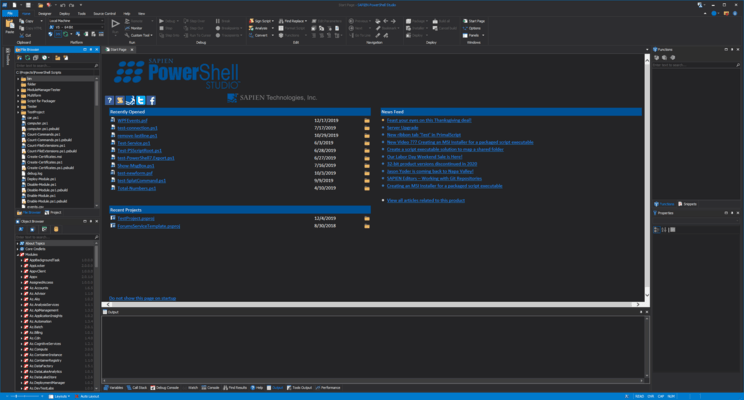
PowerShell Studio 2022
Released: Jan 7, 2022
2022 での更新項目
2022 (5.8.213)
Updated Nov 15, 2022
Features
- Added support for Microsoft PowerShell 7.3.
Fixes
- Filtered out paragraph symbol from debug variable values.
- Add-Type C# classes failing to parse.
- Other minor changes and fixes.
2022 (5.8.212)
Updated Oct 28, 2022
Features
- Added support for Microsoft PowerShell 7.0.13.
- Added support for PowerShell 7.2.7.
- Added an experimental PowerShell obfuscator for SAPIEN Script Packager.
Fixes
- Formatting moves parameter into comment when 'Insert new line after Parameter type' is disabled.
- PowerShell error messages showing line information for .Run.ps1 file instead of corresponding psf or project file for PowerShell 7.
- Using assembly statement not loading assembly information.
2022 (5.8.211)
Updated Oct 3, 2022
Features
- Updated Microsoft PowerShell supported version check to run once a day.
Fixes
- Updated company address in EULA.
- Licensing error dialog cuts off message.
- Other minor changes and fixes.
2022 (5.8.210)
Updated Sep 8, 2022
Features
- Added support for Microsoft PowerShell 7.0.12 and 7.2.6.
- Updated PrimalSense support for Add-Type C# TypeDefinitions-Setting.
- Updated support for $HOME in paths when loading assemblies from path.
- Updated all backend connectors for Database pane. NOTE: Existing connections may need to be modified.
- Updated application DPI scaling.
- Updated WebView2 included reference to 1.0.1293.44.
Fixes
- Formatting curly brace not checking for comments when setting Place open brace on a new line' is disabled.
- SAPIENCommandline failing to recognize relative paths of files passed.
- Other minor changes and fixes.
2022 (5.8.209)
Updated Jul 22, 2022
Features
- MSI builder templates now include reference to 'System64Folder'.
- MSI build now removes quotes around custom action arguments.
- UI elements in Script Packager have been re-aligned.
Fixes
- Convert Functions into Module dialog not loading properly.
- Formatting option to align equal signs in hashtables adding too many spaces.
- Check for PowerShell 3, 4 and 5 removed from MSI builder.
2022 (5.8.208)
Updated Jun 29, 2022
Features
- Added support for Microsoft PowerShell 7.2.5.
- Remote Script Execution Engine (RSEE) now supports the latest PowerShell 7 versions.
- Security enhancement for SAPIEN Updates - Now checks the trusted signatures of update downloads.
- Security enhancement for PowerShell Version Selector - Now checks the trusted signatures of downloads from GitHub.
- PowerShell Studio now checks on startup if your installed PowerShell 7 version(s) are supported by your current build.
- Updated PrimalSense for PSSenderInfo.
Fixes
- Shortcut names with a '-' character cause an error message when building an MSI.
- Progress bars in scripts packaged Windows app / Dark app not updating properly.
- Script Packager better indicates currently selected property page.
- RSEE now filters extraneous ANSI sequences in PowerShell 7 output.
- File Template dialog not loading from File menu.
- Create File Group not loading from File menu.
2022 (5.8.207)
Updated May 27, 2022
Features
- Added Microsoft PowerShell 7.0.11 and 7.2.4 support.
- Added PowerShell keywords support in PrimalSense.
- Added Projects setting to remember last PowerShell version (v5 or v7) used.
- Improved cache builder speed.
Fixes
- Inconsistent behavior building executable from PowerShell Studio using saved credential information.
- Other minor changes and fixes.
2022 (5.8.206)
Updated May 5, 2022
Features
- Added support for Microsoft PowerShell 7.0.10, 7.1.7 and 7.2.3.
Fixes
- RunAs with PowerShell 5 packages can display popups with userid and password.
- RunAs with Windows App and Dark Windows App displays application twice.
2022 (5.8.205)
Updated Apr 26, 2022
Fixes
- Auto-Insert characters not working.
2022 (5.8.204)
Updated Apr 25, 2022
Features
- The 'Recently Open Files and Projects' save format has been updated for pinned items.
- Updated PSF and PSPROJ files to save the relative paths of added assemblies.
- Improved loading speeds.
- Updated ProgressBarOverlay control to work with Microsoft PowerShell 7.1 and 7.2.
Fixes
- On select in PrimalSense prompt window, description for commands with online help links returned improperly formatted error in V7.
- Reference count shown on function/class tooltip description incorrect.
- Other minor changes and fixes.
2022 (5.8.203)
Updated Apr 6, 2022
Features
- Added support for Microsoft PowerShell 7.0.9, 7.1.6 and 7.2.2.
- PowerShell service packager engine now supports stored credentials.
- Added the option to create new empty VBScript file (File -> New).
- Added the option to package VBScript files.
- Made adjustments to improve Primalsense speed on large files.
Fixes
- Function builder does not resize correctly with enlarging dialog.
- MSDN Help menu option in Toolbox pane does not bring up WebView2 documentation.
- Other minor changes and fixes.
2022 (5.8.202)
Updated Mar 7, 2022
Features
- Added Microsoft PowerShell Version Selector.
- Assemblies dialog now shows path.
- Webview2 assemblies now need to be added for WebView2 control to appear in Toolbox pane.
Fixes
- When loading WebView2 template, references to assembly in install folder was saved to PSF file.
- Fixed exception when attempting to generate relative path for referenced assemblies.
- Exception object not set when running background process
- Other minor changes and fixes.
2022 (5.8.201)
Updated Feb 11, 2022
Features
- Added support for WebView2 control.
- Added WebView2 control template.
- Assemblies dialog updated to add references by relative path.
Fixes
- Intellisense lost for Winform objects in ps1 files.
- Project pane menu not coloring.
- PowerShell 7.2.1 causing prompt to rebuild cache.
2022 (5.8.200)
Updated Jan 24, 2022
Features
- Added the ability to prevent unnecessary cache rebuild on update.
- Added the ability to filter ANSI escape sequences in debug console output.
Fixes
- Other minor changes and fixes.
2022 (5.8.199)
Updated Jan 21, 2022
Features
- Store credentials in packaged script resources.
- Custom Microsoft PowerShell actions in an MSI can now use PowerShell 7.
- Custom actions in an MSI can now be marked to bypass execution policy.
- Custom actions in an MSI can be marked to not load a profile (default).
- Script Packager now warns if MyInvocation is used in a packaged script.
- EULA has been updated to reflect federal government regulations.
- "Service Installer" has been removed from the installer type selection.
Fixes
- Prompt for cache check will always prompt for rebuild.
2022 (5.8.198)
Updated Jan 11, 2022
Fixes
- Stuck checking and prompting for modified cache.
- Delete from menu in Snippet pane not working.
2022 (5.8.197)
Updated Jan 7, 2022
Features
- Added support for Microsoft PowerShell 7.2.1.
Fixes
- Comment mistaken as dot source statement during packaging.
- Shortcuts for startup created in wrong folder.
- Cache builder always starting on application start.
- Other minor changes and fixes.


 (3)
(3)