Data Masker for SQL Server 6.3.x
Released: Jul 4, 2019
6.3.x での更新項目
6.3.23
Updated Dec 20, 2019
Fixes
- Increase the scale and precision of numbers supported by floating point data sets.
6.3.22
Updated Dec 19, 2019
Fixes
- Fixed an issue running masking sets that affect a large number of rows or columns.
- Keep trailing semicolons when running cross database commands.
6.3.21
Updated Dec 18, 2019
Features
- Added a "Check for Updates" option to the "Help" menu to manually check for new updates.
- Use fast single pass mode is now on by default for new table to table rules.
Fixes
- Fixed an issue using `uniqueidentifier`s as a join condition of table-to-table rules.
6.3.20
Updated Dec 16, 2019
Features
- V7 performance beta now includes search and replace rules.
Fixes
- Fixed an issue with Row-Internal rules not allowing ID columns to be used when the V7 performance beta is enabled.
- Fixed an issue where the stop masking button caused the application to become unresponsive.
6.3.19
Updated Dec 10, 2019
Features
- The JSONPath in JSON masker rules can optionally be evaluated by Data Masker to allow more complex specifications.
Fixes
- Fixed an issue creating masking sets on case sensitive instances.
- Extend command timeouts when using V7 performance beta.
- Fixed an issue using V7 performance with case sensitive databases.
- Fixed an issue with V7 performance beta that could cause excessive memory usage.
6.3.18
Updated Dec 2, 2019
Fixes
- Skip not used parameters from row internal rule in a new algorithm (available from Enhanced performance V7 option) instead of failure for not filled parameters during execution.
6.3.17
Updated Nov 28, 2019
Features
- Apply V7 performance beta algorithm to shuffle and row-internal rules.
Fixes
- Fixed an issue preventing shuffle rules finishing successfully when using a commit frequency larger than 50,000.
- Shuffle rules correctly respect commit frequency instead of using a commit frequency two times that specified.
- Extend timeouts in the new algorithm.
6.3.15
Updated Nov 27, 2019
Fixes
- Fixed an issue applying numeric variance to integer columns.
- Fixed locking issue in the new algorithm for substitution.
6.3.14
Updated Nov 18, 2019
Features
- Added support for SQL Server 2019/Azure SQL Database sensitivity classifications to the SQL Server Classification import.
Fixes
- Fixed an issue where the new bulk substitution algorithm could fail to mask all rows when the target table includes an auto incrementing ID.
- Fixed an issue where counts of column by sensitivity are incorrect while filtering after importing plan data.
- Ensure that the new rules window is centered in relation to the main window.
- Don't show 'Rule Generation By Column' in sync manager when substitution template has more than one column.
6.3.13
Updated Nov 12, 2019
Features
- Improved performance for substitution rule with new bulk substitution feature.
- Added the ability to import the mask plan from the Microsoft Classification Extended Properties.
Fixes
- Fixed an issue where default masking set options weren't applied to new masking sets.
6.3.12
Updated Nov 7, 2019
Fixes
- Fix 'Cannot edit this rule' pop-up after editing the controller.
6.3.11
Updated Nov 7, 2019
Features
- Added filtering feature to the sensitivity column on table tab.
- Changed plan summary on tables tab to be more expressive.
6.3.10
Updated Nov 4, 2019
Features
- Enhancements in tables tab
A number of changes have been made to the tables tab to make it a better place to understand your schema and know what needs to be masked.
- Schemas are summarized in the "Plan Summary" column as well as tables.
- The terminology has been changed from "Must Mask" and "No Mask" to "Sensitive" and "Nonsensitive".
- Table, columns, and schemas that either haven't been categorized or have been categorized as sensitive but haven't been affected by any rule have their "Plan Summary" and "Matches Plan" columns highlighted in bold.
- Added CSV support for Masking Plan Import/Export.
- New mechanism of CSV import and export for masking plan has defaulted to export and import buttons in the controller.
- Improve context menu in tables tab
- Add new commands:
- Apply sensitivity across multiple tables and columns.
- Create a substitution rule for all columns marked "Sensitive" on a table.
- View rules that affect a table or column with "Show Rules Targeting Table/Column".
- Reorganize menus.
- Other enhancements
- Allows adding a cross-database table to table rule to sync manager.
- Show warning message box when creating a cross-server table to table rule.
Fixes
- Fix unhandled exception from 'Find Identically Named Columns' in tables tab.
6.3.9
Updated Oct 23, 2019
Features
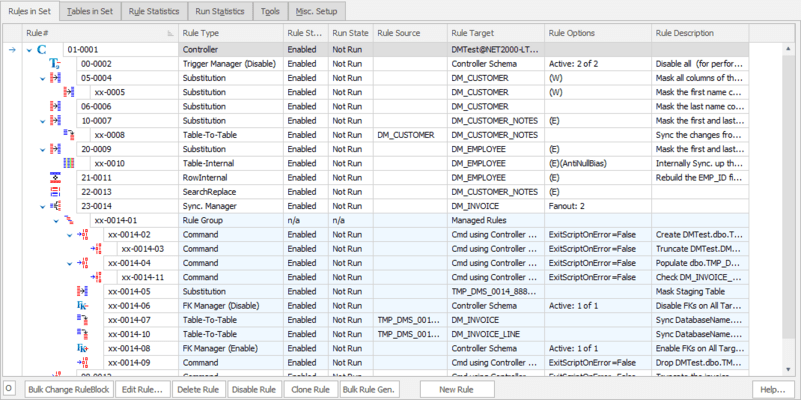
- Read-only beta release of a new rules view.
Fixes
- Resolves an issue where masking sets required the correct, case sensitive, extension to be opened.
6.3.8
Updated Oct 15, 2019
Fixes
- Fixed an issue where re-opening a form would not remember the previous maximized state.
6.3.7
Updated Oct 10, 2019
Fixes
- Fix error when editing command rules.
6.3.6
Updated Oct 9, 2019
Features
- Use SQL syntax highlighting for SQL Command Rule.
- Rule descriptions are auto-generated when the description is left blank.
Fixes
- #147359 The trigger manager editor now correctly shows the trigger's name instead of the trigger's table.
- Fixed an issue preventing a split JSON from being unsplit.
6.3.5
Updated Sep 24, 2019
Fixes
- Fixed an issue where the command line logs would show the incorrect value for "MatchesPlan" under masking statistics.
6.3.4
Updated Sep 17, 2019
Features
- Add the number of rule workers to the toolbar.
- Changed table plan summary to unknown if some of its columns are unknown.
- Added rule creation option in the context menu on the table tab.
- Removed the confirmation dialog in column finder.
- Renamed the tab name in the main page to simplify understanding.
- Improved how certain rule type names are displayed.
- Improved performance running masking sets with a large number of short-running rules.
Fixes
- Correctly handle comparison to empty string for TEXT columns when using the "Where Not NULL or empty" option.
6.3.3
Updated Sep 3, 2019
Features
- Added an option to UI command line to generate parameter file.
- Added deprecation warning to UI command line.
- Added unique number option for Spanish NIF numbers.
- Improve suggestions for SQL Server instances in connection form.
Fixes
- Fix an issue where operations in a search and replace could not be disabled.
- Fixed an issue where refresh rules fail during command line.
- #2603: Widen the rowoperations and coloperations columns in the statistics tables to monitor rules on larger tables.
6.3.2
Updated Jul 24, 2019
Features
- Changed the look and feel of the connection workflow, along with improved server and database discovery.
- Added a data set for South African ID numbers.
6.3.1
Updated Jul 11, 2019
Features
- Table-To-Text rules in a sync manager can now be used cross database.
- It is now possible to change the dataset directory while a masking set is open. However, the new dataset directory must contain any user-defined datasets in order for masking to run correctly.
Fixes
- Fixed issues working with tables and schemas with single quotes in their name.
- Fixed the default sort order to be by "Rule#" when displaying rules.
6.3.0
Updated Jul 4, 2019
Features
- Improved the accessibility of actions and tools by providing a menu and toolbar.
- The rule selection window is redesigned. It now provides information on how the rules are supposed to be used.
- Masking sets created in version 5 of Data Masker can now be imported directly from the standard open dialog. This replaces the function to import version 5 masking sets from the Tools tab.
- New rules can be created from the context menu on the Rules in Set tab.