SQL Data Catalog v1.9.x
Released: Sep 3, 2020
v1.9.x での更新項目
v1.9.14
Updated Feb 9, 2021
Features
- Performance improvements for the Instances and Databases Overview pages.
- Classification distribution can now be retrieved from /v1/instances/metadata/{instanceId}.
- Removed /v2/instances endpoint.
- Retrieving all instances no longer accepts a category ID anymore and will not fetch the classification distribution.
v1.9.13
Updated Jan 26, 2021
Features
- Moved the save filter button next to the load filter drop down on the Classifications page.
- Saved filters can now be updated and deleted.
v1.9.12
Updated Jan 14, 2021
Features
- Column name filter now allows for exact matches when the wildcard character '%' is not supplied.
- Removed all pattern endpoints as Redgate are transitioning from individual rule patterns to rule filters.
v1.9.11
Updated Dec 9, 2020
Features
- Added an Intercom which allows you to talk directly to the product team for issues/ideas and concerns you might have while using the product. Look for Intercom in the bottom right corner.
v1.9.10
Updated Dec 2, 2020
Fixes
- Fixed issue with Suggestions page intermittent sorting not working.
v1.9.9
Updated Nov 27, 2020
Features
- Significantly improved performance of the instance overview page.
Fixes
- Fixed the suggestions link on the classifications page after applying classifications.
v1.9.8
Updated Nov 18, 2020
Features
- Added support for multiple column filters including SQL Like syntax, e.g. %card%num%.
- Added the ability to save the classification filters.
- Drilling down from the overview pages now populates the column filters.
v1.9.7
Updated Nov 9, 2020
Features
- Introduced database and instance filters on the estate-wide Classification page.
v1.9.6
Updated Oct 26, 2020
Features
- Improved classification page usability.
v1.9.5
Updated Oct 20, 2020
Features
- You can now reorder columns on the Classification page by hovering over Table View and dragging them in the desired order. The configuration is preserved between sessions.
- Free text attributes are now displayed on the Classification page. As with all other columns they can be ordered or hidden.
v1.9.4
Updated Oct 13, 2020
Features
- You can now hide and show columns in the Classification view.
- Usability improvements to the Authorization tokens workflow.
Fixes
- Fixed a crash when downloading classifications from the estate-wide Classification page.
v1.9.3
Updated Oct 5, 2020
Features
- Major changes
- Introduced a new
Classification tab, which allows you to classify columns across your entire estate.
- The summary cards are now accessible through the Overview tab.
Get-ClassificationColumn PowerShell cmdlet now supports retrieving columns across Instances and Databases.- To retrieve all columns classified as
Information Classification Confidential across your entire state, simply invoke Get-ClassificationColumn -Tags @{ "Information Classification" = @("Confidential") }.
- To retrieve all columns with tags applied, pass in the flag
-WithTagsApplied (-WithNoTags for the inverse).
- To retrieve all columns in empty tables (for some quick descoping), pass in the flag
-InEmptyTables.
- Improvements
- Classification sidebar header and Apply button are now always visible.
- Usability improvements for adding patterns to rules.
Fixes
- Fix bug where columns become unchecked when classification sidebar is opened.
- API changes
- The GET
/columns API now allows column retrieval across your entire estate, instead of being restricted per database. It still supports the database filter parameter (?databaseId=) if you enjoyed the old functionality better.
v1.9.2
Updated Sep 21, 2020
Features
- Added the ability to sort suggestion rules by table, column, rule, and pattern.
v1.9.1
Updated Sep 17, 2020
Features
- The Instances and Databases pages now allow you to customize your dashboards by category.
v1.9.0
Updated Sep 3, 2020
Features
- Improvements
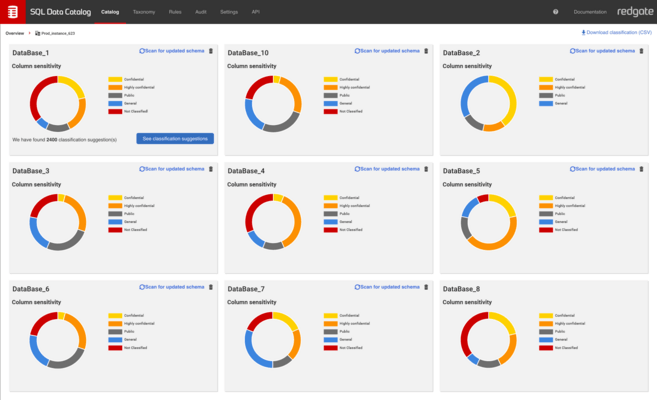
- The pie charts in the Web UI now show the proportion of columns that have had any tag applied.
- Added foundational information types and information classification tags for new installations to ease onboarding.
- Changes
- The Microsoft "Information Type" and "Sensitivity" categories will now be imported as "MS Information Type" and "MS Sensitivity" respectively. These will be read-only.
- For existing users, the original Microsoft "Information Type" and "Sensitivity" categories are no longer special-cased. Existing classifications will remain unchanged, but the tags are now fully editable.
- API changes
- The "sensitivityLabelDistribution" property on instance and database metadata has been replaced with "classificationDistribution", which lists the number of columns that have and have not been classified.