Released: Jan 26, 2010
Updates in this release
Updates in 8.0
- The ability to store static data in scripts folders
SQL Data Compare 8 allows you to store data scripts in a scripts folder, making it easier to keep databases under source control. - The ability to share projects with SQL Compare
To open a SQL Data Compare project in SQL Compare, on the Projects dialog box, select a project, right click, and click Launch in SQL Compare.
Alternatively, to open the current project in SQL Compare, click the SQL Compare icon on the toolbar of the main window.
You can open a SQL Compare 8.1 (or later) project in SQL Data Compare 8.0 or later.
You can open a SQL Data Compare 8.0 (or later) project in SQL Compare 8.1 or later. - Multiple transactions in the synchronization script
In previous versions, the synchronization can be enclosed in a single transaction. This allows rollback, but can result in poor performance for large databases. In SQL Data Compare 8.0 you have the option to use multiple transactions. You can specify the amount of data included in each transaction using the Application Options. - User interface refinements
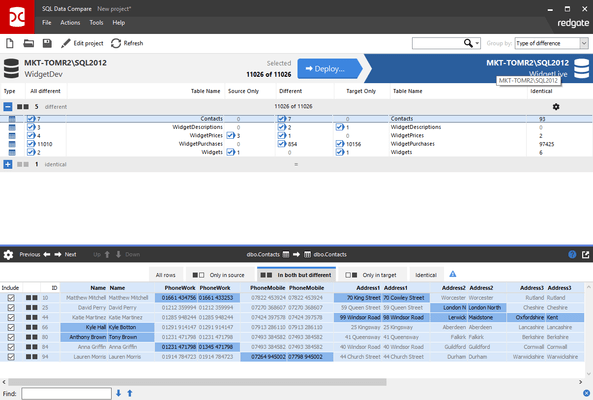
SQL Data Compare 8.0 includes many of the user interface improvements made for SQL Compare 8, bringing the workflow of the two products closer together. - Command line changes
The command line interface now supports column-level inclusion and exclusion. There are changes to the behaviour of some existing switches and options. - Stability and performance improvements
SQL Data Compare 8.0 addresses some known stability issues. There are now fewer Out of memory errors when comparing large databases.
For more information visit:
http://www.red-gate.com/about/news/sql_data_compare_8.htm