Released: Sep 26, 2018
9.3 での更新項目
機能
- You can now refactor INSERT statements into UPDATE statements, making it easier to update the data in your tables.
- This can be triggered by either right clicking in the script window and selecting the command, or by using the keyboard shortcut Ctrl+B, Ctrl+P.
- The refactoring automatically adds a default WHERE clause, which you can customize to suit your needs.
- You can now go directly to the Product Learning section of the Redgate Hub from within SQL Prompt.
- Click SQL Prompt > Help >...
Released: Jun 27, 2018
9.2 での更新項目
機能
- In addition to "as you type" code analysis, you can now also display a dockable list of all the issues in your currently selected script window.
This is accessible via the Prompt menu: 'Show List of Code Analysis Issues'.
- Improved performance of background code analysis.
不具合の修正
- Collapsed alignment layout options could cause formatting to fail when dealing with optional parentheses.
Released: Feb 21, 2018
9.1 での更新項目
機能
- Code analysis settings can now be saved to individual files (.casettings) and shared amongst your team.
不具合の修正
- Fixed - Missing space before NOT after IF RIGHT(...).
- Fixed - Cannot insert semicolons for DBCC statements.
- Fixed- Exception when closing editor window after using snippets.
- Fixed - STRING_AGG intellisense.
Released: Jan 31, 2018
9.0.8 での更新項目
機能
- Code analysis now supports larger scripts without freezing the SSMS/VS UI.
- Limitation: Only the first 50,000 issues of code analysis are shown.
不具合の修正
- Do not show ST010 issue for CTE.
- PE010 shouldn't be triggered on a SELECT INTO statement.
- Don't detect BP014 issue on computed non persisted columns.
- BP014 Shouldn't apply to identity columns.
- "Place expressions on new line" under THEN expressions moves ELSE expression.
Released: Dec 12, 2017
9 での更新項目
機能
New code analysis feature provides fast and comprehensive analysis of T-SQL code in SSMS and Visual Studio.
- Discover over 80 code issues and hidden pitfalls as-you-type.
- Get clear explanations and suggestions to improve your code.
- Choose from a large selection of analysis rules and manage which ones are displayed.
Released: Oct 4, 2017
8.2 での更新項目
機能
- Added support for most new SQL Server 2017 syntax, including:
- Added support for new Graph Table syntax.
- New SET IDENTITY_CACHE option for ALTER DATABASE SCOPED CONFIGURATION.
- New syntax for online resumable ALTER INDEX statements.
- Added support for new SELECT INTO .. ON Filegroup syntax.
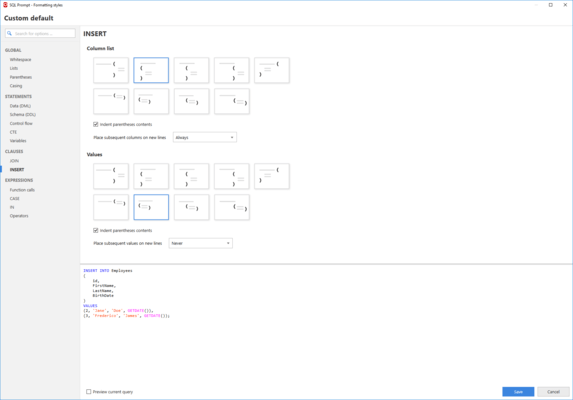
- Added new INSERTS page with formatting options for both the column and values lists.
不具合の修正
- SP-6617 : Fix 'Align items across clauses' option not aligning to JOIN tables.
- SP-6626 : Fix AS keywords not...
Released: Apr 11, 2017
7.5 での更新項目
機能
- Add support for SQL Server 2016's WITHOUT_ARRAY_WRAPPER.
- Support for Visual Studio 2017.
- Formatting improvements:
- ON and WHEN keywords in MERGE statements can now be right-aligned.
- ELSE IF statements are now indented the same as IF statements.
- Fix for error when formatting some server broker statements.
- Short ALTER TABLE statements now respects the 'Collapse Short DDL statements' option.
- Fix issue with parenthesised expressions sometimes removing spaces between keywords.
- SQL Prompt now...
Released: Feb 16, 2017
7.4 での更新項目
機能
- Support for SQL Server Management Studio 17.
- Formatting improvements:
- Improvements to BEGIN...END formatting.
- Improvements to nested parentheses.
- Case statements with comments now align correctly.
- Now adds a space before aliases following function calls (forum).
- Added "Place BEGIN keyword on new line" option.
- Azure Support
- Visual Studio Azure connection support.
- Azure active directory universal authentication support.
不具合の修正
- Fix problem with Add/remove AS keyword in MERGE statements.
- Fix...
Released: Dec 5, 2016
7.3 での更新項目
機能
- Improved SQL formatting - includes a new experimental version of the Format SQL feature, the formatting styles are now much more customizable.
- Added more options for formatting CASE statements, JOINs, CTEs, CREATE TABLE statements, IN values, and more.
- Easier to:
- Create your own style by using one of the new built-in Redgate styles as a starting point.
- Share your formatting styles with other SQL Prompt users by storing them in a shared folder.
- Create multiple formatting styles and switch...
Released: May 19, 2016
Updates in this release
Updates in 7.2.2.273
- Fix for incorrect $CURSOR$ placeholder location in the 'curff' default snippet
- SP-5694: Fix for null reference exception being thrown on invalid computed column syntax