
SharePoint Bulk Properties Editor(英語版+日本語版)
SharePointの複数のドキュメントを一度に編集、承認・拒否、タグ付け
BoostSolutions 社の製品
2009 年より日本国内にてComponentSourceで販売中。
価格:¥ 165,770 (税込)〜 バージョン: v3.10.x 更新日: Feb 17, 2022
SharePointの複数のドキュメントを一度に編集、承認・拒否、タグ付け
BoostSolutions 社の製品
2009 年より日本国内にてComponentSourceで販売中。
価格:¥ 165,770 (税込)〜 バージョン: v3.10.x 更新日: Feb 17, 2022
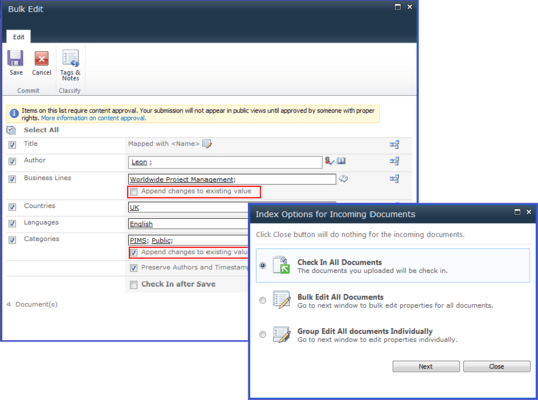
SharePoint Bulk Properties Editorは、バッチ/バルク編集プロパティ缶のバルク内のタグ。さらに、製品はそれが可能なバルク承認/ドキュメントまたはリストアイテムを拒否しbulk.Byこの製品を使用するにはタグやメモを追加することになり、エンドユーザーが1つ、それは、各フィールドに1つを編集するのにかかる時間を削減し、それによって生産性を向上させることができます。
Bulk edit properties
Save your time by bulk editing metadata for multiple documents or items.
Map metadata with any field
Map and dynamically assign metadata values with any field in the current list.
Append changes to existing values
Append changes to any multiple value columns with a simple click when you index multiple documents.
Edit documents individually with preview
Edit documents individually with preview to help you quickly and accurately index documents.
Reuse your metadata
Use your existing metadata by setting any metadata field as a default value for subsequent document or list item.
Bulk check in documents
Bulk check in documents, including the option to choose different versions and add comments
Bulk approve/reject documents or list items
Approve/reject multiple documents or list items in bulk with content approval features provided by SharePoint 2010.
Bulk add tags
Bulk tag with the social tagging features introduced with SharePoint 2010. Tags can be shared and used by enterprises to ensure compliance with industry or government standards.
Features List
電話: (888) 850 9911
Fax: +1 770 250 6199


