
SharePoint List Advanced Filter(日本語版)
SharePointの複数のフィールドを基準にしてSharePointのリストにある情報をフィルタリング
BoostSolutions 社の製品
2009 年より日本国内にてComponentSourceで販売中。
価格:¥ 82,830 (税込)〜 バージョン: v2.15.x 更新日: Mar 1, 2022
SharePointの複数のフィールドを基準にしてSharePointのリストにある情報をフィルタリング
BoostSolutions 社の製品
2009 年より日本国内にてComponentSourceで販売中。
価格:¥ 82,830 (税込)〜 バージョン: v2.15.x 更新日: Mar 1, 2022
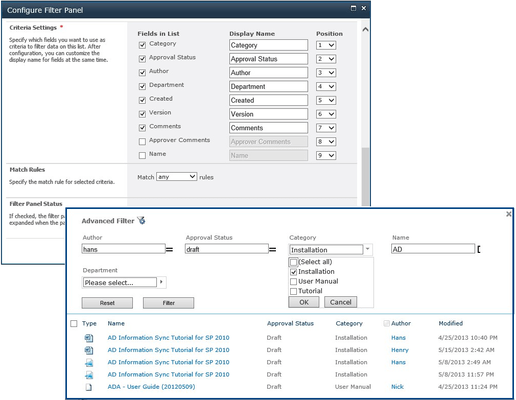
SharePoint List Advanced Filterは、ユーザー側でSharePointリストまたはライブラリ内の複数の値をフィルタで適切な情報を取得することができます。列の比較及び厳格な基準に基づいて大量のアイテムリストを簡素化することができます。論理演算子(AND、OR)によって、強力かつスマートなフィルタ条件を作成するためのオプションを持っています。SharePointリストの高度なフィルタは個々の構成することにより、管理コストを削減するユニークなフィルタパネルを設定を行い管理者の作業負荷を軽減することが可能です。
Filter using multiple values
SharePoint List Advanced Filter allows end users to set up complex and multi-field filters to focus on specific information in a SharePoint list or document library.
Filter any SharePoint column
End users can filter any SharePoint column that is available in any SharePoint list or library, including Text, Choice, Number, Lookup, Date and Time, People or Group etc.
Easy to fill values for the filter
Detect column types and provide corresponding UI elements for end users to enter values easily.
Filter by complex comparison operators
SharePoint List Advanced Filter provides more comparison criteria to compare values, which enables end users to search for exact results in a list, including searching by periods or moments of time.
Reduce IT Administrator workload
SharePoint List Advanced Filter enables each end user to set up their own filters to search for items, which can reduce an IT Administrator's workload.
Key Benefits:
電話: (888) 850 9911
Fax: +1 770 250 6199


